On/Off
WIFI
Add new network
Always scanning
WIFI
Nearby WIFI
...
..
..
3.1. iOS Cast (for iOS Devices)
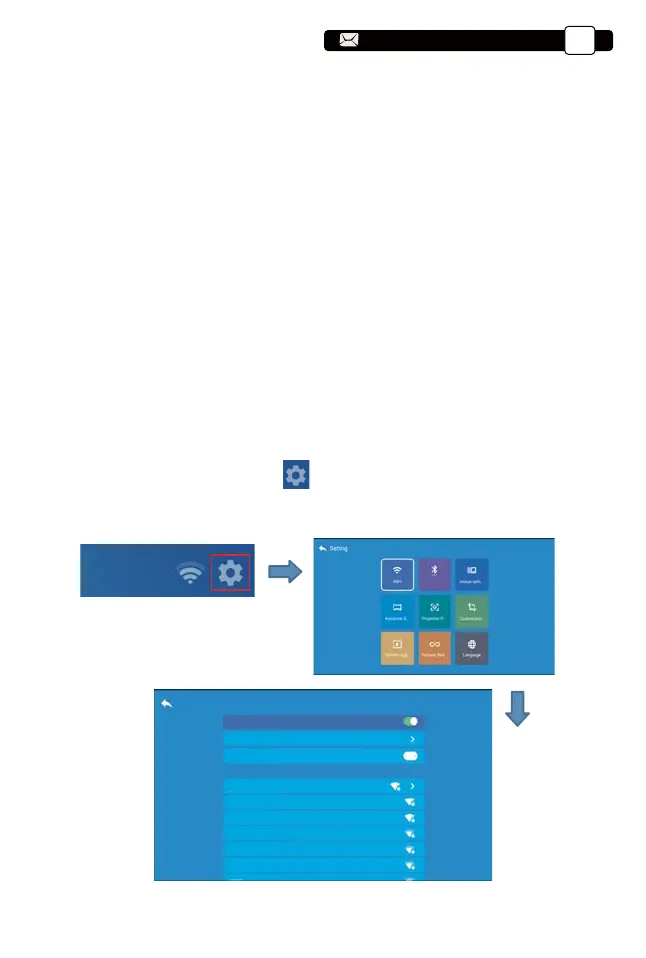
1.Go to home page -- Select the [ ] menu -- Select the [ WiFi Setting ] menu
-- Open the WiFi function -- Select your home WiFi from the list -- Connect the
Y9 projector to your home WiFi.
3. WiFi Setting
Wireless Connection
Warming Tips:
①The fluency of screen mirroring with wireless connection will be affected by
the network environment. A bandwidth of 100Mbit or more is reco
mmended
when using screen mirroring.
②
Make sure your mobile device is close to the projector when using wireless
connection. A distance within 1 meter is recommended.
③Some mobile devices may not support screen mirroring due to the compati-
bility.
④Any questions, please feel free to email YABER via
Blueteeth
Support@yabertech.com
EN
13
aftersales@yabertech.com
aftersales@yabertech.com



 To Next Page