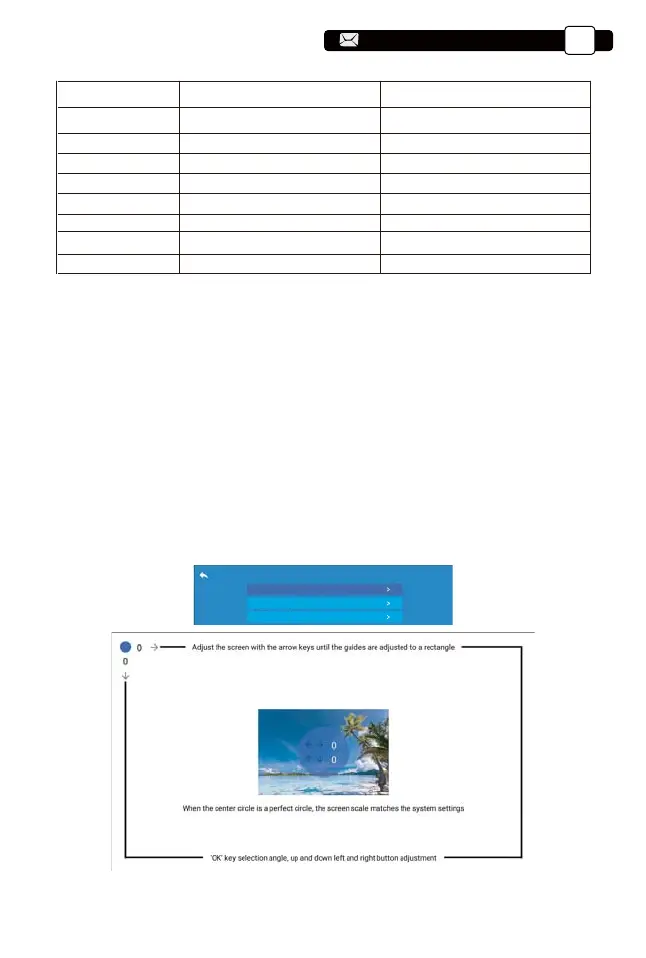
4-corner keystone
Keystone Setting
4-style keystone
Reset
6.1 4-corner Keystone:0~50
6. Keystone Setting
When the projection screen is not rectangular, it can be adjusted by 4-point
keystone correction.
Step 1: Press the button to select the [4-corner Keystone] menu, then
press the [ OK ] bottom to enter the submenu.
Step 2: Keep pressing the OK button on the remote control or projector to
select the point.
Step 3: Press the arrow keys on the remote or projector to adjust the
horizontal or vertical parameters, until the projection screen becomes the
desired rectangle.
Image setting Include Function
Picture Mode
Brightness
Contrast
Saturation
Sharpness
Color Temperature
NR
Over scan
Standard, Warm, User, Cool
0~100
0~100
0~100
0~100
Standard, Warm, User, Cool
Medium, High,Low,OFF
ON,OFF
Switch among the image mode
Adjust the brightness parameter to 100
Adjust the contrast parameter 0-100
Adjust saturation parameters 0-100
Adjust sharpness parameters 0-100
Adjust color temperature
Noise setting
Over scan
Support@yabertech.com
EN
17
aftersales@yabertech.com



 To Next Page