3. Connect to the DVD Player
Use the 3-in -1 AV cable in the package
1) Turn on your DVD player and the projector;
2) Connect the colorful female connectors to your DVD player's RCA cable
with the 3-in-1 AV cable in the package;
3) Connect the black connector to the AV port of the projector, enter the
home page to select [ AV ] as the signal source.
SIGNAL LINES CONNECTION
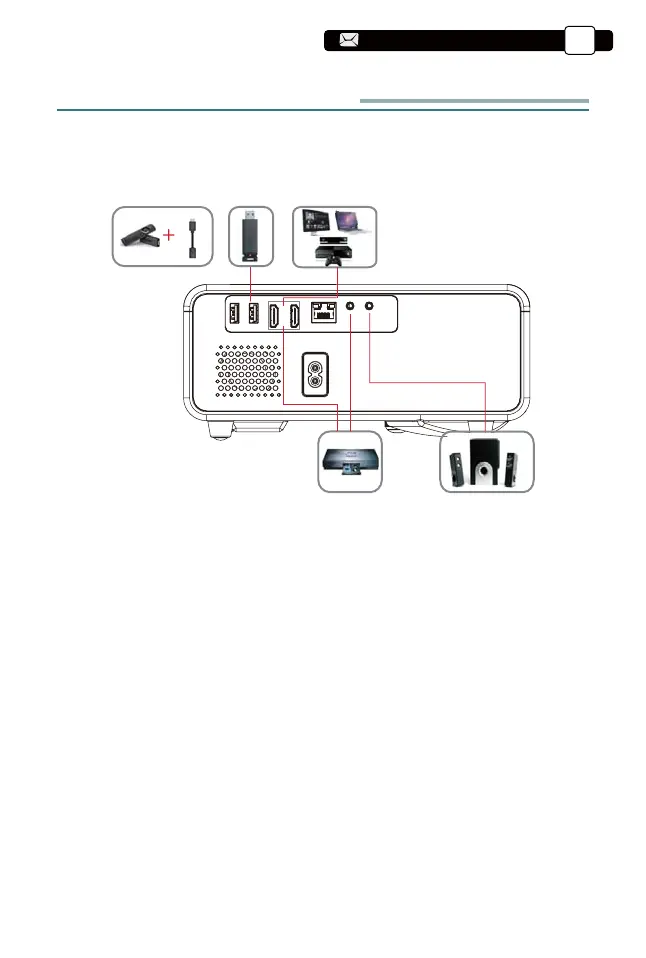
YABER Pro U9 projector has 6 interfaces, HDMI ports*2/USB ports*2/AV
output/AUDIO output. Please select the correct connecting port to connect
your device (PC, Phone, DVD Player, Sound bar, USB, PS4 etc.)
1. Connect USB Disk
1). Input the USB Disk, Select the option [ Video/Music/Picture/Office ];
2). Select the desired file (or folder to enter the subfolder) in the USB disk,
then press the [ OK ] button to play it.
2. Connect the Devices via the HDMI ports
1) Connect your TV stick or laptop to any HDMI port of the projector;
2) Enter the home page to select the corresponding HDMI as the signal
source.
Support@yabertech.com
EN
21
aftersales@yabertech.com



 To Next Page