16
Preparation
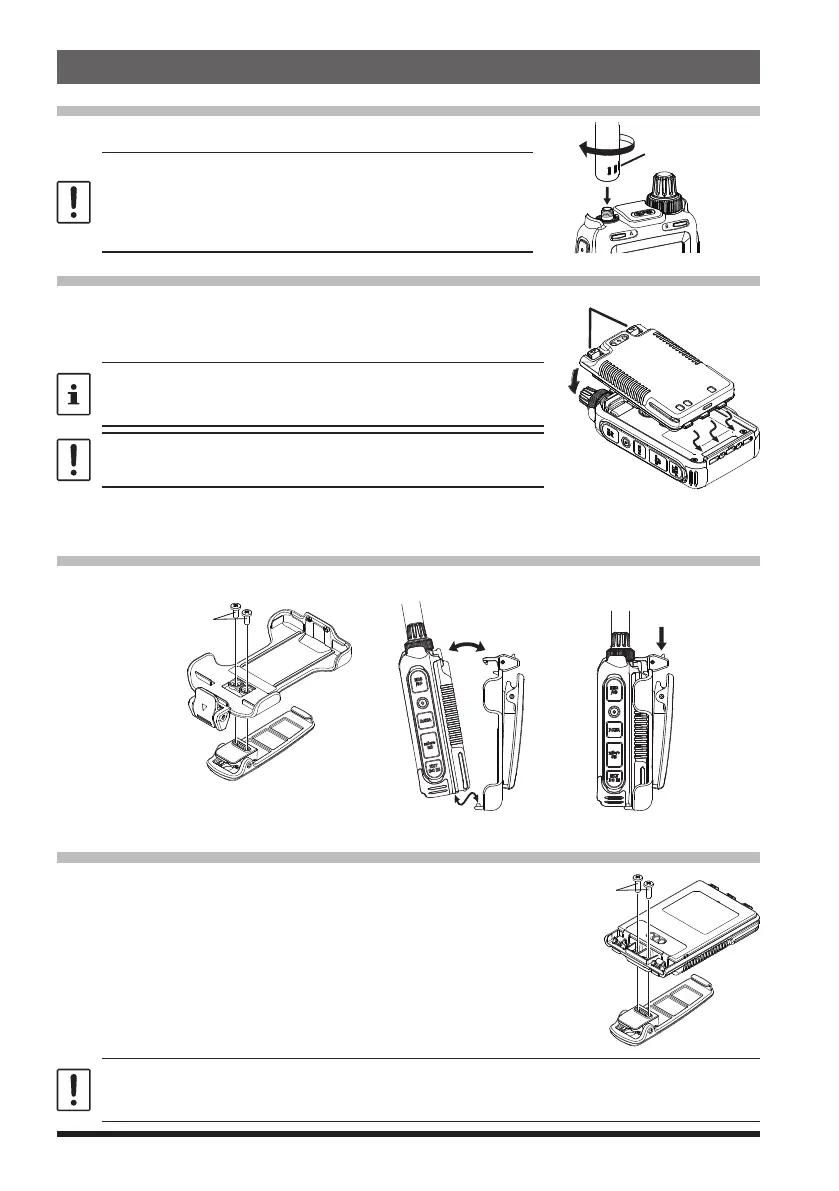
Installing the Antenna
Turn the antenna clockwise until it is secured.
• Do not hold or twist the upper part of the antenna
when installing or removing it. To do so may break the
conductors inside the antenna.
• Do not key the transmit without installing the antenna. The
transmitter components may be damaged.
of the antenna
Installing the Battery Pack
1. Insert the bottom tabs of the battery pack in the slots on
the back side lower part of the transceiver.
2. Push the battery in until the battery latches click securely.
Charge the battery pack before using the transceiver for the
first time after purchase, or when it has not been used for a
long period time.
Risk of explosion if battery is replaced by an incorrect type.
Dispose of used batteries according to the instructions
●
Removing the Battery Pack
While pressing down the latches, remove the battery pack.
Attaching the Quick Release Holster
Attach the quick release holster using the supplied screws (two).
Supplied screws (black)
for the Quick release Holster
Attaching the Belt Clip
Attach the belt clip using the supplied screws (two).
Supplied screws (silver)
for the Belt Clip
Be sure to use the supplied screws when attaching the belt clip. If any other screws are used, the
belt clip cannot be secured firmly to the battery pack and the transceiver may drop off together
with the battery pack; the transceiver and battery pack may fall off, breakage and other damage.
To remove the holster,
press the release knob.
②
Press holster firmly
until you hear the
latch click.
Insert the bottom tabs of the Quick Release Holster in the
slots on the bottom of the FT5DR/DE


 To Next Page