32
Clearing Memories
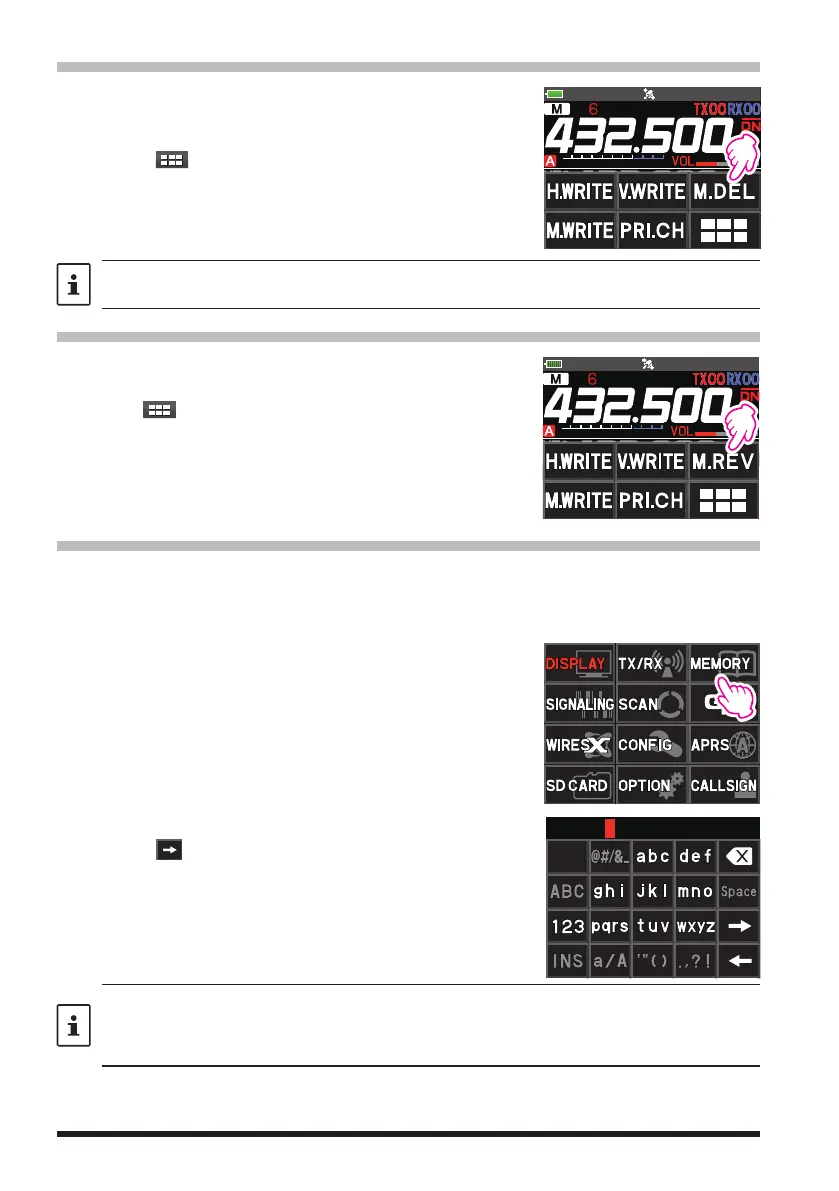
1. Press and hold the [V/M
] key.
2. Rotate the DIAL knob to select the memory channel
from which the data is to be cleared.
3. Touch [
], then touch [M.DEL].
Confirmation screen “DELETE?” is displayed.
4. Touch [OK] twice to clear the memory channel.
Data on Memory Channel One, Priority Channel, and the Home Channel may not be cleared.
Restored erased memory
1. Press and hold the [V/M
] key.
2. Rotate the DIAL knob to restore the channel.
3. Touch [
].
4. Touch [M.REV] to restored the memory channel.
Using Memory Tag
Memory name tags, such as a call sign or broadcast station name may be assigned to
the memory channels and home channels. Input a memory tag using up to 16 charac-
ters. Alphabetic characters (upper and lowercase), Numbers and Symbols may be en-
tered to the memory name tag.
1. Press the [V/M
] key to enter Memory mode.
2. Rotate the DIAL knob to Recall the memory channel to
assign the name.
To assign a name to a home channel, recall the de-
sired home channel.
3. Press and hold the [F ] key, and then touch
[MEMORY].
4. Touch [3 MEMORY NAME].
•
Use the numeric keys to input the characters.
•
Touch
to move the cursor to the right in the text
input area.
•
See “Text input screen” on page 70 to input a
memory tag.
• When a memory tagged Memory channel is recalled, both the memory tag and the
frequency will be displayed. (The Memory tag is only displayed on the operating band.)
• Touch the frequency display of the operating band to switch between memory tag display
and normal frequency display of all memory channels.


 To Next Page