46
Convenient Functions
Bluetooth
®
Operation
The FT5DR/DE has built-in Bluetooth
®
functionality, so hands-free operation is pos-
sible using the optional Bluetooth
®
headset (SSM-BT10) or a commercially available
Bluetooth
®
headset.
The operation of all commercially available Bluetooth
®
headsets cannot be guaranteed.
When connecting to a Bluetooth
®
Headset for the first time -Pairing-
When using the Bluetooth
®
Headset for the first time, the Bluetooth
®
Headset and the
FT5DR/DE must be paired.
This step is necessary only once at the beginning.
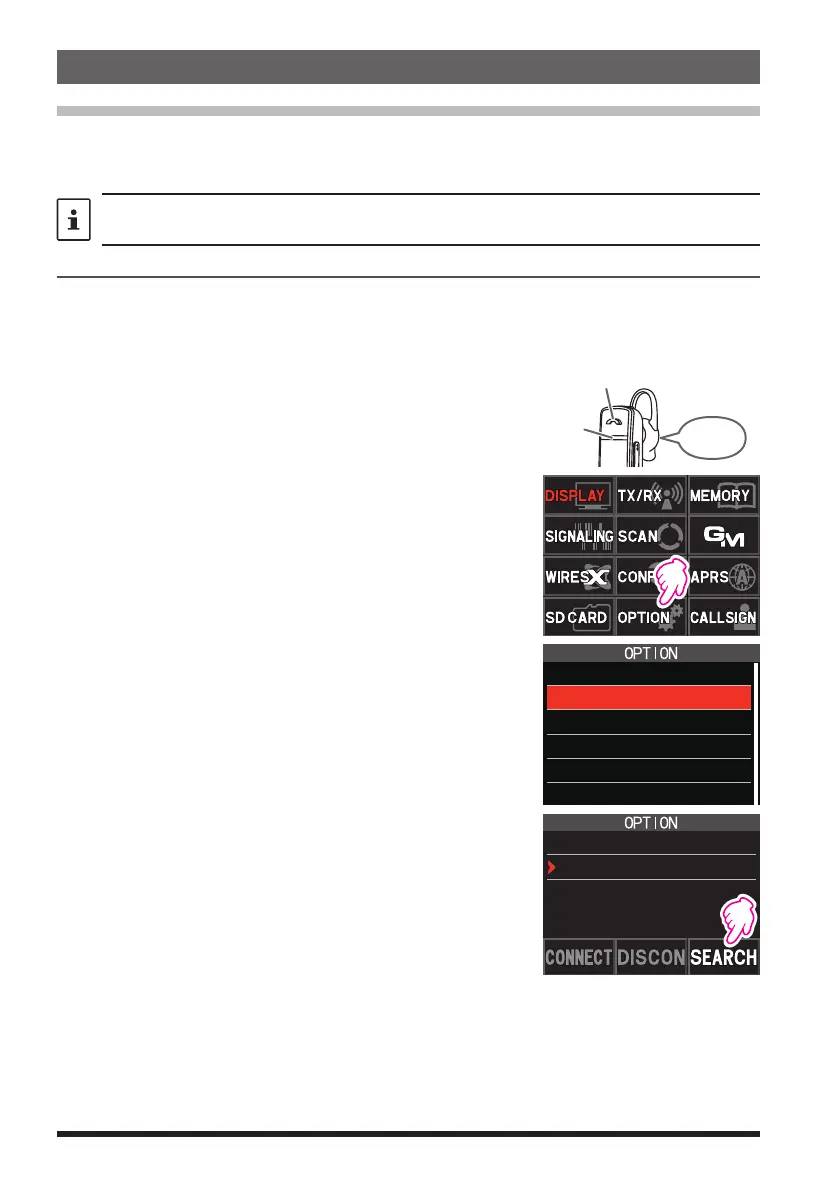
1. To start the Bluetooth
®
headset in pairing mode.
SSM-BT10: Press and hold the Multi-Function But-
ton, until the SSM-BT10 LED blinks red /
blue alternately.
Power ON
Blinks red
and blue
Press and hold the Multi-Function
Button to turn ON.
2. Press and hold the [F ] key, and then touch
[OPTION].
3. Touch [2 Bluetooth].
1 USB CAMERA
2 Bluetooth
3 DEVICE LIST
4 Bluetooth
SAVE
5 Bluetooth
AUDIO
4. Touch [SEARCH].
•
“Searching” is displayed and the model name of
the found Bluetooth
®
device is displayed in the list.
•
To stop the search in progress, touch [STOP].
2 Bluetooth
ON
Not Connected


 To Next Page