47
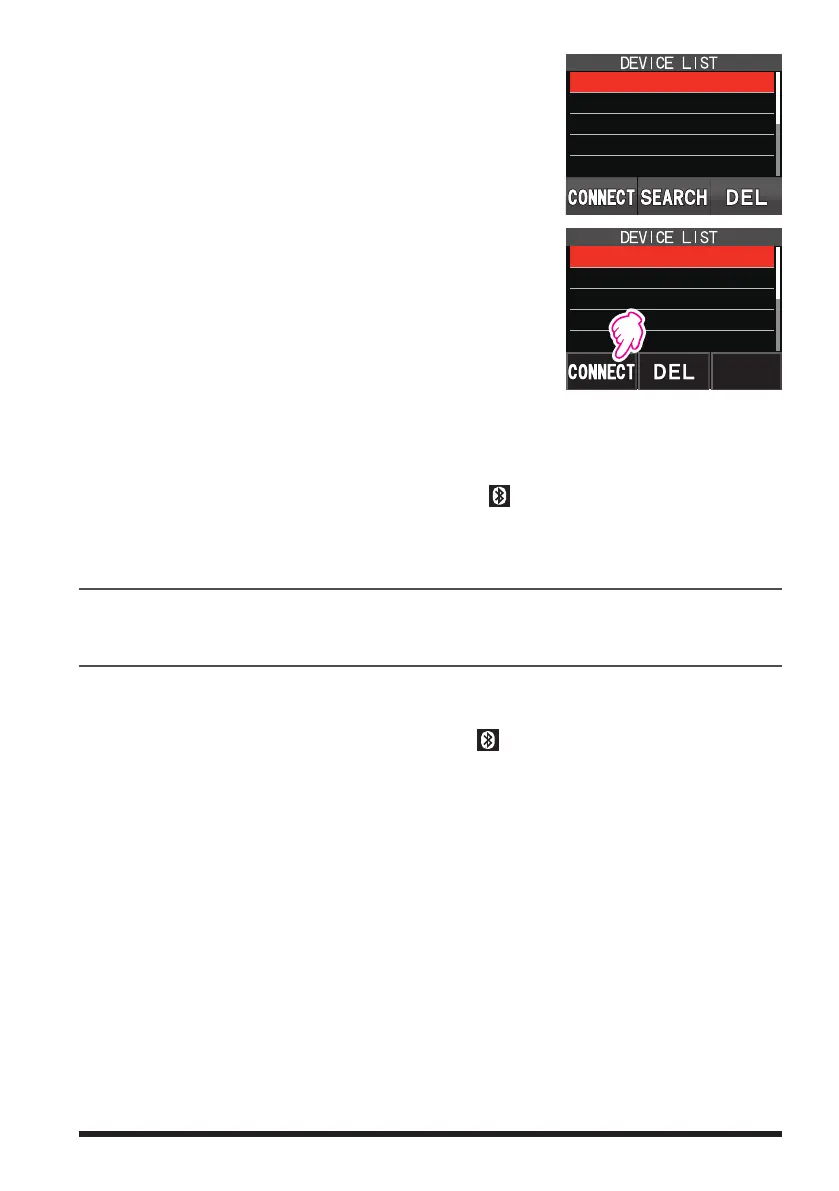
5. Rotate the DIAL knob to select the desired Bluetooth
®
device.
6. Touch [CONNECT].
SSM-BT10
SSM-BT10
yaesu-01
yaesu-02
yaesu-03
R556
7. When pairing is complete and connected, the
Bluetooth
®
headset model name is displayed.
SSM-BT10: LED blinks blue.
8. Press the PTT switch to return to the normal operation.
While connected to a Bluetooth
®
headset, the “ ” icon lights up on the FT5DR/DE
screen, and the received audio and operation beep will be heard from the Bluetooth
®
headset.
Disable the Bluetooth function
To cancel Bluetooth
®
operation, just repeat the above procedures, selecting “OFF” in
step 4 above.
Subsequent Bluetooth
®
headset connection when the power is turned ON
When the power is turned OFF while the Bluetooth
®
headset is connected, the next
time the power is turned ON, the same Bluetooth
®
headset is searched for and auto-
matically connected when found.
If the Bluetooth
®
headset cannot be found, the “ ” icon flashes on the screen.
If the power of the same Bluetooth
®
headset is turned ON in this state, it will connect
automatically. If not, turn the FT5DR/DE and Bluetooth
®
headset OFF and then ON
again.
To connect to other Bluetooth
®
headsets, refer to the “Connect with another Bluetooth
®
headset” on page 49.


 To Next Page