39
Delete a registered memory channel from CAM group
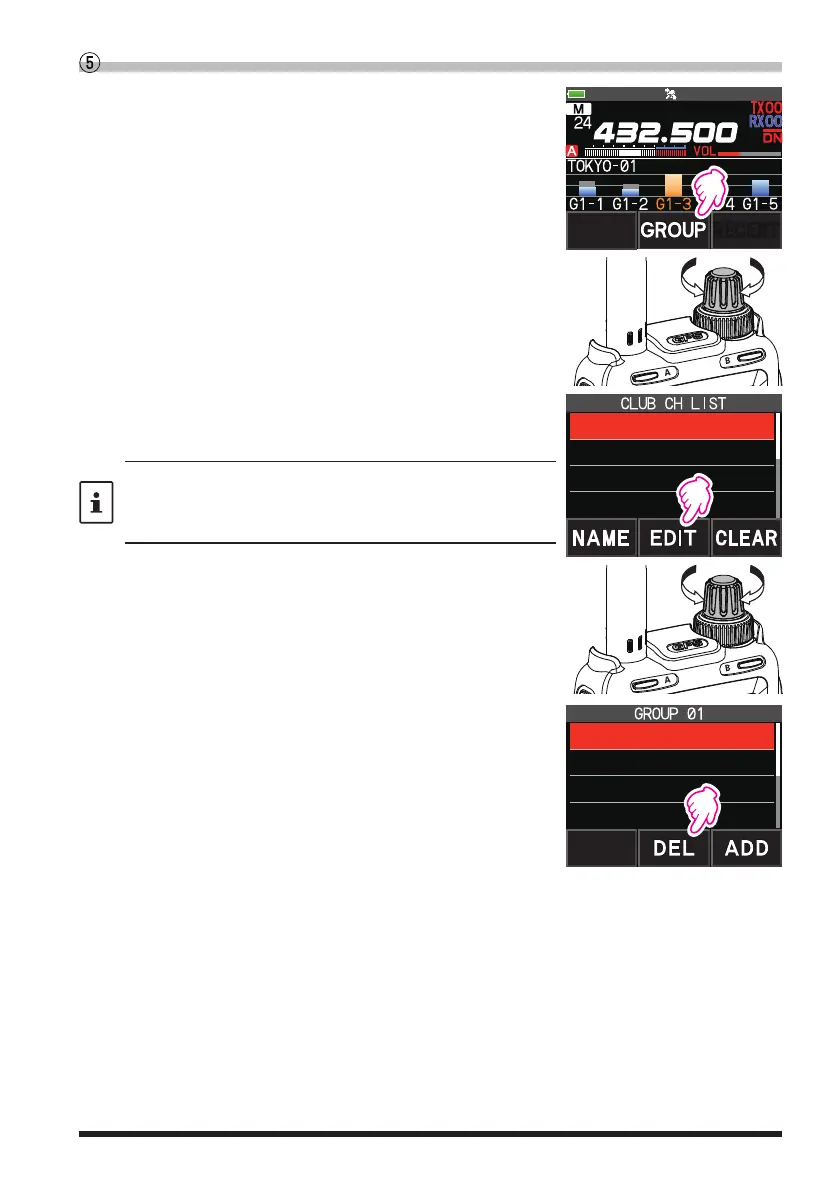
1. Touch [GROUP] on the CAM screen.
YAESU
2. Rotate the DIAL knob to select the CAM group (GROUP
01 to 10) in which the memory channel to be deleted is
registered.
3. Touch [EDIT].
•
The memory channels registered in the group are dis-
played in a list.
When the memory channel is displayed as a tag (name),
press and hold the [V/M●] key to switch to the frequency
display. Press and hold the [V/M●] key again to switch to the
tag (name) display.
2 GROUP 02
3 GROUP 03
4 GROUP 04
1 GROUP 01
4. Rotate the DIAL knob to select the registered memory
channel to be deleted.
5. Touch [DEL].
Confirmation screen “DELETE?” is displayed.
6. Touch [OK] twice.
•
The memory channel is deleted from the CAM group
and the list display returns.
•
To cancel the deleting, touch [CANCEL].
G1-2 5 439.700.00
G1-3 6 432.500.00
G1-4 10 145.340.00
G1-1 1 145.300.00


 To Next Page