37
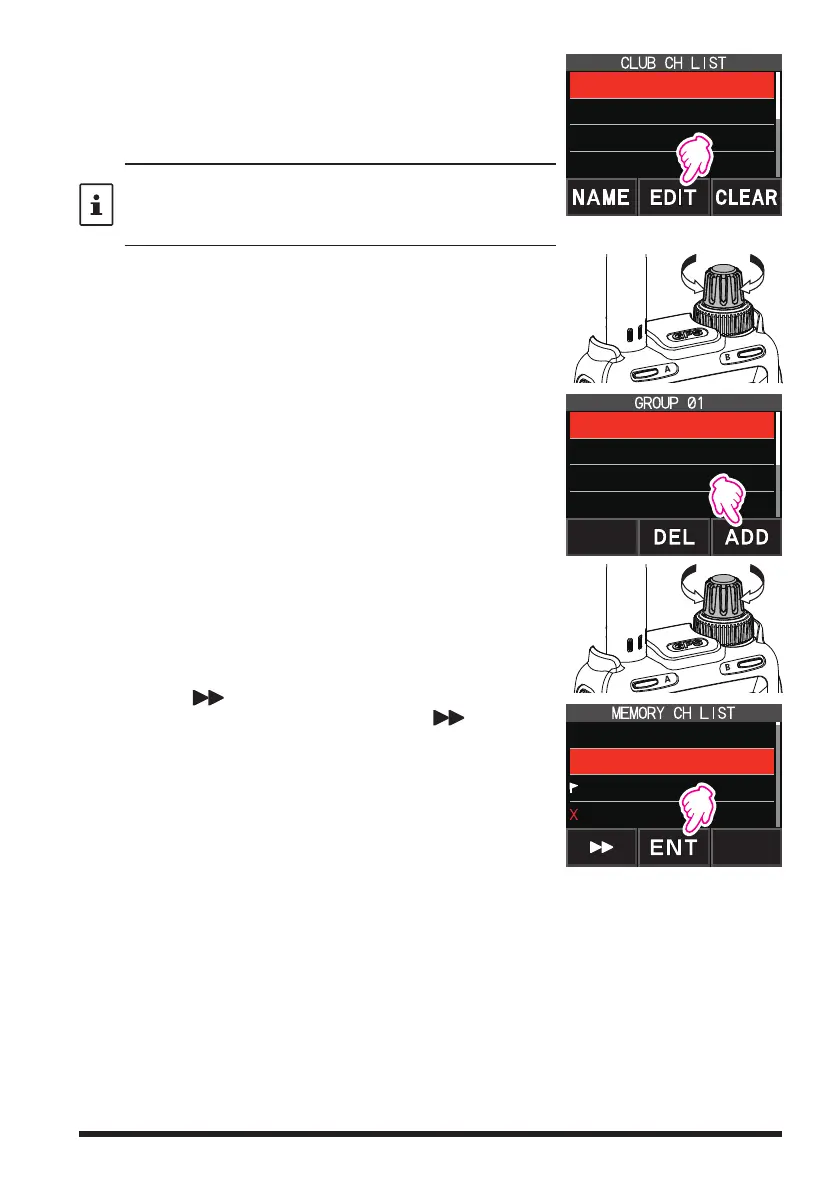
3. Touch [EDIT].
•
A list of memory channels registered to the CAM
group is displayed.
•
Press the [V/M
] key to switch between the memory
tag screen and the frequency screen.
When the memory channel is displayed as a tag (name),
press and hold the [V/M●] key to switch to the frequency
display. Press and hold the [V/M●] key again to switch to the
tag (name) display.
2 GROUP 02
3 GROUP 03
4 GROUP 04
1 GROUP 01
4. Rotate the DIAL knob to select the CAM memory chan-
nel to register.
5. Touch [ADD].
G1-2 5 439.700.00
G1-3 6 432.500.00
G1-4 ----------------
G1-1 1 145.00.00
6. Rotate the DIAL knob to select the memory channel to
register, and touch [ENT].
•
Repeat step 4 to 6 register multiple memory channels.
•
Up to 5 channels can be registered in one group.
•
The same memory channel cannot be registered
twice in one group.
•
Touch [
], and rotate the DIAL knob to fast-for-
ward 10 channels at a time. Touch [
] again, to
cancel fast-forward.
2 439.700.000
3 145.620.000
4 432.500.000
1 145.000.000
7. Press the [BACK] key to return to the CAM screen.


 To Next Page