57
Setting the Recording function
The band or bands to be recorded, and whether or not to include the transmit audio in
the recording may be selected:
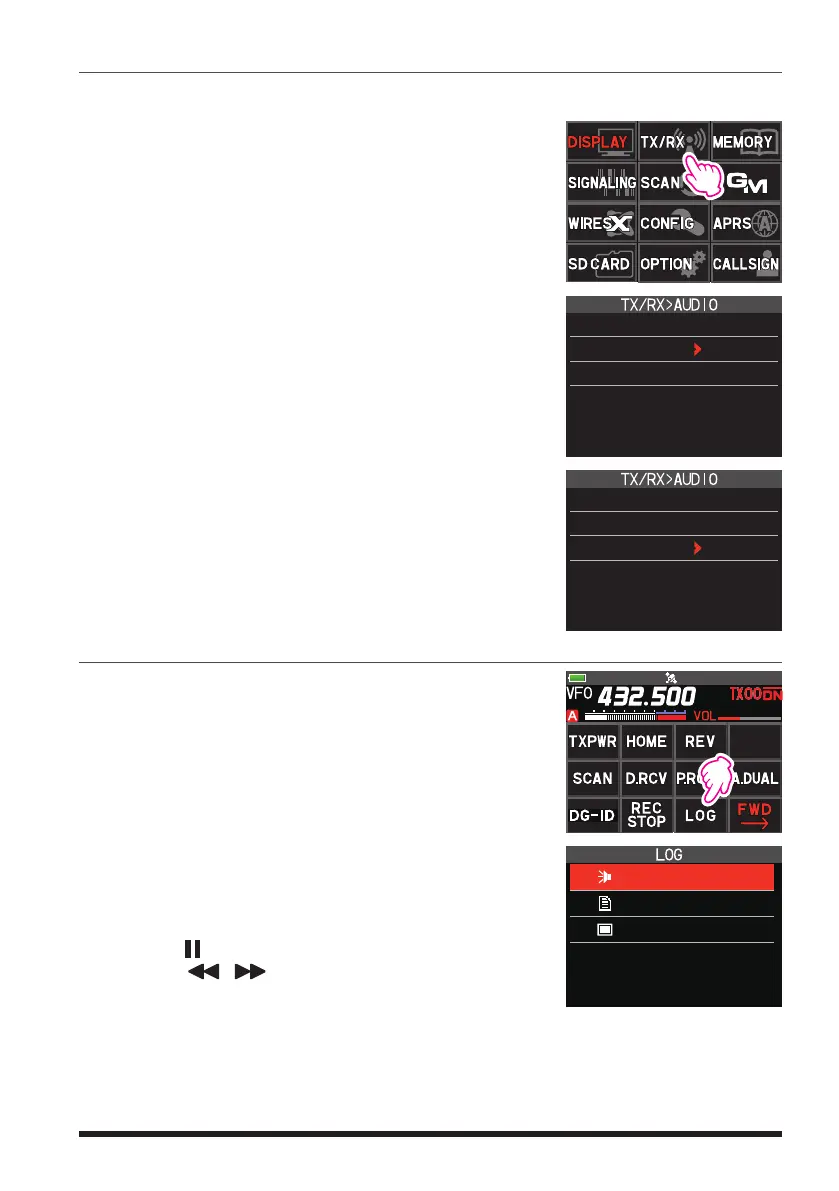
1. Press and hold the [F ] key, and then touch
[TX/RX].
2. Touch [3 AUDIO], and then touch [6 RECORDING].
3. Press the [F ] key, and then rotate the DIAL knob
to select the band to record.
A: Record the A-band received audio
B: Record the B-band received audio
A+B: Record both A-band and B-band received audio
4. Press the [BACK] key, and then rotate the DIAL knob
to select “MIC”.
5. Press the [F ] key, and then rotate the DIAL knob
to select “ON” or “OFF”.
ON: Record both transmit and receive audio
OFF: Record only the receive audio
6. Press the PTT switch to return to the normal operation.
6 RECORDING
BAND: A
MIC : OFF
6 RECORDING
BAND: A
MIC : OFF
Playback the recorded audio
1. Press the [F ] key, and then touch [LOG].
If [LOG] is not displayed, touch [BACK
] to display
[LOG] and then touch it.
2. Touch [VOICE].
•
The recorded file will be displayed in a list.
•
Touch [▲/▼] to display 20 files at a time.
•
Touch [TOP] to display the latest file.
3. Touch the file to playback.
•
Playback will begin (The receiver audio will not be
heard during playback).
•
Play back while recording is not possible.
•
Touch the bar graph to play from that point.
•
Touch [
] to pause playback.
•
Touch [
/ ] to rewind or fast forward 5 sec-
onds at a time.
PICT
VOICE
MESSAGE
●
Delete files
1. Rotate the DIAL knob in step 2 to select the file to be deleted, and then touch [DEL].
Confirmation screen “DELETE?” is displayed.
2. Touch [OK].


 To Next Page