11
●
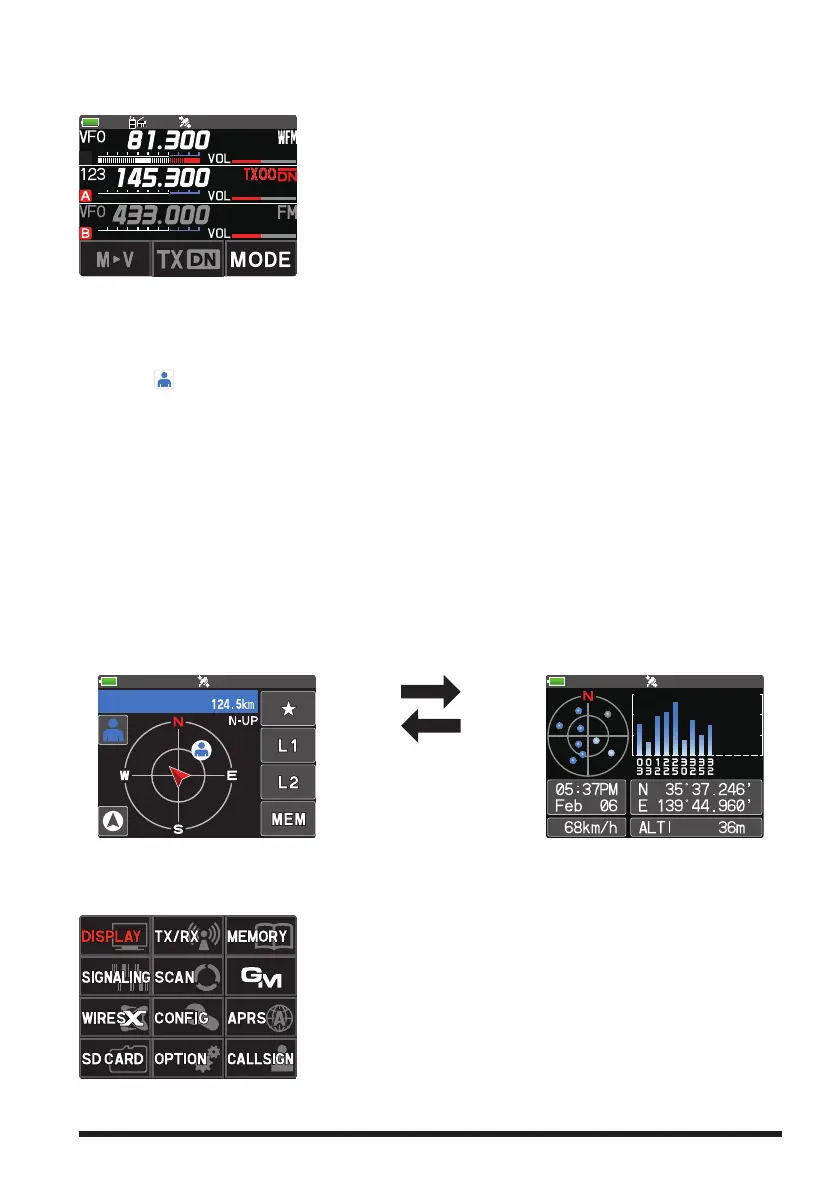
AF DUAL Screen (Press the [F] key
Touch [A.DUAL])
While receiving and listening to a radio broadcast, the A-band and B-band may also be
monitored simultaneously for activity.
When a signal is received on A-band or B-band, the
broadcast audio is muted and the A or B band audio is
heard.
To end the AF DUAL function, press the [BACK] key.
●
BACKTRACK Screen (Press the [F ] key
Touch [DISP])
The backtrack screen, or the GPS information screen, whichever was displayed last, will
be displayed.
Real-time navigation function
Touch [
] at the top left of the screen to display the position and direction of the part-
ner station in real time during communication in C4FM digital V/D mode. (The signal
of the partner station must contain location information.)
BACKTRACK function
May register the departure point etc. up to 3 places (“
H
”, “L1”, “L2”) in advance and
display the distance from the current location to the registered point in real time.
●
GPS Information Screen (Press the [F ] key
Touch [DISP])
The backtrack screen, or the GPS information screen, whichever was displayed last, will
be displayed. The GPS satellites status and numbers are shown.
The following information is displayed.
Direction and elevation of satellites, and their signal strengths
Current time and date
●
Current latitude and longitude
Moving Speed
●
Altitude of current location
Backtrack Screen
Touch the screen (other
than the Touch keys).
GPS Information Screen
●
SETUP MENU Screen (Press and hold the [F] key)
Setup Menu allows selecting various functions from the displayed list and setting the
parameters of each function according individual preferences.
Press the PTT switch or press the [BACK] key several
times to exit the Setup Menu.


 To Next Page