38
Using the CAM function
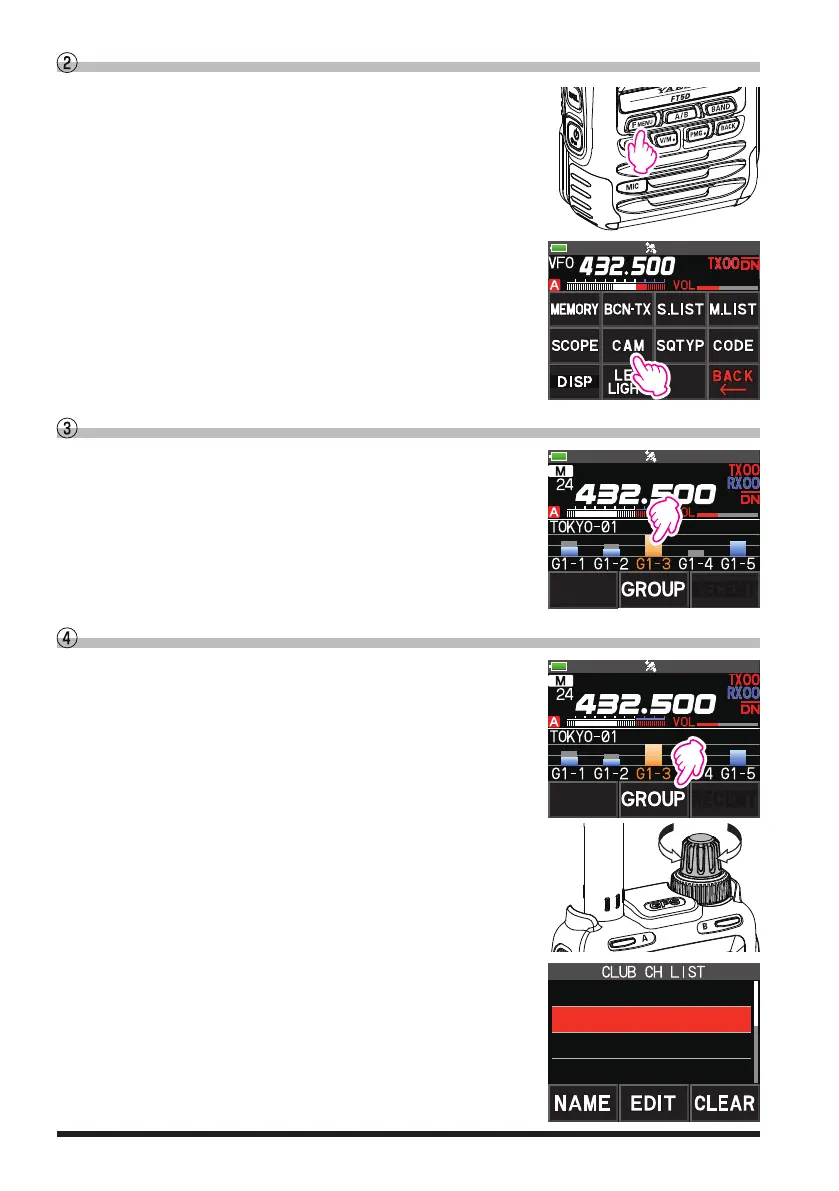
1. Press the [F ], and then touch [CAM
]
.
•
If [CAM] is not displayed, touch [FWD
] to display
[CAM] and then touch it.
•
The CAM screen is displayed, and the signal strength
of the channel that received the signal is displayed as
a bar graph.
Touch the bar graph to switch the frequency
1. Touch the bar graph on the screen.
•
The touched bar graph is displayed in orange and
switched to the memory channel frequency and received.
•
Press the PTT switch to transmit as it is, so you can
start communicating with the other station immediately.
YAESU
Change the displayed CAM group
1. Touch [GROUP] on the CAM screen.
YAESU
2. Rotate the DIAL knob to select the CAM group (GROUP
01 to 05) to be displayed.
3. Press the [BACK] key to return to the CAM screen.
2 GROUP 02
3 GROUP 03
4 GROUP 04
1 GROUP 01



 To Next Page