43
Scanning Function
The FT5DR/DE supports the following four scanning functions:
•
VFO Scan
•
Memory Channel Scan
•
Programmable Memory Scan (PMS)
•
Memory Bank Scan
For additional details on the Programmable Memory Scan (PMS) and Memory Bank Scan,
refer to the Advanced Manual which may be downloaded from the Yaesu website.
VFO Scan
VFO scan function scans the frequencies, and detects signals.
1. Pres the [V/M
] key to enter the VFO mode.
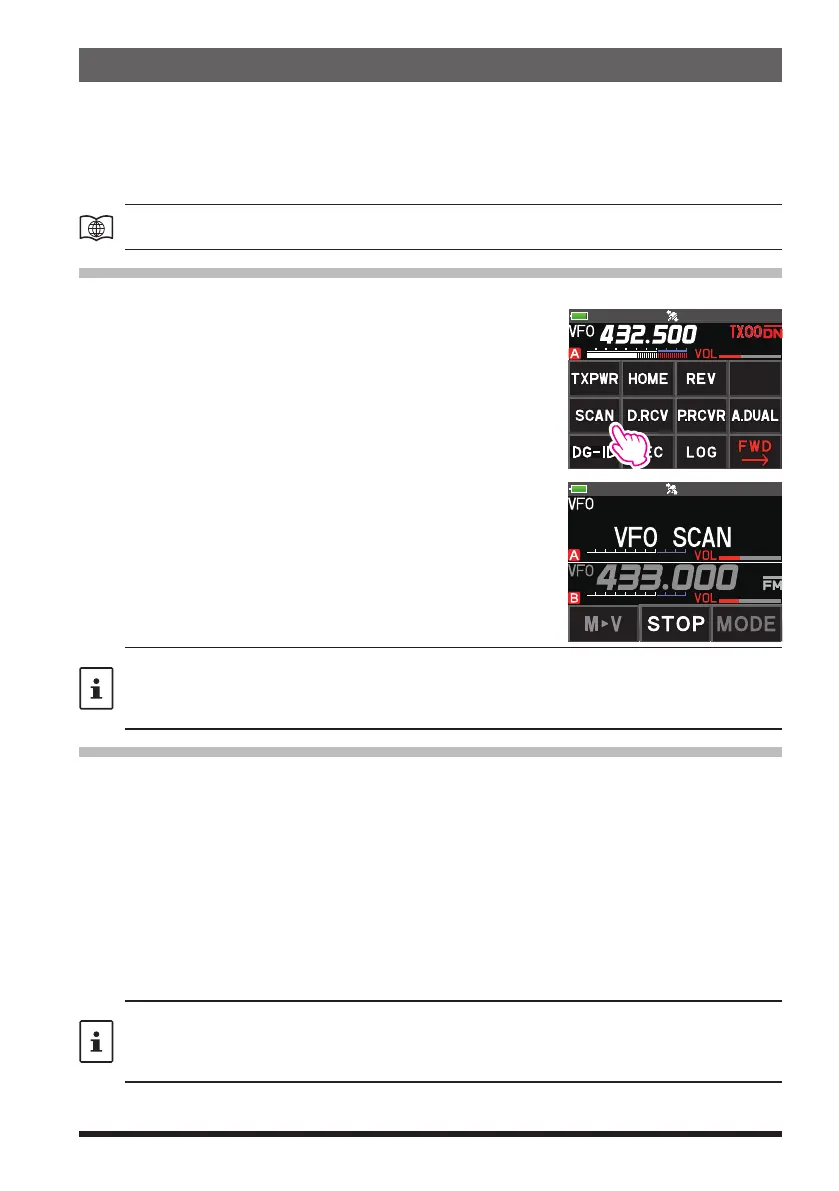
2. Press the [F ] key, and then touch [SCAN].
If [SCAN] is not displayed, touch [BACK
] to display
[SCAN] and then touch it.
•
When the scan is active, “VFO SCAN” appears on
the display.
•
If the scanner halts on an incoming signal, the back
light will turn ON and the decimal point between the
“MHz” and “kHz” digits of the frequency display will
blink. Scanning will resume in about 5 seconds.
•
Change the behavior when the scan is paused with
“Setting the Receive Operation When Scanning
Stops” on the next page.
3. Press the PTT switch or touch [STOP] to cancel the
scanning.
• If the scan has paused on a signal, rotating the DIAL knob will cause scanning to resume
instantly.
• If the DIAL knob is rotated while scanning is in progress, the scanning will continue up or
down in frequency according to the direction of the DIAL Knob rotation.
Memory Channel Scanning
The receiver may be set to scan memory channels:
1. Recall a memory channel to begin memory scanning.
2. Press the [F ] key, and then touch [SCAN].
If [SCAN] is not displayed, touch [BACK
] to display [SCAN] and then touch it.
•
When the memory scan is active, “MEM SCAN” appears on the display.
•
If the scanner halts on an incoming signal, the back light will turn ON and the dec-
imal point between the “MHz” and “kHz” digits of the frequency display will blink.
Scanning will resume in about 5 seconds.
•
Change the behavior when the scan is paused with “Setting the Receive Operation
When Scanning Stops” on the next page.
3. Press the PTT switch or touch [STOP] to cancel the scanning.
• If the scan has paused on a signal, rotating the DIAL knob will cause scanning to resume
instantly.
• If the DIAL knob is rotated while scanning is in progress, the scanning will continue up or
down in frequency according to the direction of the DIAL Knob rotation.



 To Next Page