Touring the Menus 39
DME32—Owner’s Manual
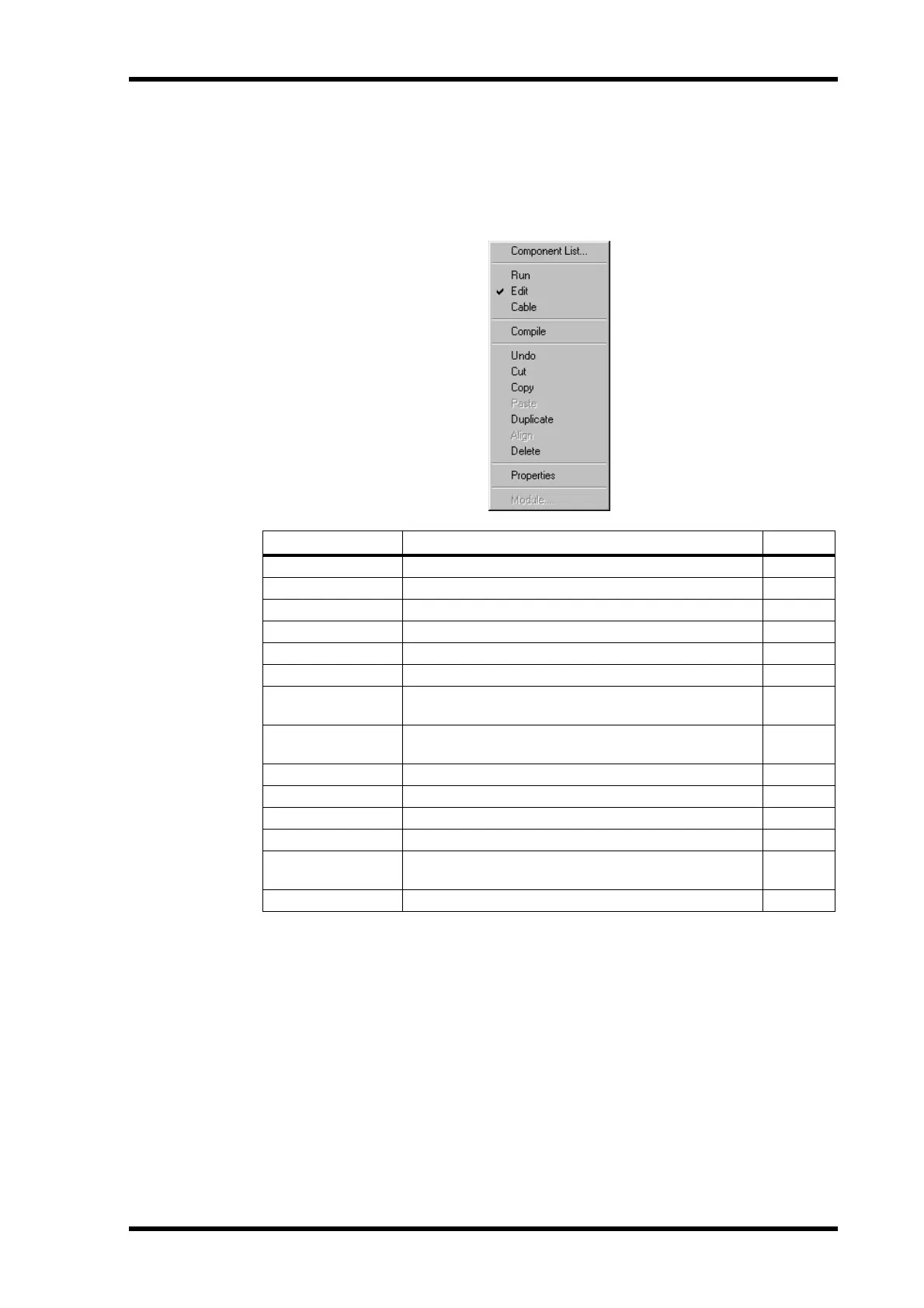
Shortcut Menu
The Shortcut menu combines commonly used commands from several menus into one
menu that can be accessed simply by clicking the right mouse button. It’s a context-sen-
sitive menu, which means that the commands available depends on the type of item
(e.g., component or wire) that the cursor is over when the right mouse button is clicked.
Command Description See page
Component List Opens the Component List 40
Run Selects Run mode 66
Edit Selects Edit mode 45
Cable Selects Cable mode 51
Compile Compiles the current configuration 61
Undo Undoes the last component or wire edit 48, 51
Cut
Cuts the selected component and places it in the Clip-
board
48
Copy
Copies the selected component and places it in the Clip-
board
48
Paste Pastes the component in the Clipboard 48
Duplicate Duplicates the selected component 48
Align Aligns all components to the grid 49
Delete Deletes the selected component or wire 48, 56
Properties
Opens the Properties window for the selected compo-
nent
80
Module Opens the Module window 193


 To Next Page