31
DTX-PRO Owner’s Manual
Basic Operation of the DTX-PRO
Basic Guide
How to Use the Mixer
Use the mixer to adjust each pad’s level to set the overall volume balance.
1.
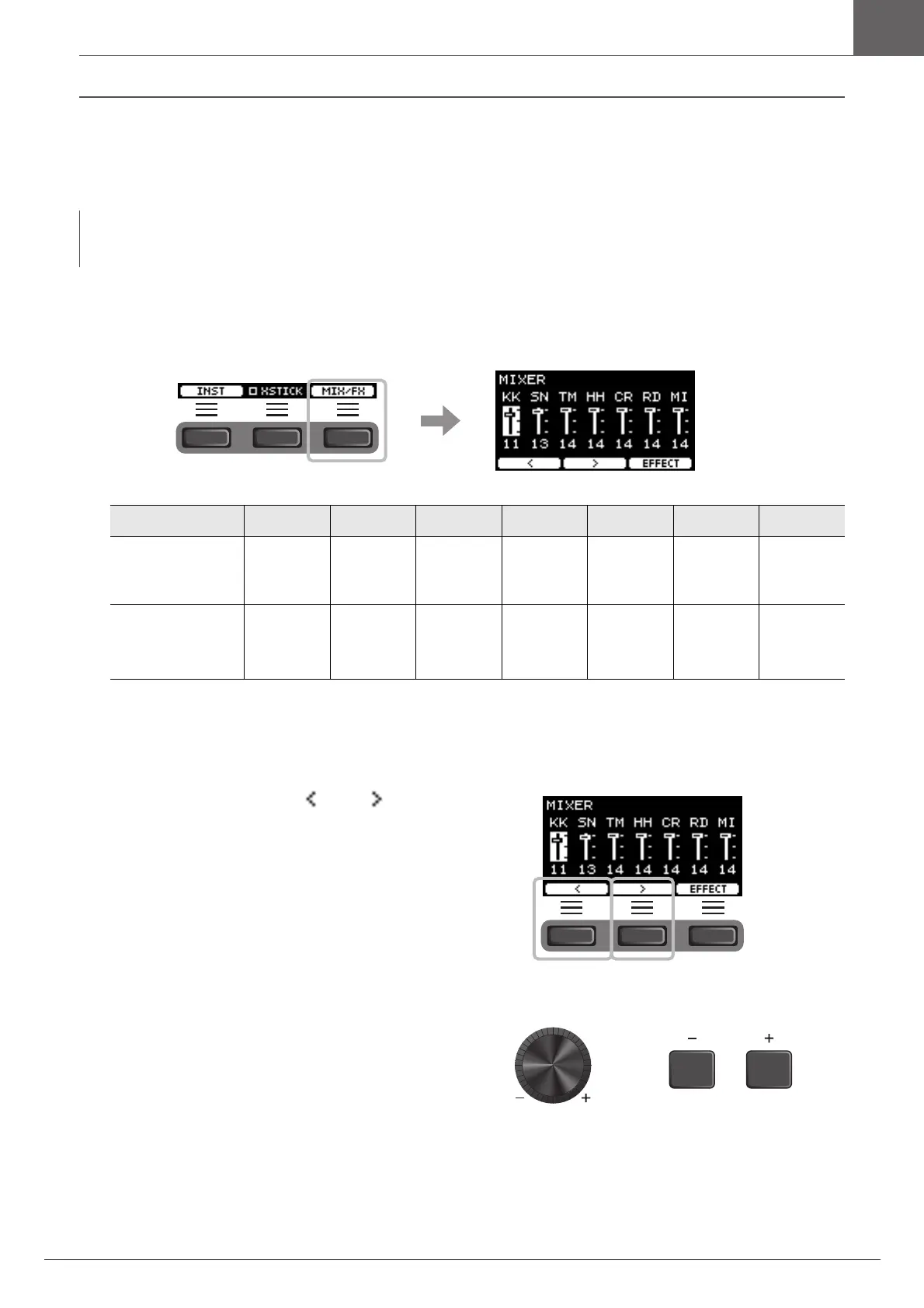
Press the button below “MIX/FX” (F3).
The MIXER screen appears.
To adjust the volume of each pad, press the [MENU] button to change the Inst volume settings.
To adjust the volume of each section of the pad (Zone), press the [MENU] button to change the Voice volume settings.
For more information, refer to the Reference Manual (PDF).
2.
Use the buttons below “ ” or ” ” ([F1]or
[F2]) to select the desired pad.
3.
Use the [–] [+] controllers to adjust the vol-
ume.
NOTE
• The mixer setting is retained after switching to another Kit.
• The mixer setting is not saved as a Kit setting.
Shown on screen KK SN TM HH CR RD MI
Pad Kick Snare Tom1
Tom 2
Tom 3
Hi-Hat Crash1
Crash2
Ride Others
Trigger input jack
the pad is con-
nected to
!2KICK qSNARE wTOM1
rTOM2
yTOM3
!1HI-HAT oCRASH1
!0CRASH2
iRIDE e, t, u,
!3, !4



 To Next Page