50
~~~~~~~~~~~å
Nam:M03~~~TDRå03
~~~~~~~~~~å
4.
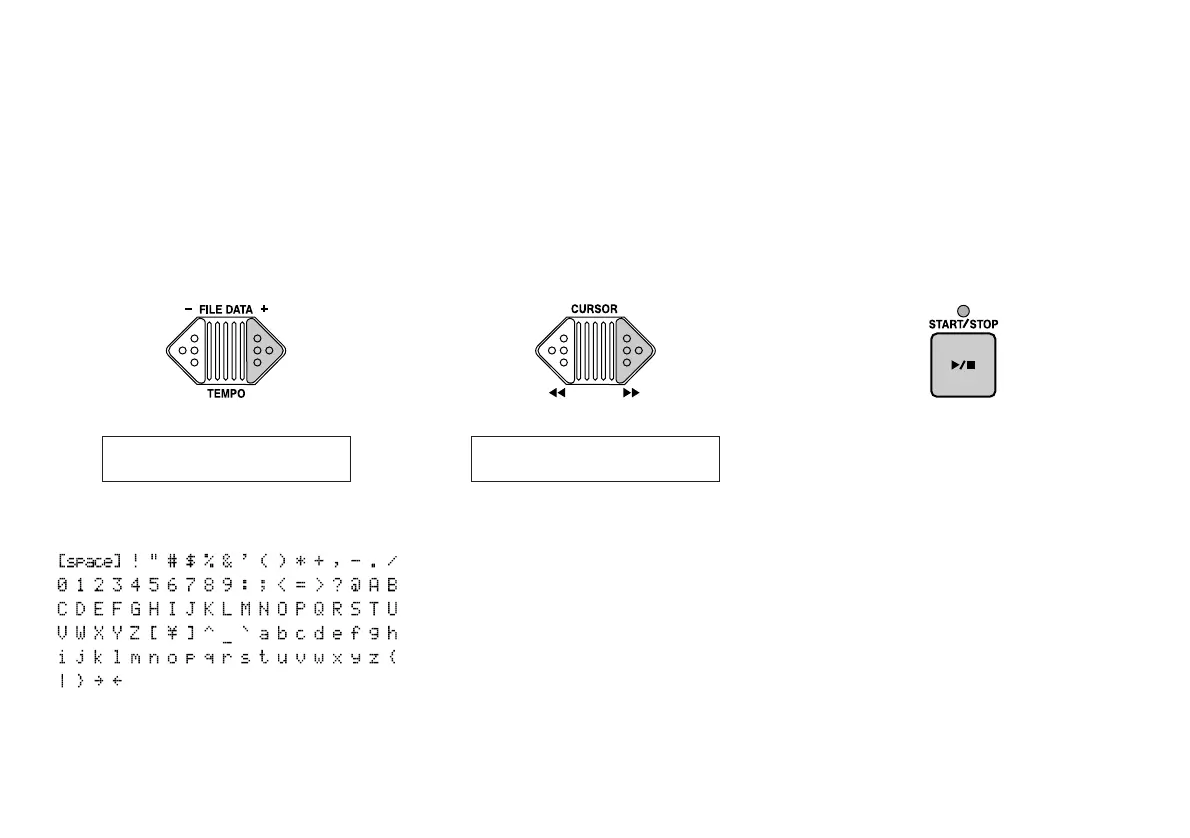
Change a character.
Using the FILE DATA keys, change the
character where the cursor is located.
Available characters:
5.
Move to the next character.
When the desires character appears,
press a CURSOR key to move to the next
letter.
Repeat steps 4 and 5 as needed until you
have changed the entire name.
6.
Press the START/STOP key.
When you’ve finished changing the
name, press the START/STOP key. The
MDF3 will write the new name to disk.
You can now press the CURSOR [<<] key
to move the cursor back to the file num-
ber area and select a new file to rename;
or press any of the mode keys (MDR,
SEQ, JOB, or UTIL) to exit the function.
Nam:M03~~~TDRå03
Hint:
You can run through the options rap-
idly by holding down the FILE DATA keys.


 To Next Page