En 18
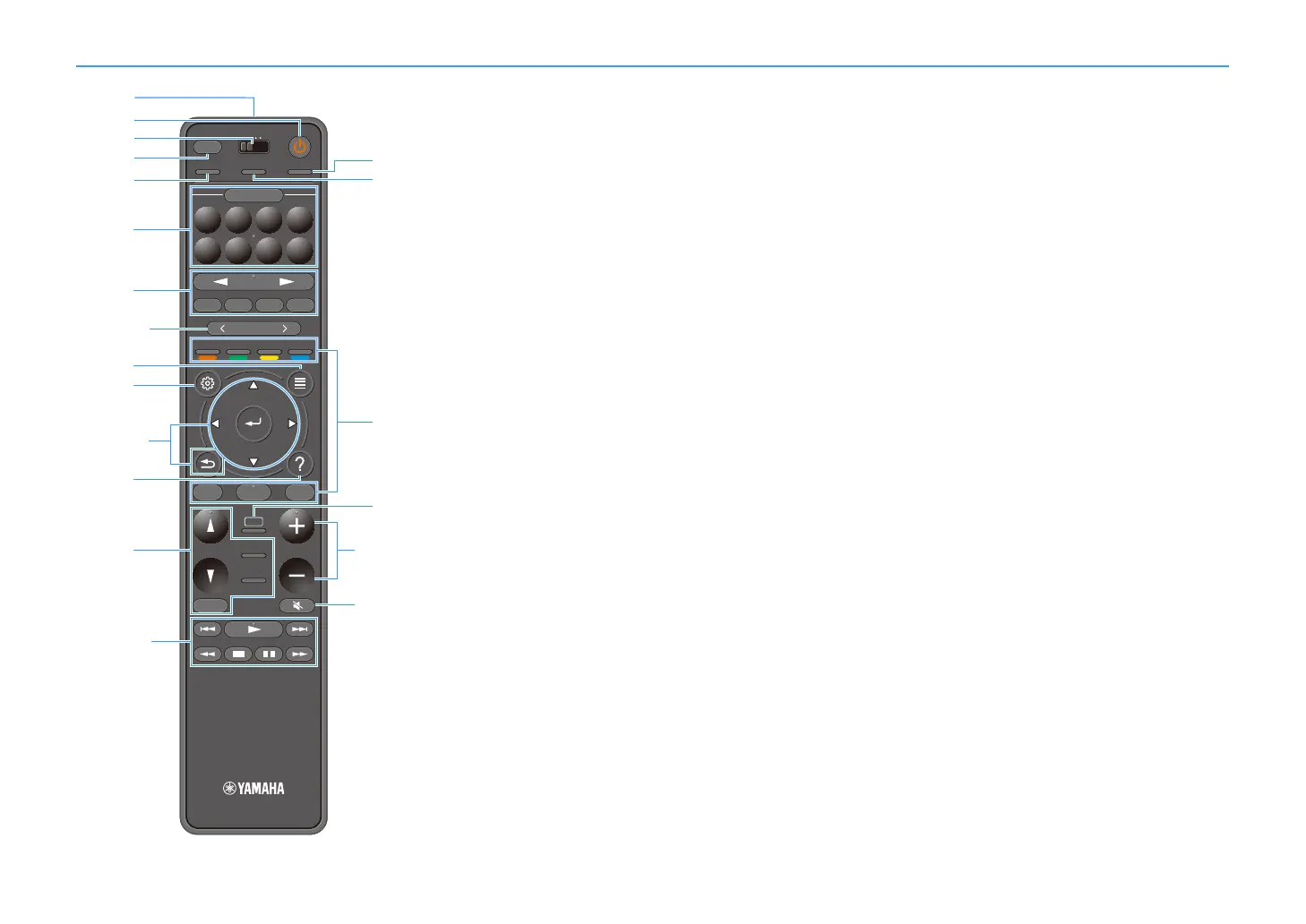
Remote control
a Remote control signal transmitter
Transmits infrared signals.
b z (receiver power) key
Turns on/off (standby) the zone selected with the MAIN/ZONE
switch.
c MAIN/ZONE switch
Changes the zone that is controlled by the remote control (p.111).
d SLEEP key
Pressing this key repeatedly will specify the time (120 min, 90 min,
60 min, 30 min, off), in which the unit switches to the standby mode.
e PARTY key
Turns on/off the party mode (p.112).
f SCENE keys
Switch with one touch between multiple settings set using the
SCENE function. Also, turn on the unit when it is in standby mode
(p.74).
g Input selection keys
Select an input source for playback.
Y
Presses NET repeatedly to select a desired network source.
h PRESET keys
Select a preset FM/AM radio station (p.82).
Recall USB, Bluetooth, or network content that is registered
as a shortcut (p.113).
i OPTION key
Displays the option menu (p.116).
j SETUP key
Displays the setup menu (p.122)
k Menu operation keys
Operates the menu.
l HELP key
In the on-screen menu, the description of a term in the cursor
position appears on the TV. This key is enabled when the “?” icon
is displayed on the on-screen menu.
m Sound mode keys
Select a sound mode (p.75).
n Playback operation keys
Controls playback of the external device.
o HDMI OUT key
Selects HDMI OUT jacks to be used for video/audio output (p.73).
p PURE DIRECT key
Enables/disables the Pure Direct (p.81).
q External device operation keys
Let you perform playback operations when “Bluetooth”, “USB” or
“NET”is selected as the input source, or control playback of the
HDMI Control-compatible playback device.
Y
The playback devices must support HDMI Control. Some HDMI
Control-compatible devices cannot be used.
r AI key
Turns on/off the SURROUND:AI mode (p.76).
s VOLUME keys
Adjust the volume.
t MUTE key
Mutes the audio output.
TUNINGBANDTUNING
MEMORY
STRAIGHT
VOLUME
ENHANCER
SUR. DECODE
AI
PROGRAM
POP-UP
/MENU
HOME
TOP
MENU
BLUE
YELLOW
GREENRED
PRESET
BLUETOOTH
NET USBTUNER
INPUT
8765
4321
SCENE
HDMI OUTPURE DIRECT
PARTY
MAIN 2 3 4
ZONE
SLEEP


 To Next Page