En 50
4 Connecting a network cable or preparing the wireless antenna
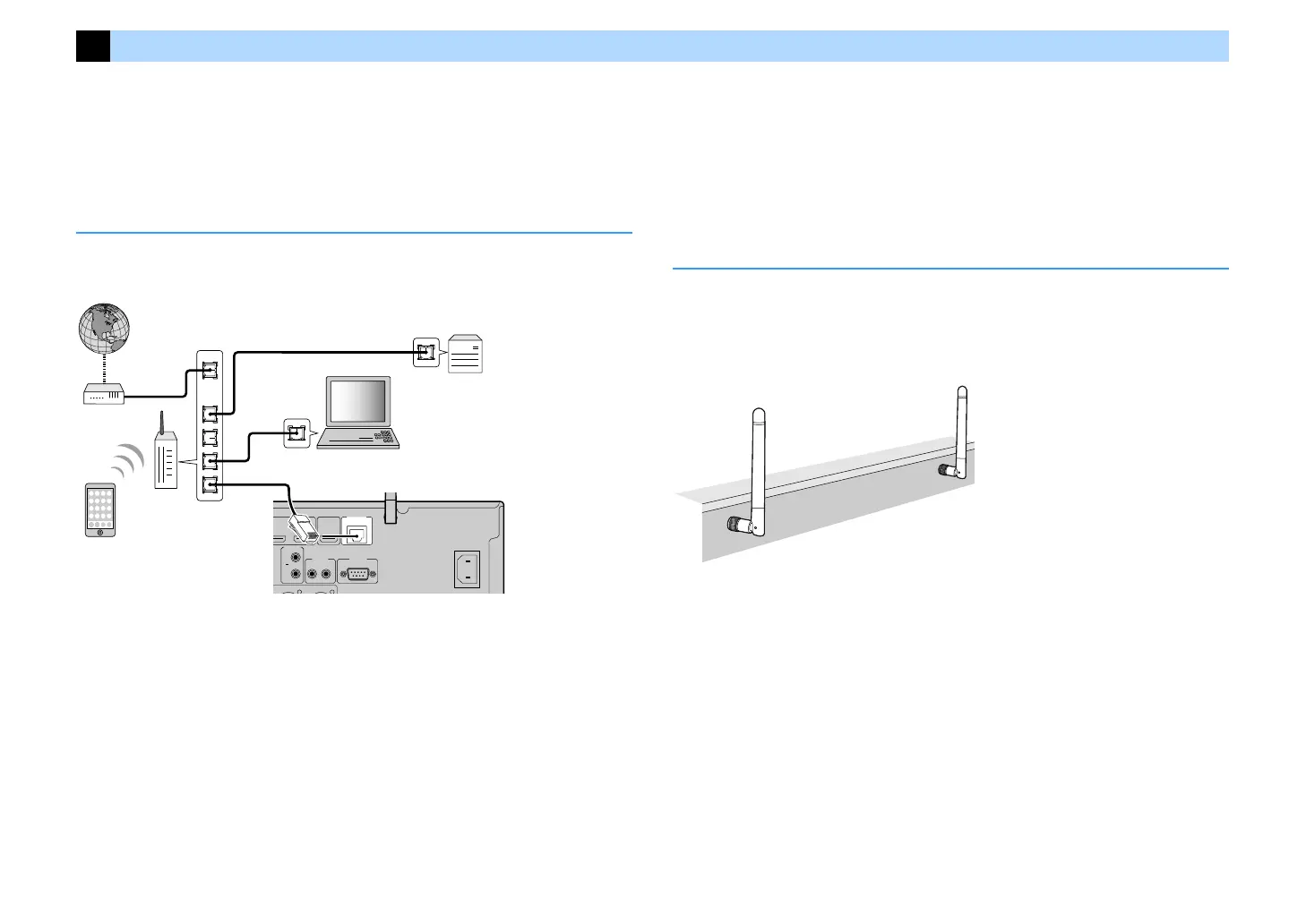
Connect the unit to a router (access point) with a network cable, or prepare the wireless
antenna for establishing a wireless network connection.
You can enjoy Internet radio or music files stored on media servers, such as PCs and Network
Attached Storage (NAS), on the unit.
Connecting the network cable
Connect the unit to your router with a commercially-available STP network cable (CAT-5 or
higher straight cable).
X
• If you want to use a wired (network cable) connection when a wireless connection has been made, set “Network
Connection” (p.144) in the “Setup” menu to “Wired”.
• If you are using a router that supports DHCP, you do not need to configure any network settings for the unit, as
the network parameters (such as the IP address) will be assigned automatically to it. You only need to configure
the network settings if your router does not support DHCP or if you want to configure the network parameters
manually (p.144).
• You can check whether the network parameters (such as IP address) are properly assigned to the unit in
“Information” (p.133) in the “Network” menu.
Y
• Some security software installed on your PC or the firewall settings of network devices (such as a router) may
block the access of the unit to the network devices or the Internet. In these cases, configure the security
software or firewall settings appropriately.
• Each server must be connected to the same subnet as the unit.
• To use the service via the Internet, broadband connection is strongly recommended.
Preparing the wireless antenna
If you want to establish a wireless network connection and Bluetooth connection, stand the
wireless antenna up straight.
For information on how to connect the unit to a network device wirelessly, see “Connecting to
a network device wirelessly” (p.66).
Y
Do not apply excessive force on the antenna. Doing so may damage it.
RS-232C
TRIGGER
OUT
1
2
12V 0.1A
MAX. TOTAL
NETWORK
HDMI OUT
(4
NET
)
(8 SERVER)
(HDCP2.2)
(ZONE OUT)
LAN
WAN
Network Attached Storage
(NAS)
Internet
Modem
Router
Network cable
PC
The unit (rear)
Mobile device


 To Next Page