Connecting a device compatible with the trigger function
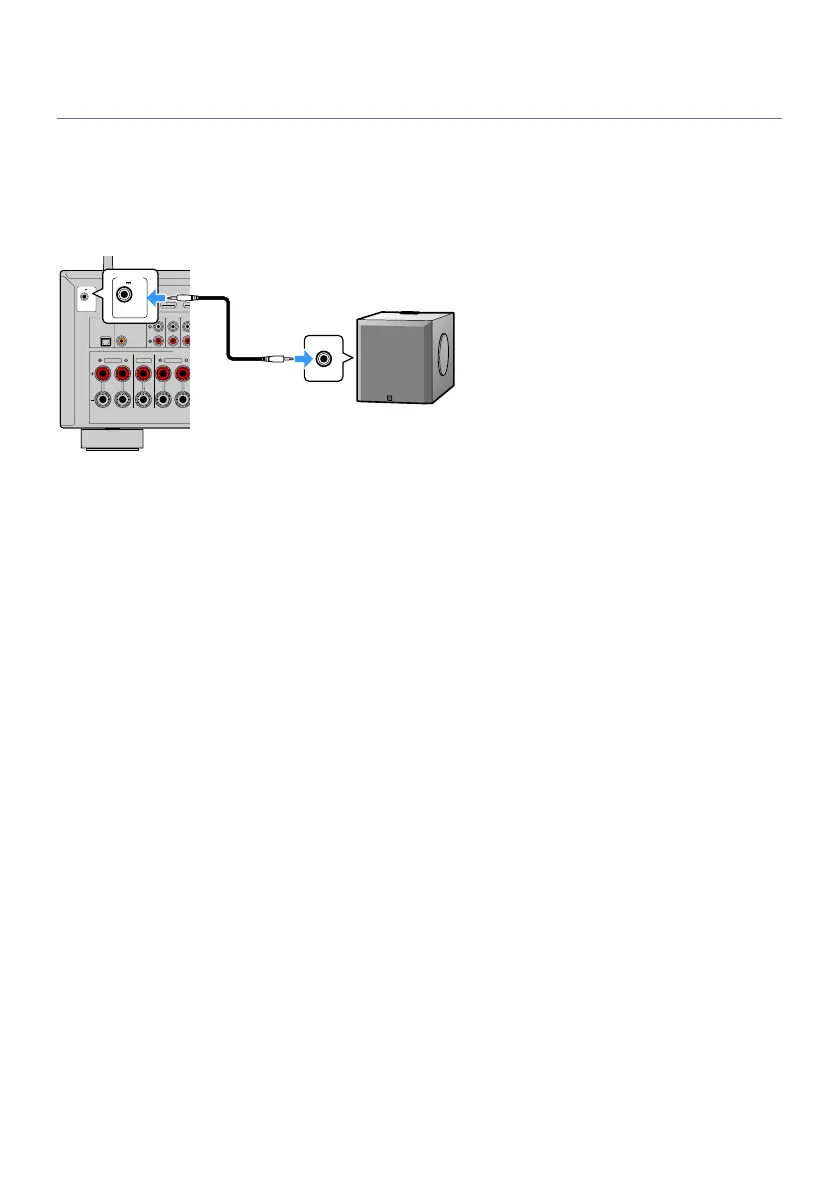
The trigger function can control an external device in conjunction with operating the unit (such as powering
on/off and input selection). If you have a Yamaha subwoofer that supports a system connection or a device
with a trigger input jack, you can use the trigger function by connecting the external device to the TRIGGER
OUT jack with a monaural mini-jack cable.
AUDIO 5AUDIO 4
OPTICAL COAXIAL
CENTER FRONT
SPEAKERS
AUDIO 2
(3 MUSIC)
AUDIO 1
(7TV)
AUDIO 3
SURROUND
HDMI OUT
eARC/ARC
1
(1 MOVIE) (5 STB)
TRIGGER OUT
12V 0.1A
The unit (rear)
TRIGGER OUT jack
System connector
jack
Yamaha subwoofer that
supports a system connection
Related links
(
“Plugging in the power cable”(p.81)
(
“Specifying the zone with which the TRIGGER OUT jack functions are synchronized”(p.252)
80
PREPARATIONS > Connecting other devices


 To Next Page