13
3. COMPONENT NAMES AND FUNCTIONS
Main Unit
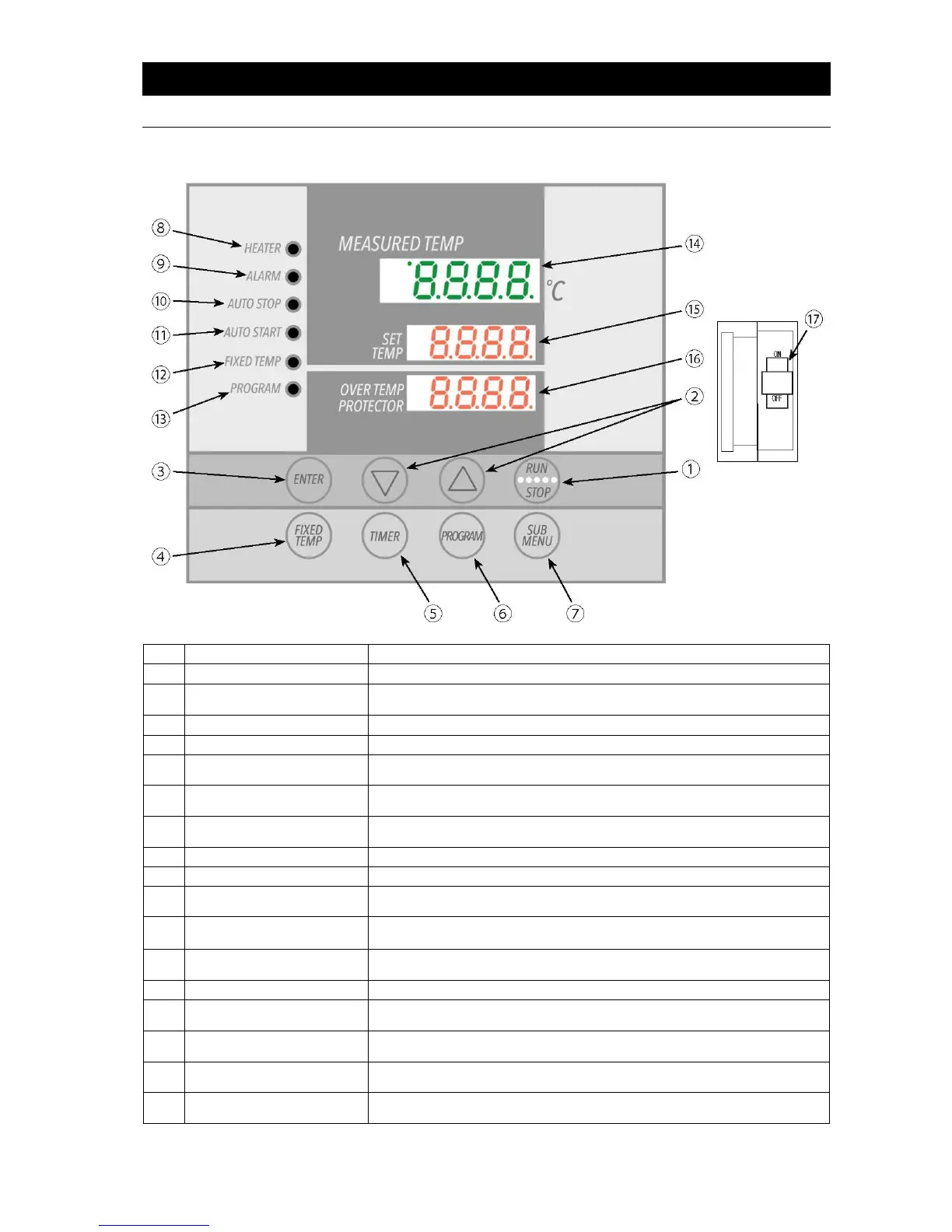
Press to start or stop an operation.
Press repeatedly to increase or decrease setting value incrementally.
Press and hold to increase or decrease setting value perpetually.
Press to finalize setting.
Press to select FIXED TEMPERATURE mode.
Press to select timed operation. Quick Auto Stop, Auto Stop or Auto Start
modes may be selected.
Press to begin creating programs or to select programmed operation.
3 programs with a total of 6 patterns may be set. (See P.25)
Press to enter overheat prevention temp setting, calibration offset, keypad lock,
and program repeat menus.
Illuminates when heater is on and drawing power.
Illuminates when an error occurs (accompanying alarm tone sounds).
Illuminates while Auto Stop operation is in progress. Flashes while setting Quick
Auto Stop or Auto Stop modes.
AUTO START Indicator
Lamp
Illuminates while Auto Start operation is in progress. Flashes while setting.
FIXED TEMP Indicator
Lamp
Illuminates while Fixed Temperature operation is in progress. Flashes while
setting.
Illuminates while Programmed operation is in progress. Flashes while setting.
Shows current chamber temperature, setting characters and error information.
Shows temperature setting, timer setting and remaining time.
Overheat Prevention
Display
Shows overheat prevention temperature limit setting.
Main Circuit Breaker
(MCB)
Flip up or down to turn unit ON or OFF respectively.



 To Next Page