14
3. COMPONENT NAMES AND FUNCTIONS
Display Characters
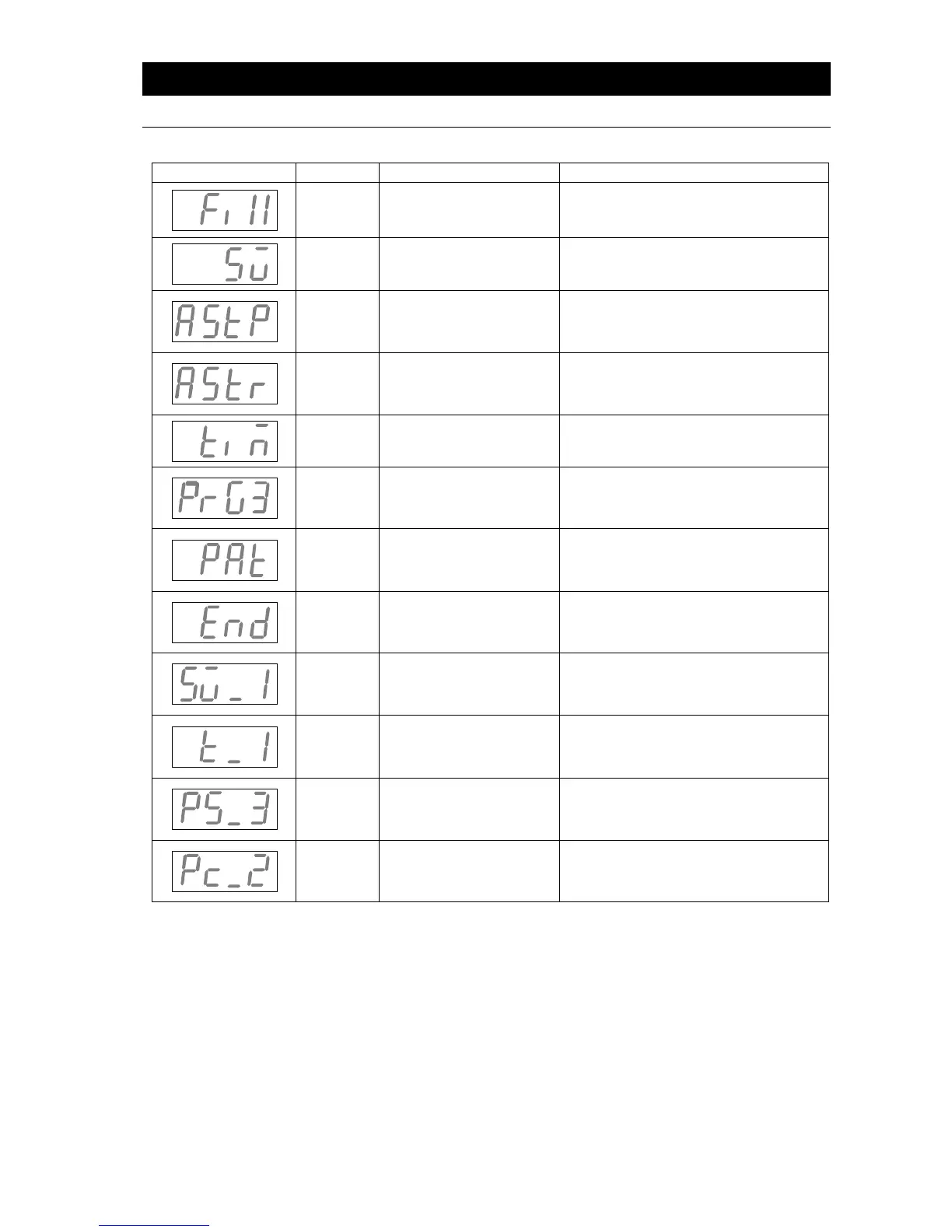
All characters displayed when making settings and during operation are defined as follows:
Signifies constant
temperature
setting mode
Appears while entering settings for
constant temperature operation.
Signifies temperature
setting mode
Appears while entering temperature
settings.
Signifies auto stop and
quick auto stop setting
mode
Appears while entering settings for
quick auto stop or auto stop mode.
Signifies auto start
setting mode
Appears while entering settings for
auto start mode.
Signifies timer setting
mode
Appears while entering timer
settings.
Signifies which program
is being set
Appears when selecting which
program to use (1, 2 or 3) See
“Programmed Operation” (P.26)
Signifies program
pattern
Appears when selecting a program
pattern. See “Programmed
Operation” (P.26)
Signifies end of a timed
operation
Appears when a timed operation is
completed. See pgs. 19~23
Signifies which step
temperature is being set
Appears while setting temperature
for each step in a program. (Sv-1 to
Sv-30)
Signifies which step
timer is being set
Appears while setting timer for each
step in a program. (t-1 to t-30)
Signifies what step is to
be repeated
Appears when selecting step
numbers to be repeated in a program.
See “Pattern Repeat Function” (P.31)
Signifies number of
times to repeat
Appears when setting the number of
times to repeat steps in a program.
See “Pattern Repeat Function” (P.31)



 To Next Page