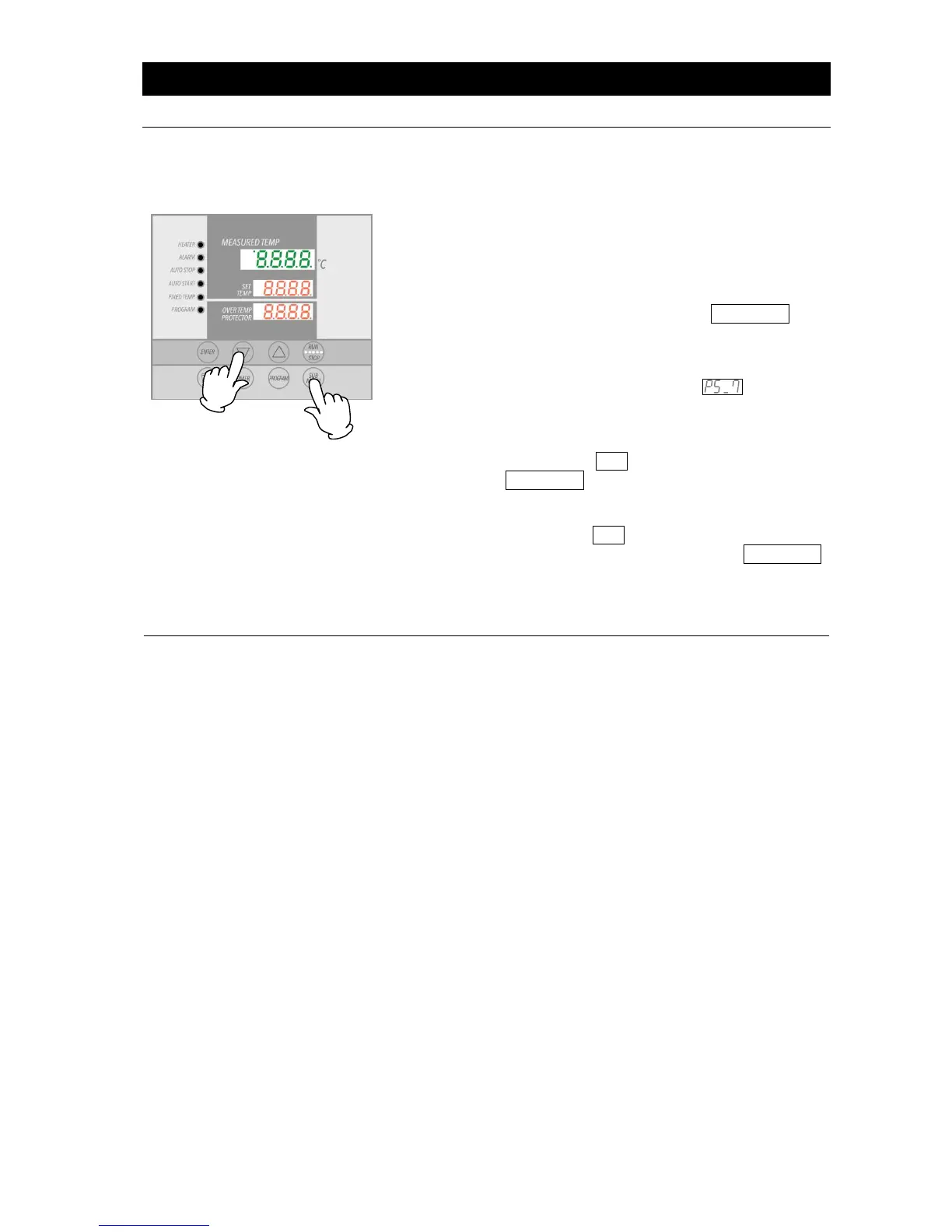
The following illustration continues from ⑪ of Step 4, “Enter
program,” above.
This procedure sets the step number to be repeated, "PS_x",
and number of times to repeat, "Pc_x" (x = step number)
① After setting the timer, press the the SUBMENU key
(Step 7 in the preceding example). This brings up the
repeat function setting mode.
② Top display will show "PS_x", indicating the step to be
repeated in the program pattern. would be
shown in the example above, since repeat function is
used at the seventh step. Step numbers 1 to 7 can be
entered into the center display. Enter the number (1 in
the example) using the ▲▼ keys.
③ Press the SUBMENU key.
Top will show "Pc_x", indicating the number of times to
repeat. Enter this value (2 in the example) into the
center display with the ▲▼ keys.
④ Screen proceeds to the next step when the SUBMENU
key is pressed again.
Sv_8 would be displayed next (in the case of example
above).
Editing settings is not possible while in repeat setting mode.
To edit or confirm the settings, complete current step entry, then
press the FIXED TEMP key, when temperature setting screen
for the next step appears. Display will return to previous screen,
where editing can be done.
Note: Editing and confirmation must be done in the program
setting screen.
Contact original dealer of purchase, if further questions arise
concerning operation procedures.



 To Next Page