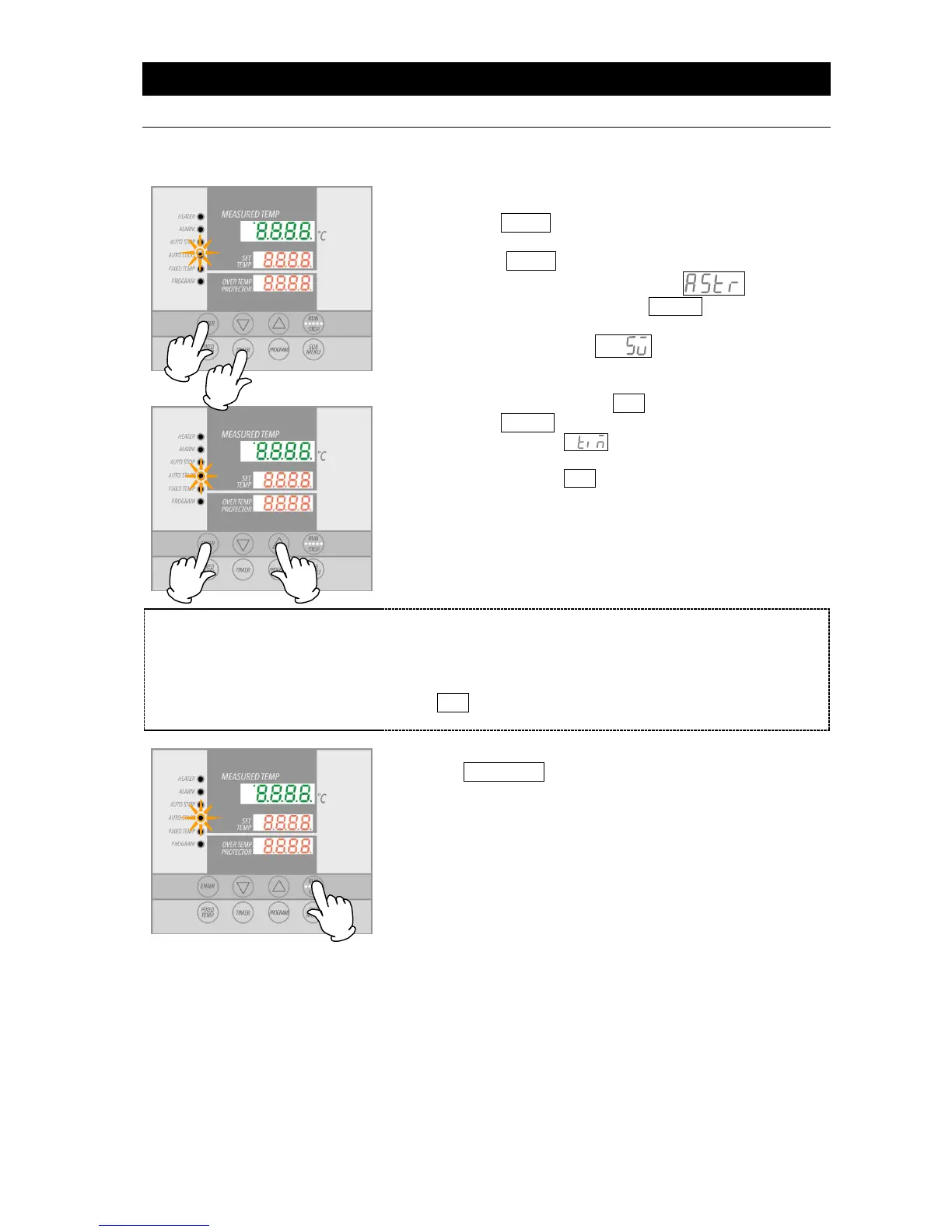
① Press the TIMER key from the initial settings screen.
②
Previous operation mode is displayed in center display.
Press the TIMER key again and center display begins
flashing. Use TIMER key to select , signifying
auto start mode, then press the ENTER key.
Top display will show
, indicating temperature
can now be set. Current temperature setting flashes in the
center display. AUTO START lamp also flashes.
③ Set temperature using the ▼▲ keys.
④
Press the ENTER key again.
Top display shows , indicating the timer can be set.
Current timer setting will flash in the center display.
⑤
Set timer using the ▼▲ keys.
The time can be set in increments of one minute, under 99 hours
and 59 minutes.
Setting increments are 10 minutes, after 100 hours.
When ▼▲ keys are held down, values advance perpetually.
Press repeatedly for incremental adjustment.
Press the RUN/STOP key for about one second after setting
timer.
Auto start operation mode begins when timer reaches 0.00 and
AUTO START lamp illuminates.



 To Next Page