YCO-1127-12-08
PPC-300WP Operation Manual
Grading Function
Once the grading function is enabled, the grade weights need to be setup. Each weight entered is the
lowest acceptable weight for that grade. This example will setup three grades. The rst is from 8.00 to
9.99 lb. The second is from 10.00 to 11.99 lb. The third is from 12.00 to 18.00 lb. Since parameter 02
is set to 003, the scale will prompt for four weights. The weights for this setup will be 8.00, 10.00, 12.00
and 18.01 lb.
Setup
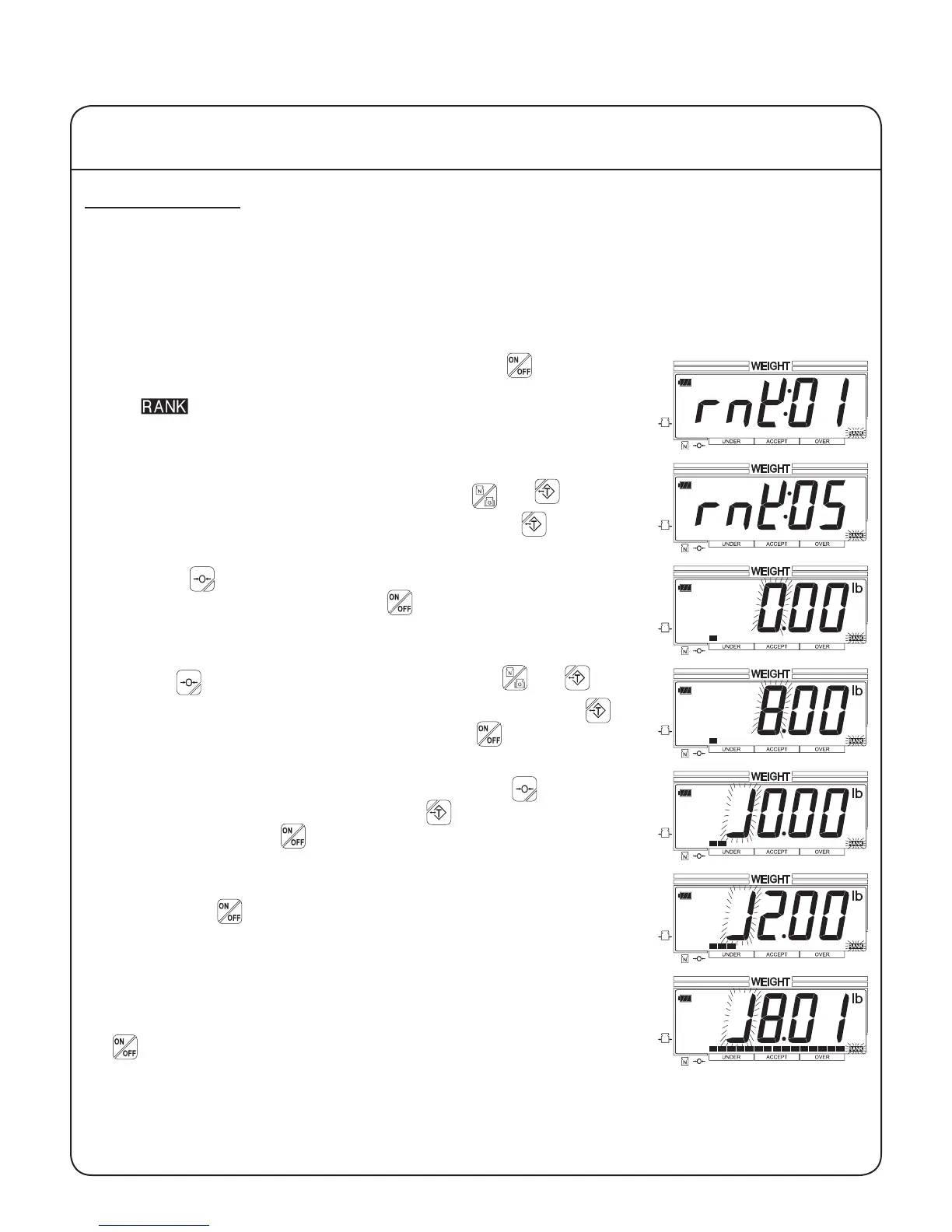
1. With the scale on and the platform empty, press the key for one
second. The scale will indicate that it is in grading setup mode and
the indicator will ash.
2. Up to 66 different congurations can be stored in memory. Initially,
the scale will display conguration 01. Use the and keys to
select the desired conguration. Example: Press the key four
times to select conguration 05.
3. Press the key to enter the grade weight setting. If the congura-
tion is already setup, then press the key to exit setup and begin
weighing. The single bar on the bar chart indicates that this is the rst
grade weight.
4. Use the key to select a digit to change, and the and keys
to decrease or increase the digit's value. Example: Press the key
eight times to change the digit to "8". Press the key to save this
weight and advance to the next grade.
5. Enter the second grade weight. Example: Press the key three
times to select the fourth digit. Press the key once to change the
digit to "1". Press the key to save the second weight and advance
to the next grade.
6. Enter the third grade weight. Example: Use the keys to enter 12.00
lb. Press the key to save the third weight and advance to the nal
weight entry.
7. Enter the nal weight. This will be the lowest unacceptable weight
above the nal grade. Example: The nal grade is from 12.00 to
18.00 lb, so enter 18.01 lb (one division above 18.00 lb). Press the
key to save the nal weight and exit setup mode.
The scale will not accept a grade weight that is equal to or less than the previous grade weight.
IV Using the Scale
20


 To Next Page