11
Identification of Parts
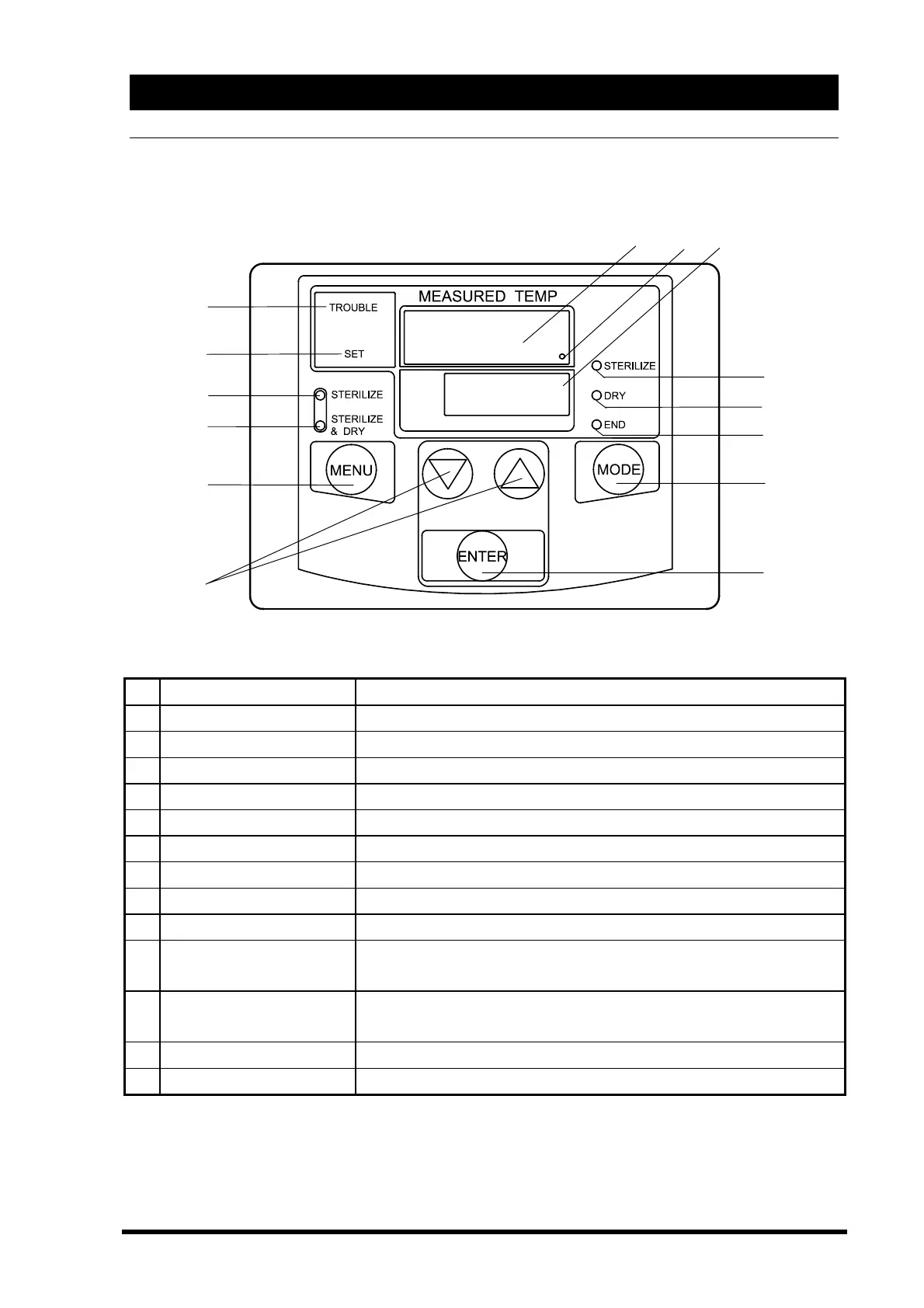
Control Panel
①
ENTER key Start and stop operation, fix the set point/function changed.
② △▽(up down) key
Change set point/function.
③
MENU key Choose “STERILIZE” or “STERILIZE & DRY” before operation.
④
MODE key Use at the beginning/end to change or confirm set point/function.
⑤
Main display Shows mainly chamber temperature and set temperature.
⑥
Sub display Shows mainly time left and set time.
⑦
Heater lamp Stays lit or blinks when heater is on.
⑧
STERILIZE lamp Stays lit or blinks in sterilization process.
⑨
DRY lamp Stays lit or blinks in drying process.
⑩
END lamp Stays lit in the end of operation.
⑪
STERILIZE lamp
Blinks when “STERILIZE” menu is selected before operation, and
stays lit during operation.
⑫
STERILIZE & DRY lamp
Blinks when “STERILIZE & DRY” menu is selected before operation,
and stays lit during operation.
⑬
TROUBLE lamp Stays lit when the unit is out of order.
⑭
SET lamp Stays lit when pushing MODE key to check set point etc.,
①
②
④
③
⑫
⑪
⑭
⑬
⑩
⑨
⑧
⑤
⑦
⑥



 To Next Page