7 Options
39
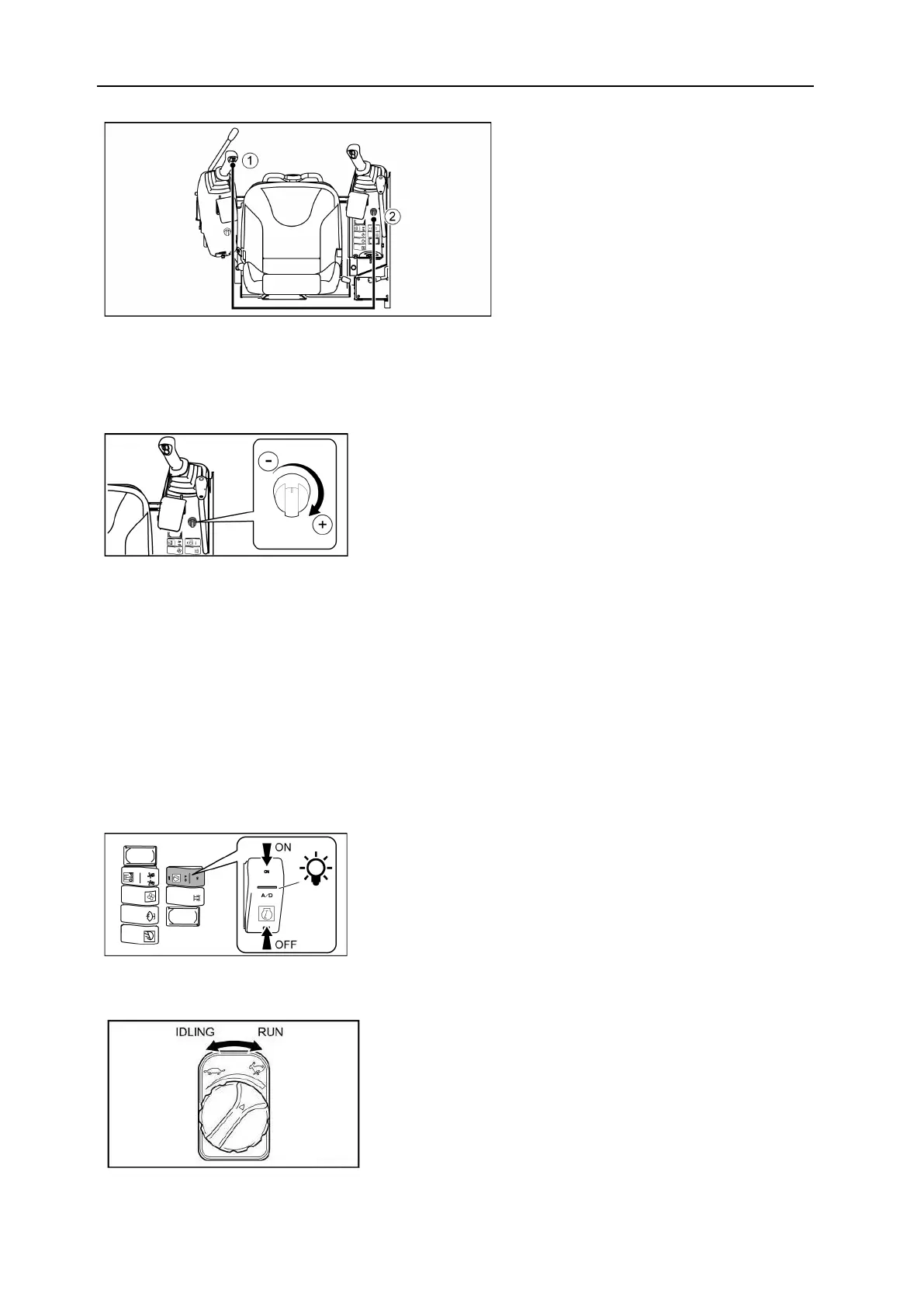
1= Proportional roller
2= Knob
• To use the adjustable proportionality system:
1. Operate the accessory with the proportional roller.(1)
2. Set the maximum hydraulic circuit speed with the knob. (2)
– Turn the button clockwise to increase the
flow rate.
– Turn the button counter-clockwise to de-
crease the flow rate.
7.4 Automatic engine idle
Engine slow down switch
• Use this switch to automatically reduce engine speed.
• When the auto-idle switch is ON and the machine controls are in neutral, the engine speed is
automatically reduced after 4 seconds.
• If you use the machine controls, the engine speed will automatically returns to the speed set
by the engine speed knob.
ON = Auto-idler activated The indicator light is
on.
OFF = Auto-idler deactivated The light is off.
Engine rate setting
• The throttle lever is replaced by a knob on the
dashboard to the right of the operator seat.
• Turn the knob to increase or decrease the en-
gine speed.
– Turn the knob clockwise to increase the engine
speed.
– Turn the knob counter-clockwise to decrease
engine speed.


 To Next Page