BASIC OPERATIONS
Start and Stop the Unit
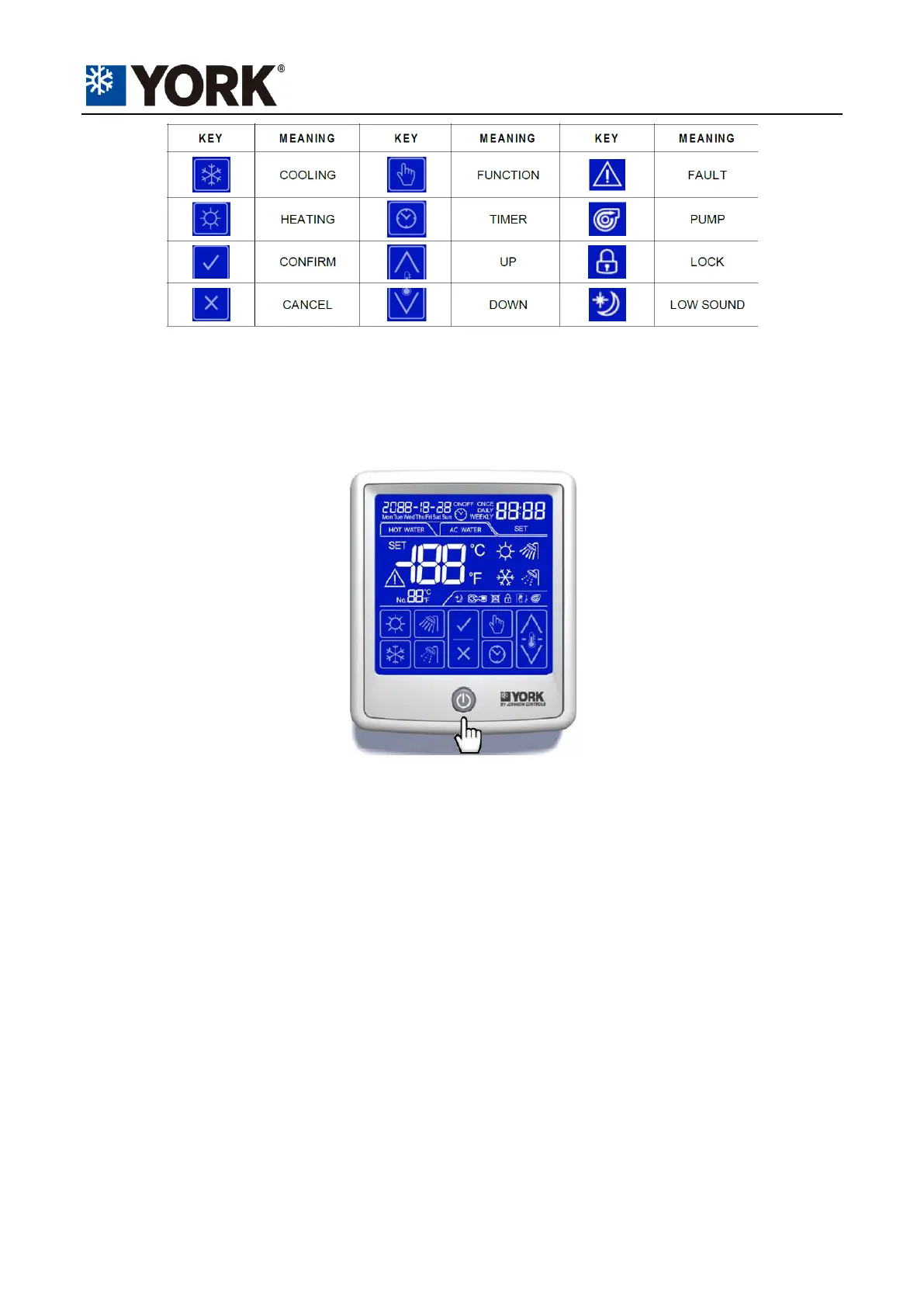
Press the button below the screen to start or stop the unit.
Operating Mode
Press the key of “COOLING” or “HEATING” to set or switch operating modes. The “SET” icon will be
showing during the process. Press “CONFIRM” to finish the setting, or the controller will autosave if
there’s no operation for 10 seconds.
Press “CANCEL” to abandon the setting.
Liquid Temperature Setpoint
Press “UP” or “DOWN” key in daily display screen to set target liquid temperatures. Press “CONFIRM”
to finish the setting, or the controller will autosave if there’s no operation for 10 seconds. Press
“CANCEL” to abandon the setting.
ADVANCED OPERATIONS
Date and Time
Press the “TIMER” and “FUNCTION” keys simultaneously for 5 seconds to enter the Date and Time
setting screen. The “TIMER” and “SET” icons will flicker while the function is activated.
Cooke Industries - Phone: +64 9 579 2185 Email: sales@cookeindustries.co.nz Web: www.cookeindustries.co.nz


 To Next Page