4
Deva 5.8 and Deva 16 Owner’s Manual
Chapter 1
Getting to Know Your Deva Recorder
This section describes the physical features and location of items on the Deva recorder.
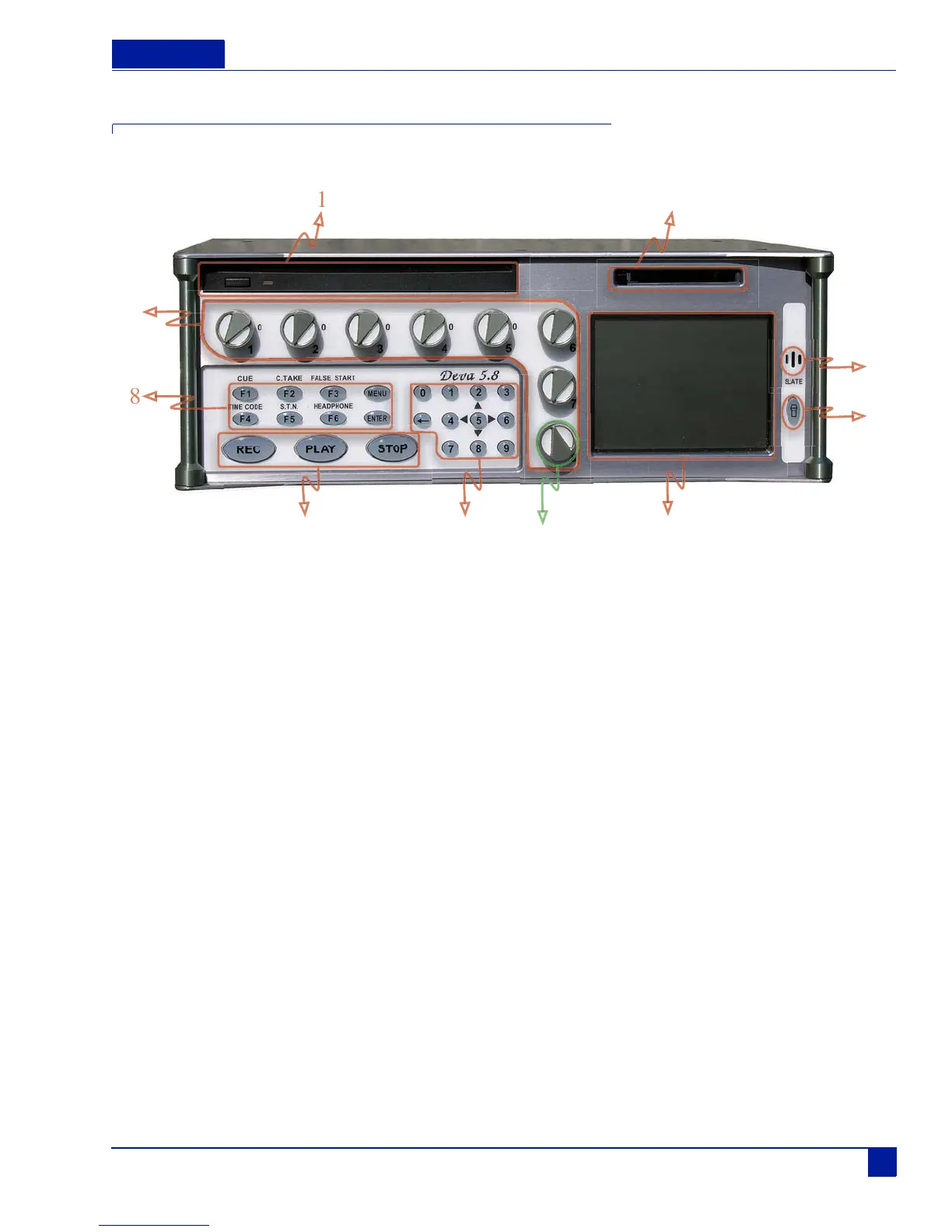
Figure 1 Deva Front panel
Front Panel Descriptions
1. DVD-RAM Drive
2. CompactFlash Slot
3. Slate Microphone
4. Slate Mic Activation
5. Color Touch Screen
The touch screen display is the main interface of the Deva. Most selections are made and displayed using it. You
can use either a PDA stylus or your finger to make selections.
6. Numeric Keypad and Backspace Buttons
These provide an alternative means of entering numeric data such as time code, metadata, and equalization values.
7. Transport Control Buttons
These three buttons provide the Record, Play, and Stop functions.
8. Function Buttons F1, F2, F3, F4, F5, F6, MENU, and ENTER
Many of the function buttons are used for multiple tasks. When the touch screen display shows the home screen,
the function buttons perform the function written above them. In other menu modes, the function buttons can be
programmed to perform additional tasks. The MENU and ENTER button always perform only those functions.
q F1 —CUE
Displays the 'Cue' or Playback Menu on the touch screen.
q F2 —C.TAKE
Marks a take as a 'Circled Take' in the metadata file. This button can be pushed either during record or after
the take has been recorded but before the next take has started.
0



 To Next Page