6
Deva 5.8 and Deva 16 Owner’s Manual
Chapter 1
Left Panel Descriptions
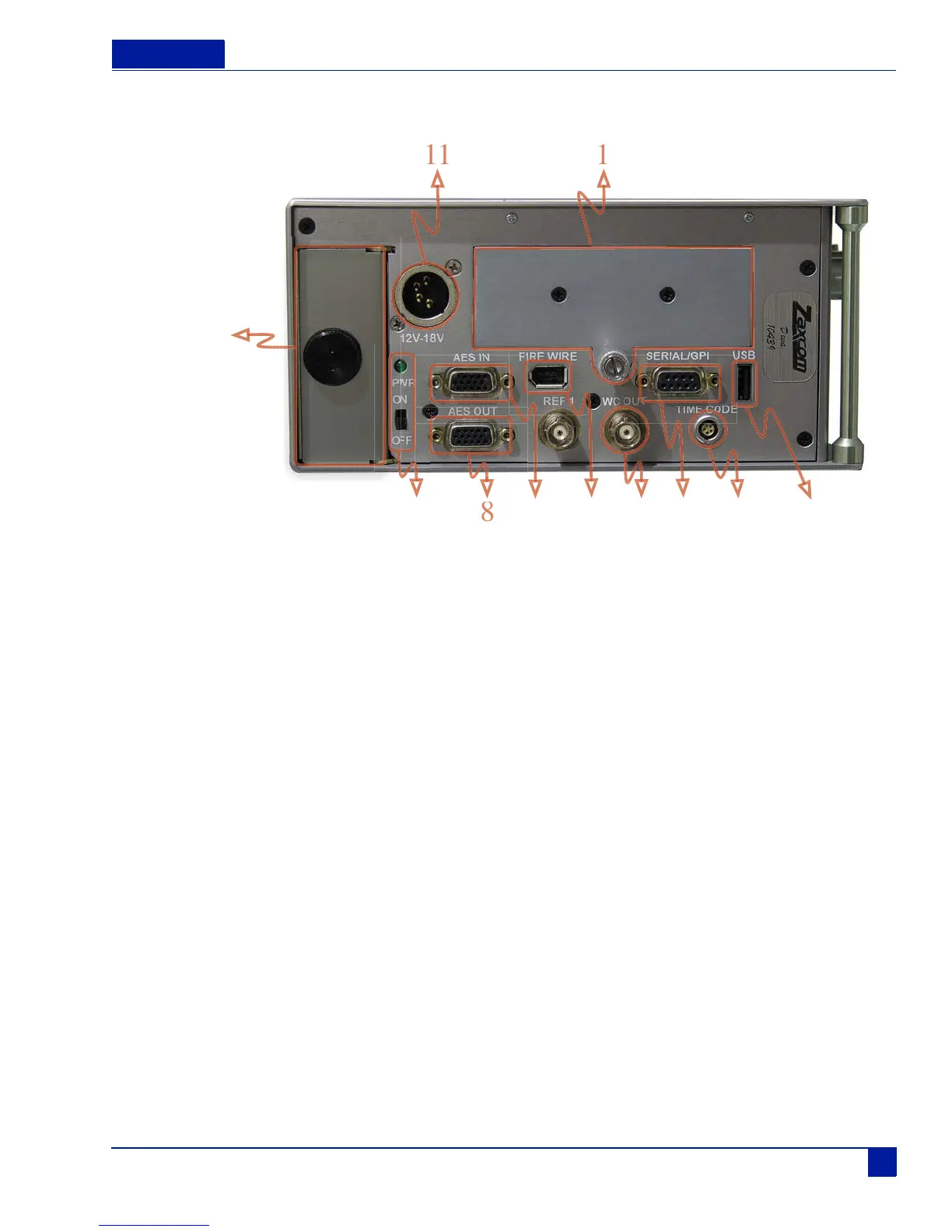
Figure 2 Deva Left panel
1. Hard Drive Compartment
2. USB Port
This port is designed to connect Zaxcom approved keyboards.
3. Time Code Connector
This is the standard 5 pin Lemo connector used for Time Code I/O (Lemo part number: EGG.OB.305.CLL)
4. Serial / RS422 connector
This 9-pin connector is used for controlling the Deva using an external device such as the Zaxcom Deva MIX-12
mixer.
5. Word Clock Output
This BNC connector provides a word clock timing output generated internally from the Deva.
6. IEEE 1394 (FireWire) connector
This is a FireWire 400 port which can be used with FireWire hard drives, CD, and DVD-RAM drives. If the
external FireWire device requires power, it can be turned on from the My Deva menu. (see My Deva Menu on
page 71).
7. AES Digital Input Connector
Connect the supplied AES Digital input cable to this 15-pin mini sub-D connector. The cable provides four pairs of
AES inputs.
8. AES Digital Output Connector
Connect the supplied AES Digital output cable to this is a 15-pin mini Sub-D connector. The cable provides four
pairs of AES digital output.
9. Power Switch and LED
When the Deva is powered on the green LED illuminates.
10



 To Next Page