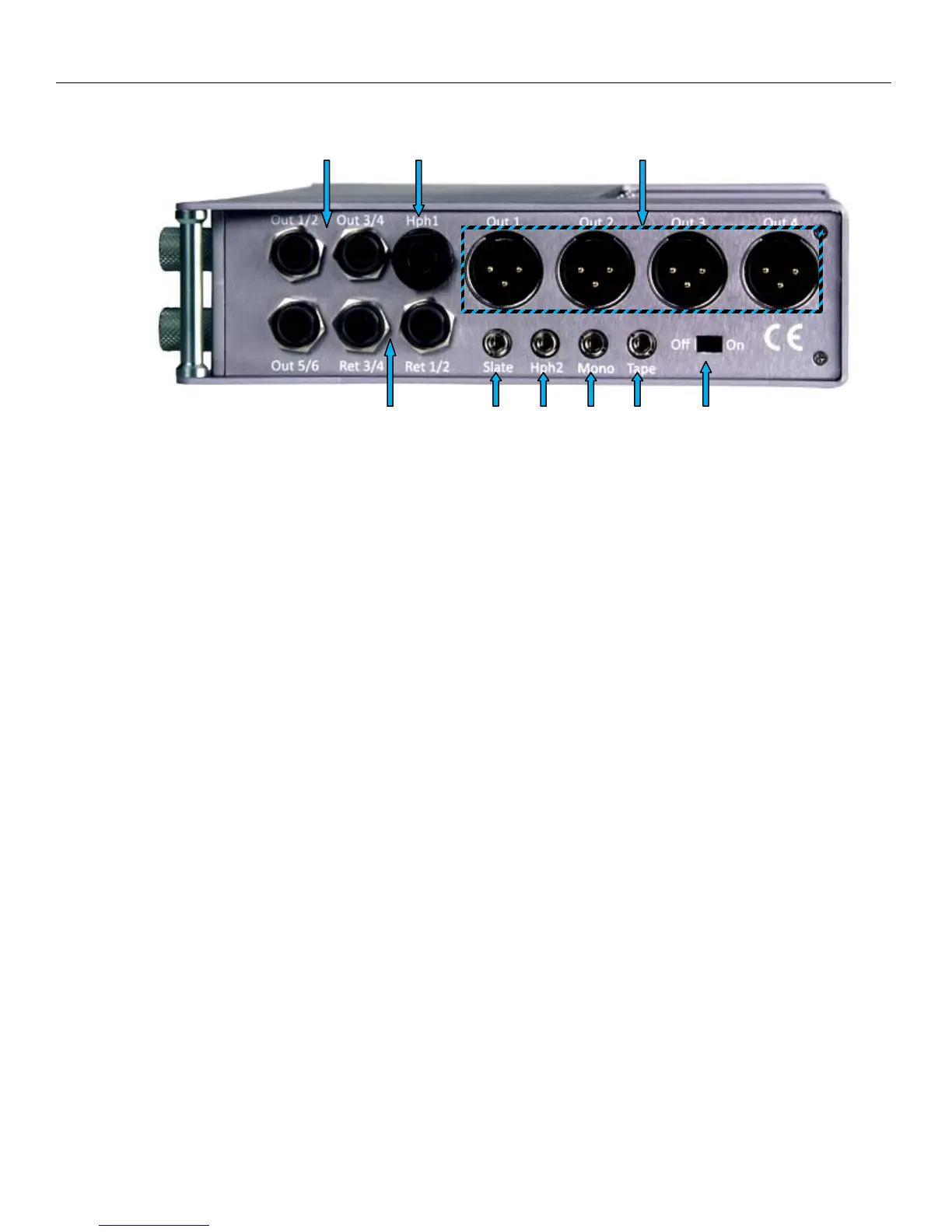
NOMAD LAYOUT Right Side Panel
11
Right Side
1 2 3
4 5 6 7 8 9
1. Outputs 1 – 6 (TA-5M)
Outputs 6 channels of audio via output buses 1-6
TA5 out 1/2 carries output bus 1 and 2
TA5 out 3/4 carries output bus 3 and 4
TA5 out 5/6 carries output bus 5 and 6
2. Headphone #1 (1/4” stereo jack)
3. Outputs 1 – 4 (XLR-3M)
Outputs 4 channels of audio via output buses 1- 4
XLR 1 carries output bus 1
XLR 2 carries output bus 2
XLR 3 carries output bus 3
XLR 4 carries output bus 4
4. Returns 1 – 4 (TA-5M)
These inputs accepts a Headphone Level or Line-Level signal (Range: -20dBu and +30dBu)
• These can act as camera returns and each is independent and can be used to monitor audio from 4
different sources
Or
• Line level analog inputs for inputs 7 through 10
5. External Slate Microphone input (1/8” (3.5mm) TRS jack)
This is where you plug-in the external Com microphone
6. Headphone #2 (1/8” (3.5mm) TRS jack)
7. Mono Output (1/8” (3.5mm) TRS jack)
8. Tape Output (1/8” (3.5mm) TRS jack)
9. Power Switch



 To Next Page