Operation of the instrument
000000-1865-713-GA-en-US-080622
Operation of the instrument
User's safety obligations
CAUTION – GENERAL HAZARDS
The patient should not touch the instrument with his/her hands. In
particular, the instrument should not be used as a support or an aid when
standing up.
Activate Automatic Reference Image
This function allows to set the astigmatism threshold for the automatic
activation of the Reference Image mode.
Automatic Reference Image
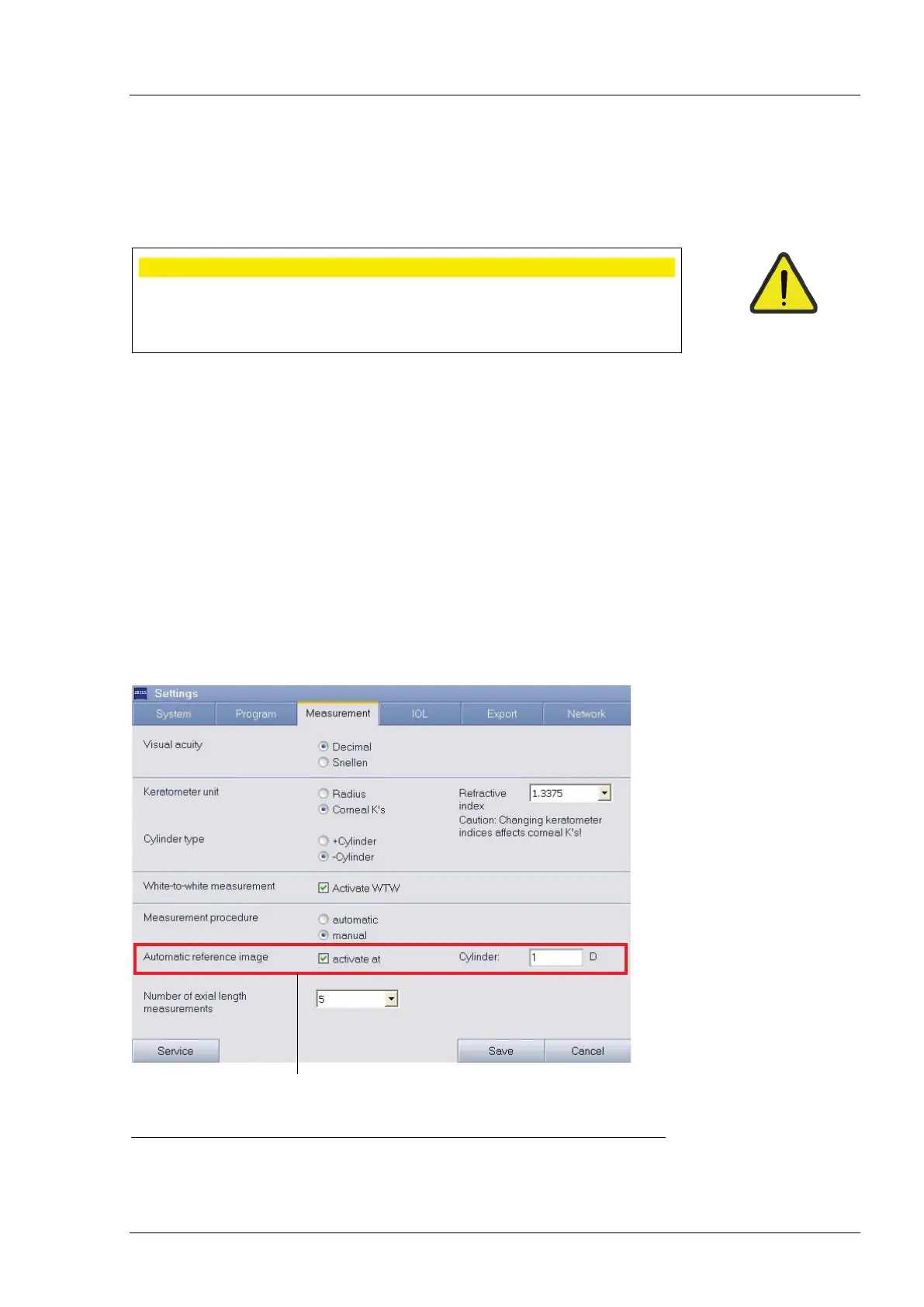
Activate the Automatic Reference Image function (1, Fig. 7) on the
Measurement tab in the Settings menu. In the Cylinder field you can
determine the level of corneal astigmatism which triggers automatic
activation of the measurement procedure in Reference Image mode.
If, in the Dual measurement mode during keratometer measurement, a
higher cylinder value is measured than the value set in the Automatic
Reference Image function, the Reference Image mode will be automatically
started after WTW measurement.
1 Activating the Automatic reference image function
Fig. 7 Settings - Measurement tab





 To Next Page