22 Rev.A
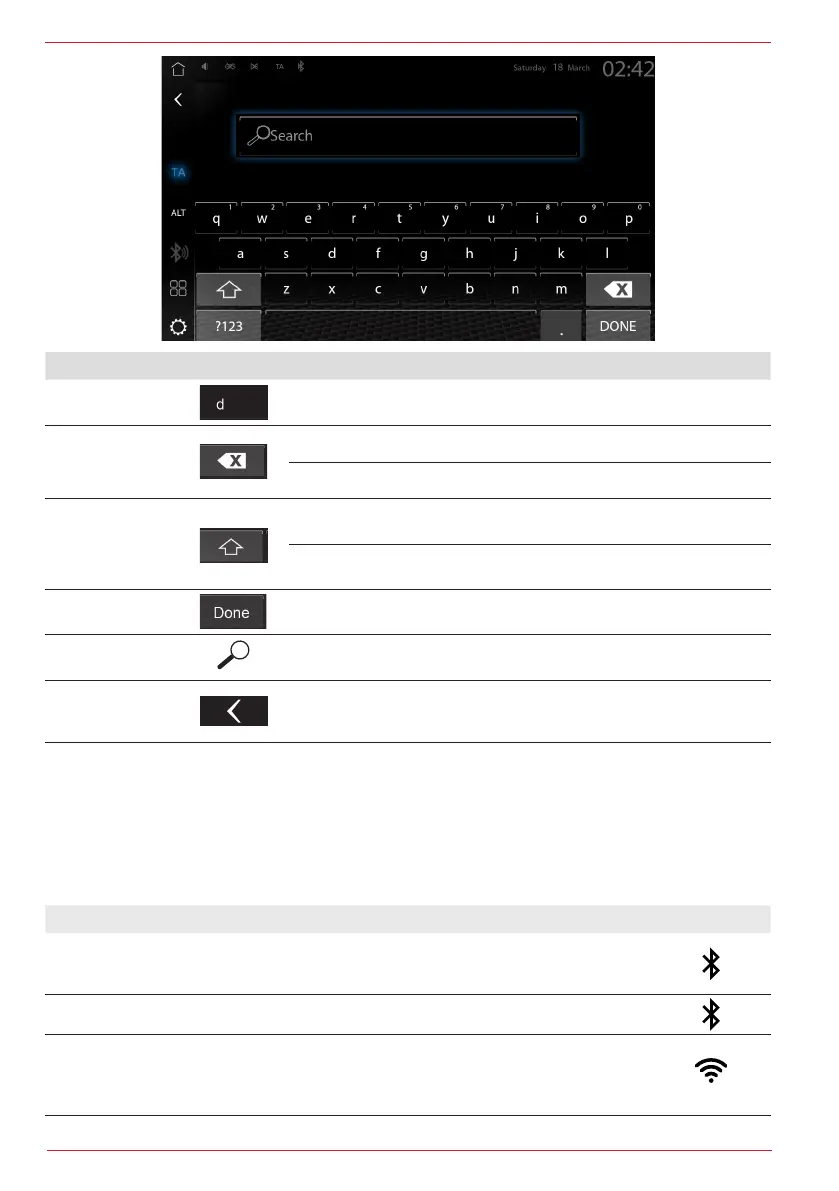
Function Icon Operation
Search Cursor and text input field.
Delete
Tap to delete a number or character.
Hold down to delete the entire entry.
Large / small
Tap to write a number large or small.
Double tap to write all subsequent numbers large or small.
List view Tap to display all search results.
Open keyboard Tap to open an entry keyboard.
Back
Tap the “Back” button in the Zenec toolbar to end the search or
entry and go back step by step.
Connections
In order to be able to use mobile devices in the vehicle, various types of connection are available.
The connection type to be selected depends on the mobile device and the required
function. An overview of the possible types of connection is shown below.
Function Type of connection Symbol
Making phone calls via the Zenec handsfree
device.
Phone book management and contact search.
Bluetooth
A2DP music playback from Smartphone.
Bluetooth-Audio A2DP
WLAN: Internet access via Smartphone/iPhone
hotspot or home network (router) for future
software updates.
WLAN


 To Next Page