34 Rev.A
PAUSE AND CONTINUE AUDIO PLAYBACK
On the ZENEC device:
Tap on the following button to pause or continue the playback.
Function Symbol Meaning
Playback Tap to play back the track.
Pause Tap to play back the track.
CHANGE TRACK AND FAST FORWARD / REWIND
On the ZENEC device:
Function Symbol Meaning
Back
Tap to skip back a track.
Hold down to start fast rewind.
Wipe to the left to skip back a track.
Forward
Tap to skip forward a track.
Hold down to start fast forward.
Wipe to the right to skip forward a track.
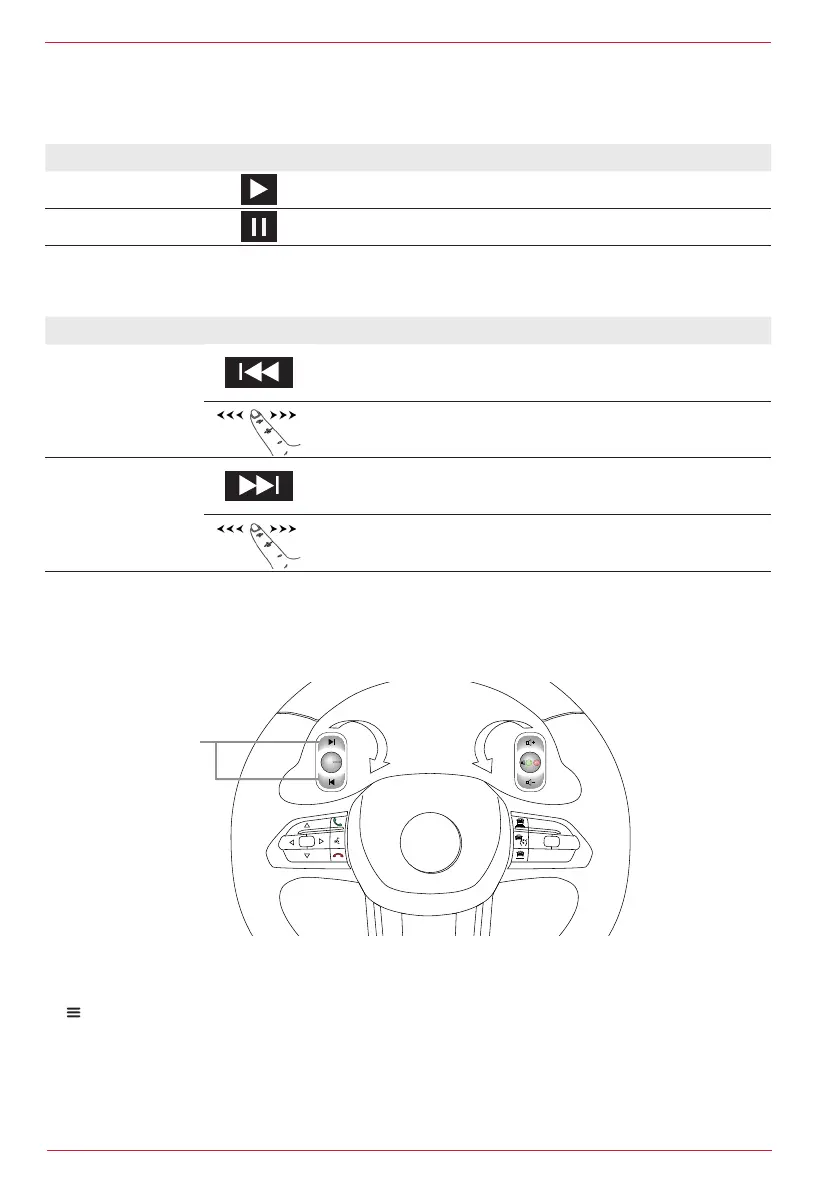
On the steering wheel remote control of the vehicle:
In vehicles with Skip buttons 1 on the steering wheel with a suitable interface or the analogue LFB
connection, the change track and fast forward/rewind function is also supported.
1
CAM /
OK LIM
RES
SET-
SET+
CANC
From model year 2021
Extract of the Fiat Ducato 8 LFB.
SEARCH AUDIO FOLDER AND FILE STRUCTURE
1. Call up the playback list / file directory (playlist page).
2. Search music collection or folder.
3. Tap on required folder to display the contents of the folder such as the track or other sub-folders.


 To Next Page