TUNER (FM/AM) OPERATION
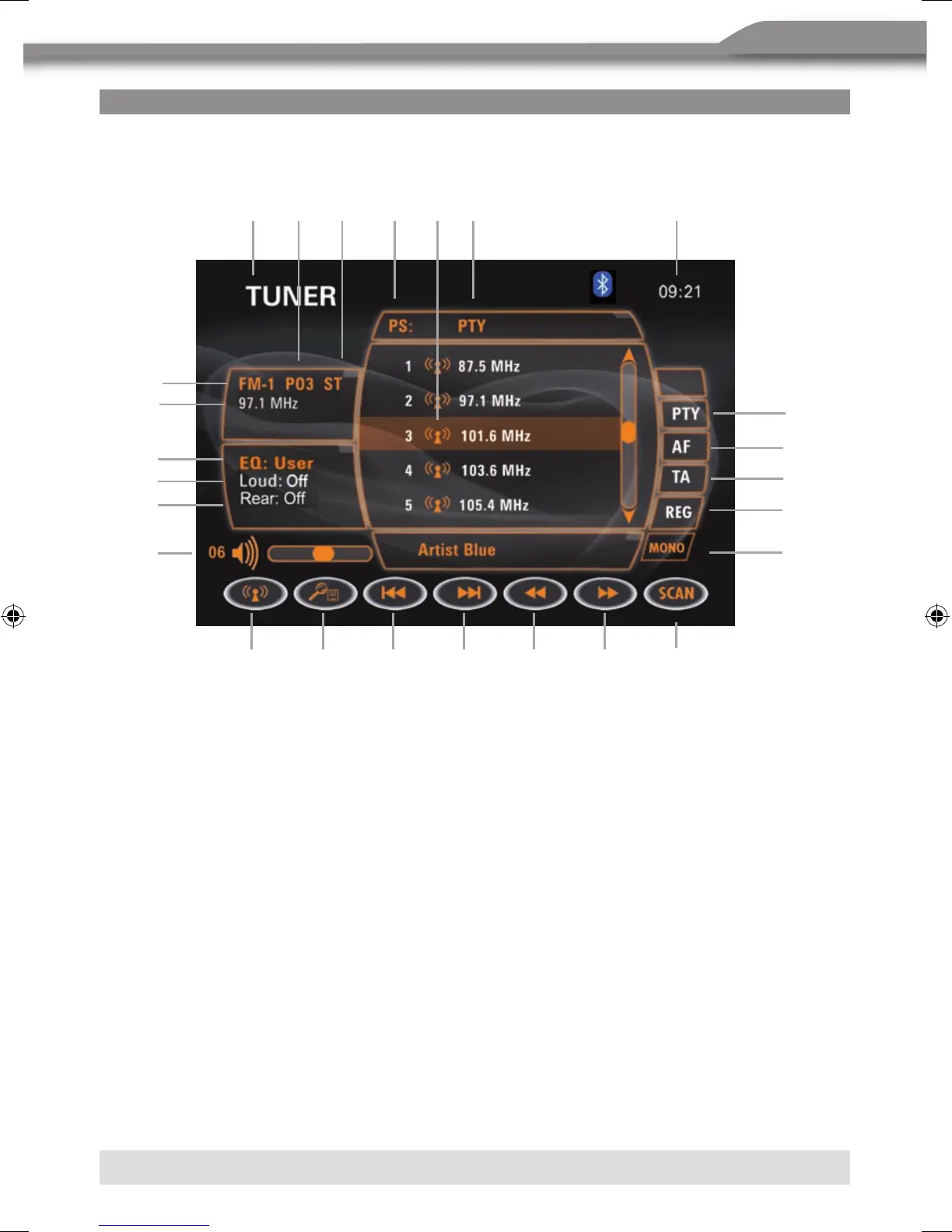
TUNER TFT DISPLAY
0 1. Current source information, touch this area to return to MAIN MENU.
0 2. Current preset station playing back indicator.
3. Stereo broadcasting indicator.
4. Program name.
5. Preset radio stations: Touch to recall preset stations or touch and hold to store
a station, (total 6 stations a band you can store).
6. Program type (PTY).
7. Current time indicator.
8.
A
Touch to change among the following bands: FM-1, FM-2, FM-3, AM-1, AM-2.
9.
B
Touch to automatically scan and store stations in current radio band.
You can also press the AS/PS button on the unit.
10. g Touch to seek backward.
11.
f
Touch to seek forward.
12.
C
Touch to tune backward one step.
13.
D
Touch to tune forward one step.
14.
K
Touch to activate/deactivate SCAN function.
15.
[
Program type indicator: Touch to activate/deactivate the PTY function.
16.
]
Touch to activate/deactivate the AF (Alternative Frequency) function.
17.
\
Touch to activate/deactivate the TA (Traffic Announcement) function.
18.
a
Touch to activate/deactivate the region function.
bq
br
bs
8 9 bl bm bn bo
1 2 3 4 5 6 7
bt
cl
cm
cn
cp
co
cq
bp
bu



 To Next Page