Note that in case the ballast does not implement this function, DALIBOX
Interface 64/32 will not be able to report these errors (see section 1.3).
Blocking errors (short-circuit and lack of power supply) will interrupt all actions,
including timed actions. Other errors will not interrupt them – they will still be executed
by all connected ballasts that do not present errors.
ETS PARAMETERISATION
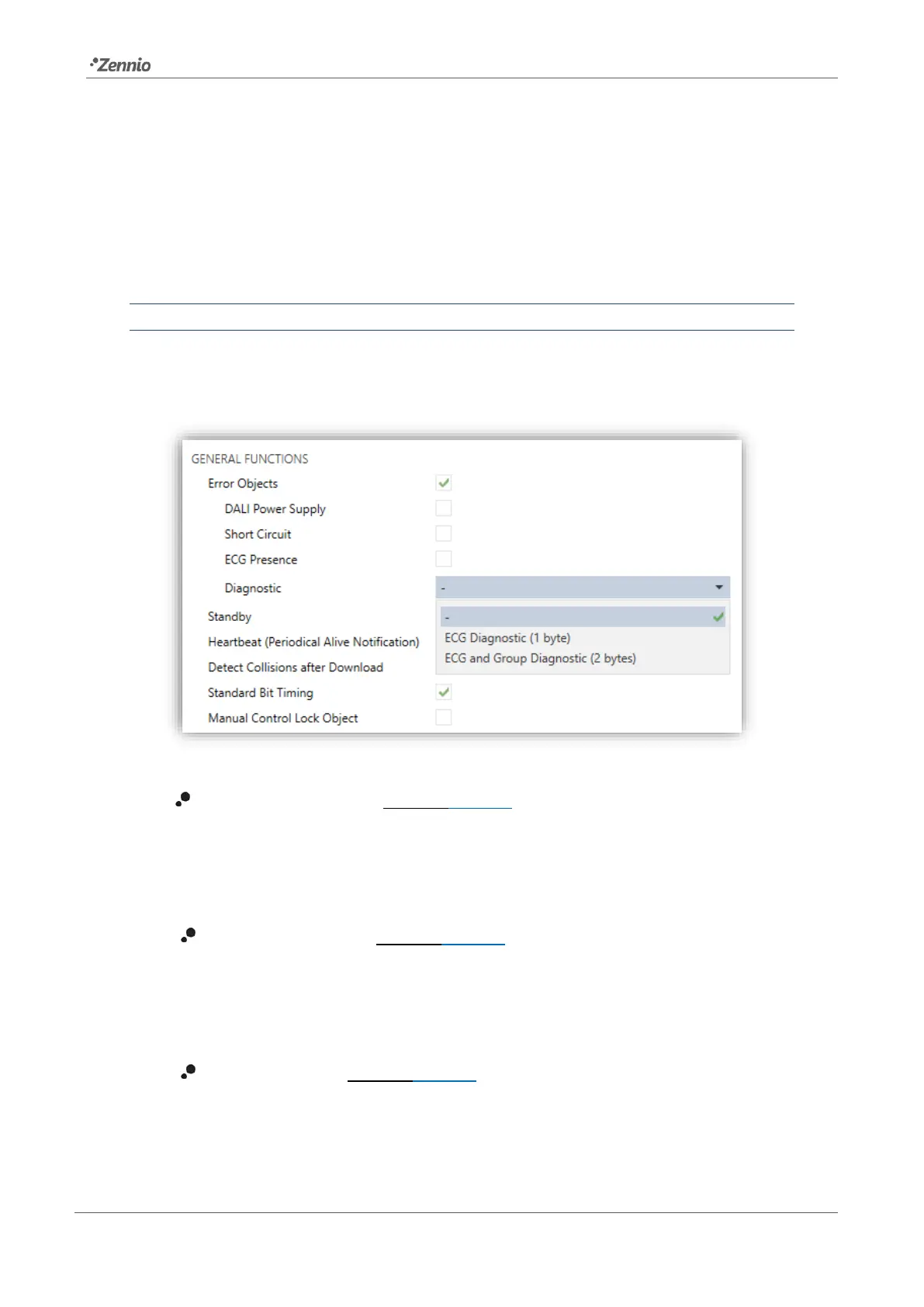
The Error Objects function can be enabled from the “General” tab (see section 2.1). The
following options will then become available:
Figure 6. Error Objects
DALI Power Supply [enabled/disabled]: enables a one-bit object (“Error:
DALI Power Supply”) that will notify the existence of a power supply failure in
the device by sending a value of “1”. Once the error is over, it will send a value
of “0”.
Short Circuit Error [enabled/disabled]: enables the “Error: Short Circuit”
object, which will be sent with a value of “1” in case of detecting communication
errors or a short circuit in the DALI bus. After the error is over, it will be sent
once with a value of “0”.
ECG Presence [enabled/disabled]: enables the “Error: ECG Presence”
object, which will be sent with a value of “1” in case of detecting a ballast
presence failure. After the error is over, it will be sent once with of “0”. This



 To Next Page