On Value [1…100] [%]: sets a specific dimming percentage to be applied to
the group during the “On” stages.
Final Value [0…100] [%]: sets a specific dimming value to be applied to the
group after the last repetition or after the reception of one “0” through the
“[Group n] Flashing” communication object.
2.5.8 LOCK
Enabling the lock function will bring a one-bit object which will allow locking and
unlocking the group. Group locking causes that any bus orders addressing to that group
are ignored.
Receiving a lock order while running a sequence, a flashing sequence or a timed action
will stop the execution of that action.
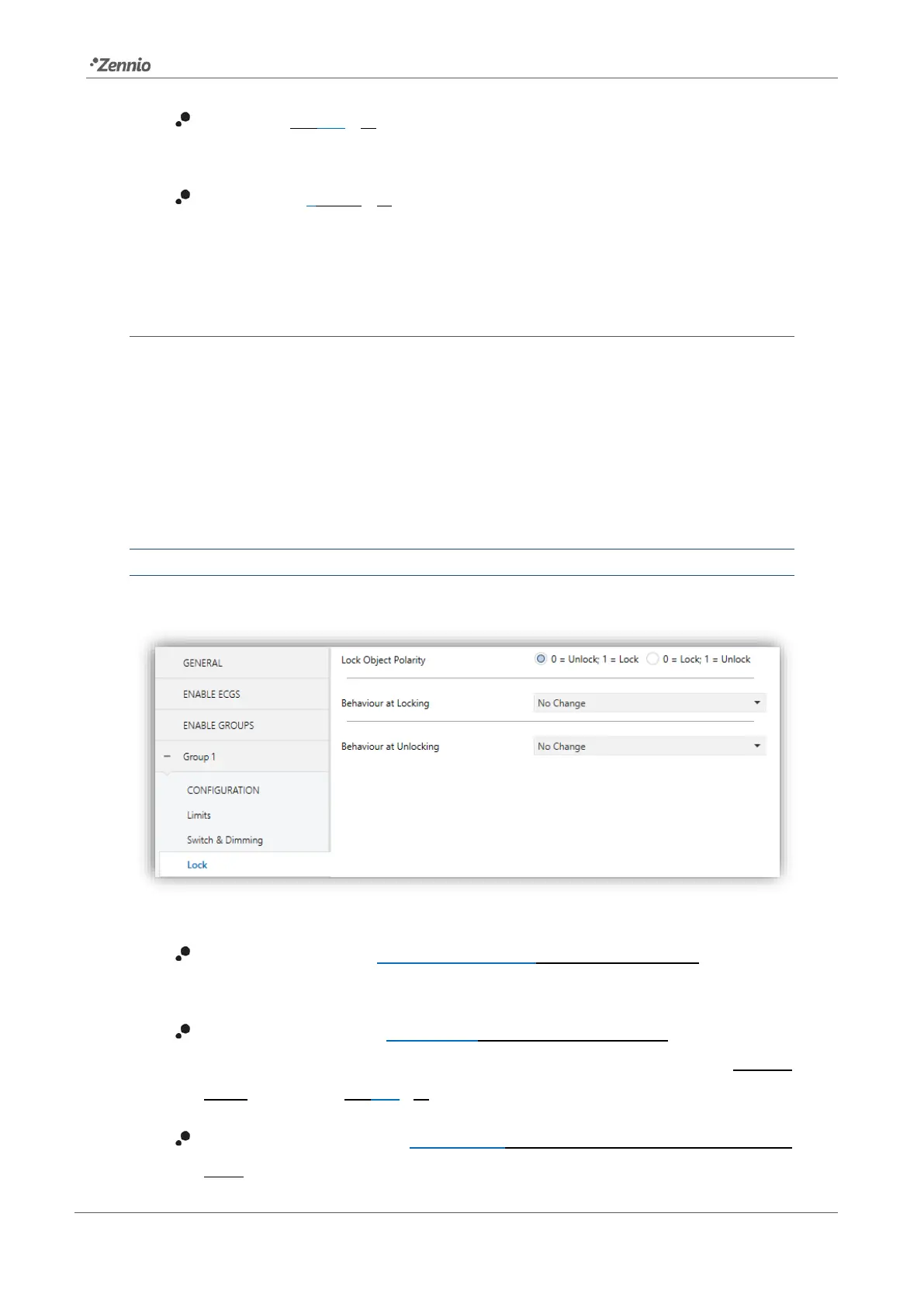
ETS PARAMETERISATION
Once this function has been enabled, the following options will show in ETS:
Figure 22. Lock
Lock Object Polarity [0 = Unlock; 1 = Lock / 0 = Lock; 1 = Unlock]: sets which
value will be interpreted as a lock order and which one as an unlock order.
Behaviour at Locking [No Change / Off / On / Defined Value]: sets the action
to be performed when a lock order is received. In case of selecting “Defined
Value”, the value [0…100] [%] will be parameterisable.
Behaviour at Unlocking [No Change / Off / On / Defined Value / Previous
State]: sets the action to be performed when an unlock order is received. The



 To Next Page