➢ The Write flag of the two-byte object has been enabled so it can receive
requests specifically for a particular ballast or group.
Although the two-byte object admits requesting information about a specific
group, all automatic sendings will always be referred to ballasts.
2.1.2 STANDBY MODE
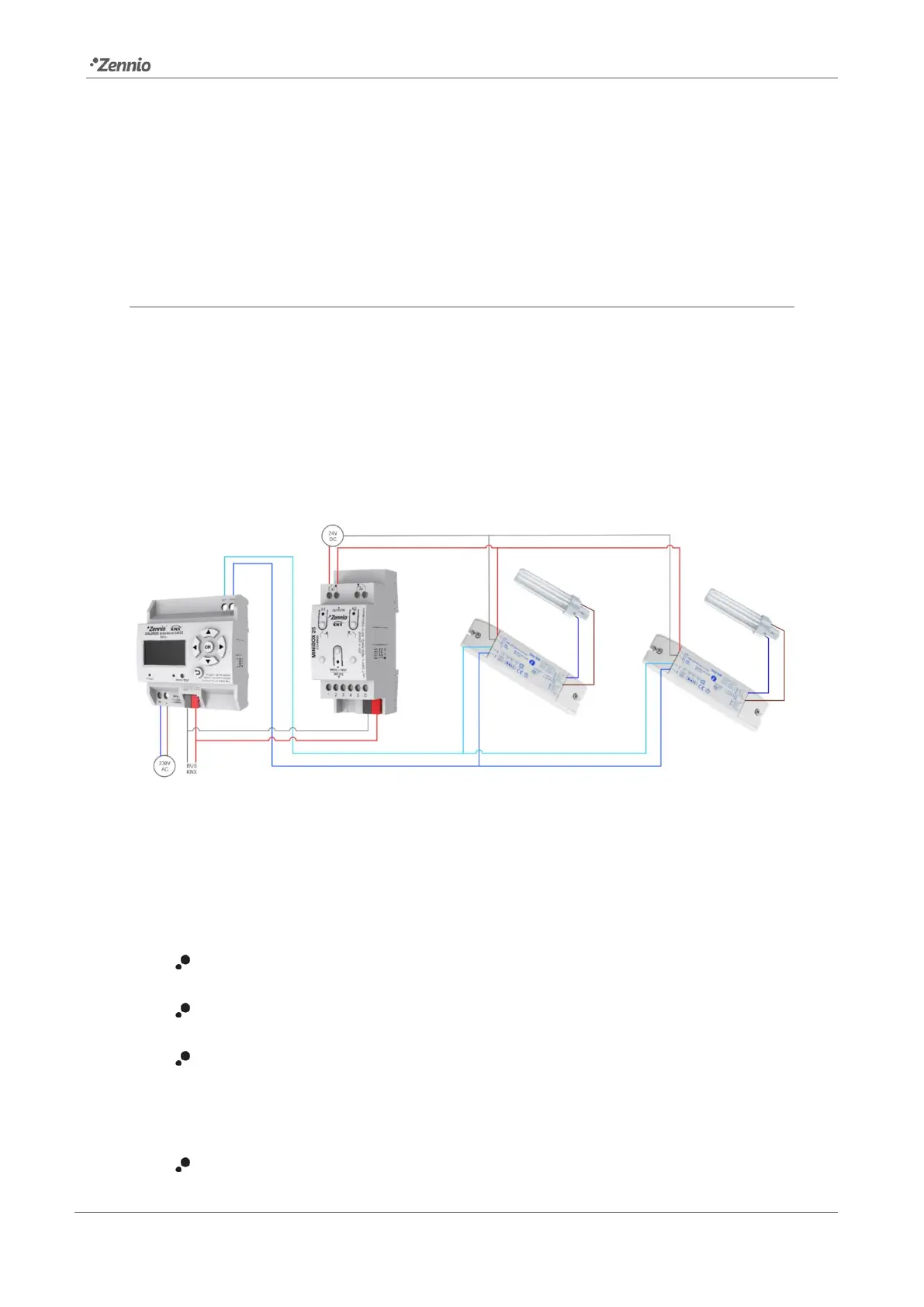
When enabled, DALIBOX Interface 64/32 sends a one-bit object to the KNX bus thirty
seconds after every group is switched off. This allows making use of an external actuator
to interrupt the power supply of the ballasts, thus reducing the power consumption. The
object will be sent once again (with the inverse value) as soon as the group is switched
on again. Note that enabling this function may make the group switch-on last a little
longer than expected.
Figure 7. Wiring suggestion for the Standby function
On the other hand, during the device start-up, the Standby object will be sent as inactive
to make it possible that the ballasts are powered during their initialisation. Some other
situations imply sending the Standby object:
A power supply error,
A short-circuit error,
The Burn-In mode (see section 2.5.10.1). If the Standby function has been
enabled, the Burn-In mode will last 600 ms longer, to ensure the ballasts are
powered for at least the parameterised burn-in time.
The Test On mode (see section 2.8.6).



 To Next Page