6
FUNCTIONALITIES
POWER ON
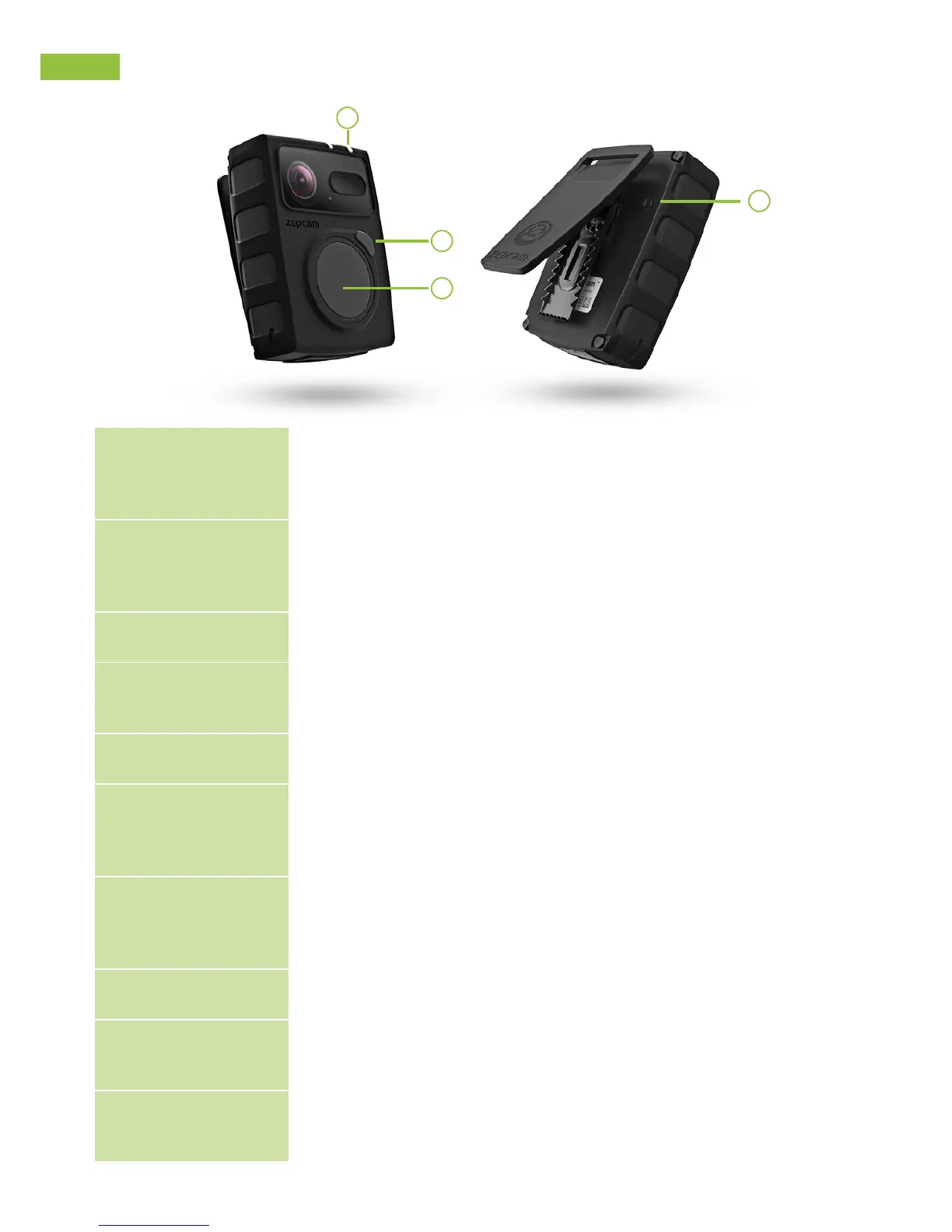
• Push button 4, keep pressed for 2 seconds (single beep,
indicator 9 is green to indicate standby).
• (Note! After switching on, the camera needs 5 seconds before
accepting record commands!)
POWER OFF
• (When the indicator 9 is green) Push button 4, and keep
pressed for 3 seconds (single long beep, indication lights
turns off).
RECORD
• Push button 4. (2 beeps, indicator 9 blinks red)
STOP RECORDING
• Push button 4, keep pressed for 2 seconds. (2 beeps,
indicator 9 is green).
TAKE A PICTURE
• Push button 5 (1 beep, indicator 9 flashes one time red)
TAKE A PICTURE
WHILE RECORDING
• Push button 4 or 5. (1 beep).
PRERECORDING
ENABLED
• When pre-recording is activated, indicator 9 is flashing red.
(you can activate this option in Zepcam Connect).
RESET
• Press once for reset (no data and settings will be lost).
MEMORY CARD
FULL
• Long / short beep every 10 seconds
BATTERY ALMOST
EMPTY
• Battery almost empty: (< 15%): 2 beeps every 10 seconds
5
4
6
9



 To Next Page