10
NOTE:
• Please repeat Step 5 before every flight.
• Please pair the remote control within 5 metres of the Drone to avoid interference
with other signals.
4.5 YOUR DRONE IS READY TO TAKE OFF
Please ensure that the Drone is kept on a flat surface and away from any
obstructions.
There are two methods to begin flying your Drone:
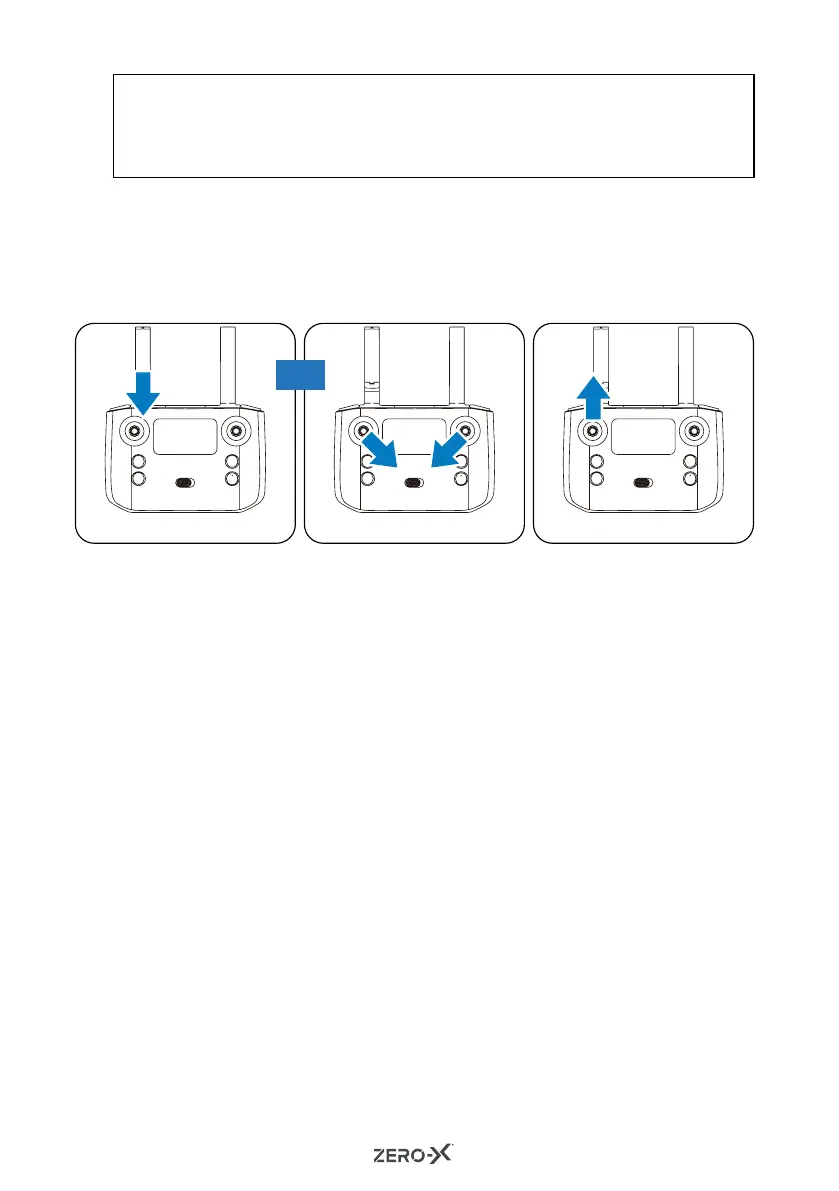
1. Press the One Key Take Off/Landing button (Fig 3).
2. Press the left and right control sticks inward and downward (left stick
5 o'clock and right stick 7 o'clock positions) (Fig 4) for 3 seconds.
The Drone blades will start rotating and the Drone is ready to fly by
pushing the left control stick upwards (Fig 5).
5.0 FLYING YOUR DRONE
5.1 5.1 FLIGHT SAFETY
Before flying your Drone make sure that you are in a safe setting. CASA
restrictions regarding flying Drones require the Drone to be no closer
than 5.5 kilometres from any airport or airfield while flying. Drones should
also not be flown over populated areas or any closer than 30 metres from
vehicles, people or animals.
It is also required that you check your surroundings before taking off
making sure there are no obstacles or dangers in the area including
overhead power lines and large bodies of water. If there are hazards
present in your intended area of flight, please consider an alternative
location.
(Fig 3) (Fig 5)(Fig 4)
OR



 To Next Page