12
5.3 TRIM FUNCTION
Trimming is used to balance out your Drone if it is drifting when flying. To
adjust the Trimming please follow the steps below. You can only use the
Trim function when the Drone is airborne.
1. Make sure that the remote control and Drone are switched on and
correctly paired.
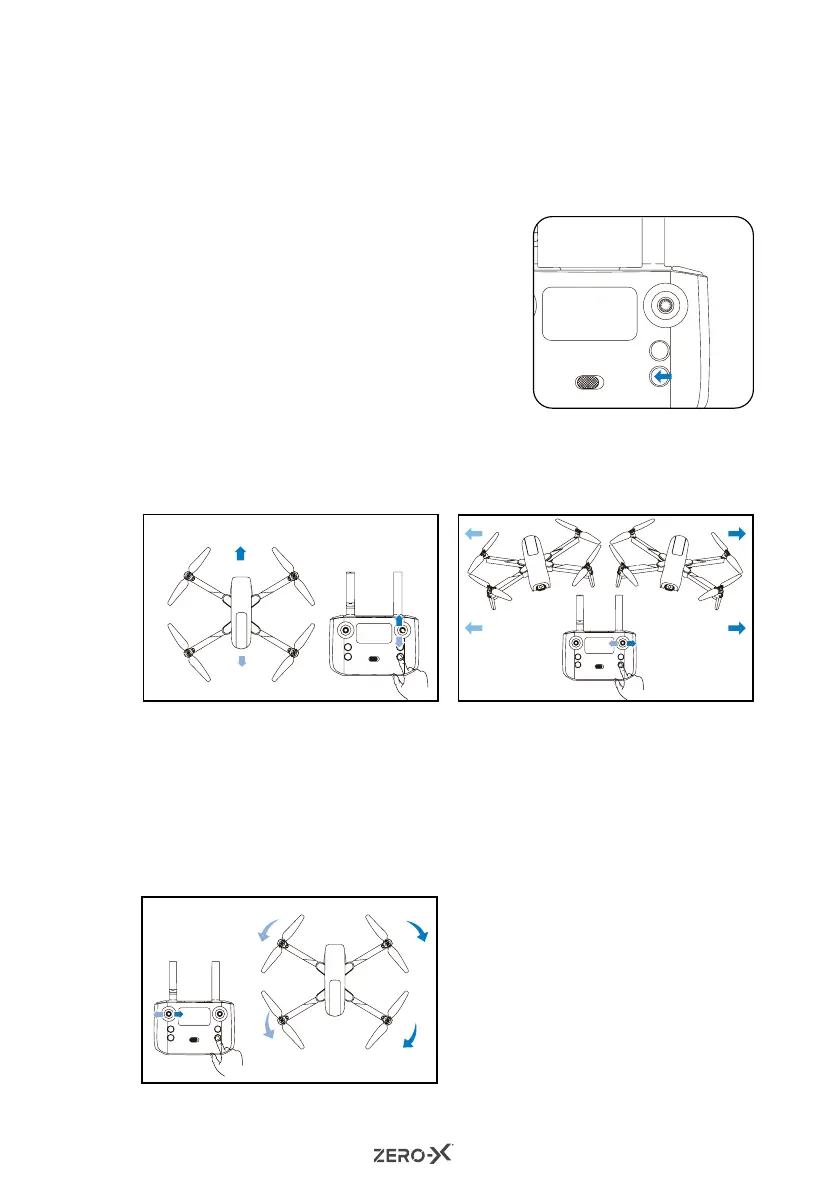
2. Press the trim button and then use
the right control stick to activate the
trimming function.
3. You can now adjust your trim by using
the right control stick to move left/
right and/or up/down. Please refer to
the images 1-3 below.
4. To stop the trimming function, press
the trim button again or stop using
the right control stick for 3 seconds.
The trimming function will automatically stop.
2
1
3
If the Drone keeps rotating to left,
press the left control stick to the
right until it is stable. If the Drone
keeps rotating to the right, press
the left control stick to the left until
it is stable.
LEFT/RIGHT TRIM
When the Drone is hovering and
starts to drift to the side, push the
right stick to the left/right until the
Drone is stable.
TRIM LEFT/RIGHT FLIGHT
When the Drone is hovering in place,
and starts to drift forward, press the
right control stick backwards until it
is stable. If it drifts backwards, press
the right control stick forward until
it's stable.
TRIM FORWARD/REVERSE



 To Next Page