14
7.0 FLIP FUNCTION
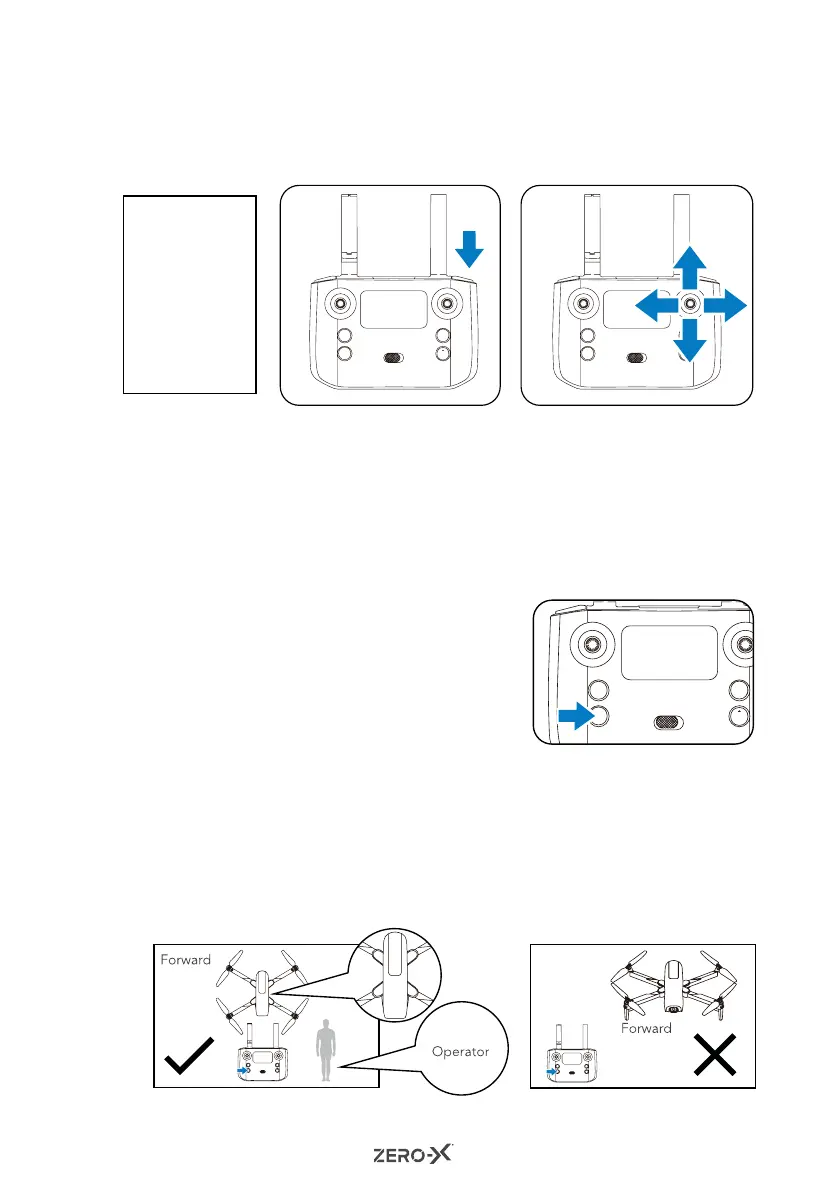
Fly your Drone to a height of more than 3 metres and press the FLIP button at
the top right of your remote control. Then immediately push the right control
stick to either forward/reverse or left/right position to flip your Drone.
8.0 HEADLESS MODE
When the Headless mode is enabled, the Drone will move in the direction that
the control stick is pressed, regardless of its orientation. This makes it easy to
bring the Drone home when it is far away from you. To ensure headless mode
works well, please use the correct take off position. The camera of the Drone
must point in the intended direction of flight; the back of the Drone should be
facing the pilot. See instructions below.
1. Press the Headless Mode button on the
control (shown in the diagram to the right).
The remote control will start beeping
continously and the LED light of drone will
blink continously indicating that headless
mode has been enabled. To stop headless
mode, press the headless mode button
again. The remote control will stop beeping and
the LED light of drone will also stop blinking.
2. When using headless mode, the camera of the
Drone must point in the direction of flight; the
back of the Drone should be facing the operator.
See below.
NOTE:
• The Flip
function
is only
available
during
the first 8
minutes of
flight time.
Correct take off position.
(Fig 6)
Incorrect take off position.
(Fig 7)
Reverse
Reverse



 To Next Page