Motherboard Technical Specification
Page 22
Type How to Configure
SCSI
Select Type. Select Not Installed o the drive parameter screen. The SCSI
drivers provided by the SCSI manufacturer should allow you to configure
the SCSI drive.
IDE
Select Type. Select Auto to let AMIBIOS determine the parameters. Click
on OK when AMIBIOS displays the drive parameters. Select LBA Mode.
Select On if the drive has a capacity greater than 540 MB.
Select Block Mode. Select On to allow block mode data transfers. Select
32-Bit Mode. Select On to allow 32-bit data transfers. Select the PIO
Mode. It is best to select Auto to allow AMIBIOS to determine the PIO
mode. If you select a PIO mode that is not supported by the IDE drive, the
drive will not work properly. If you are absolutely certain that you know
the drive’s PIO mode, select PIO mode 0 - 4, as appropriate.
CD-ROM
Select Type. Select CDROM. Click on OK when AMIBIOS displays the
drive parameters.
Standard
MFM
Select Type. You must know the drive parameters. Select the drive type
that exactly matches your drive’s parameters.
Non-
Standard
MFM
Select Type. If the drive parameters do not match the drive parameters
listed for drive types 1 - 46, select User and enter the correct hard disk
drive parameters.
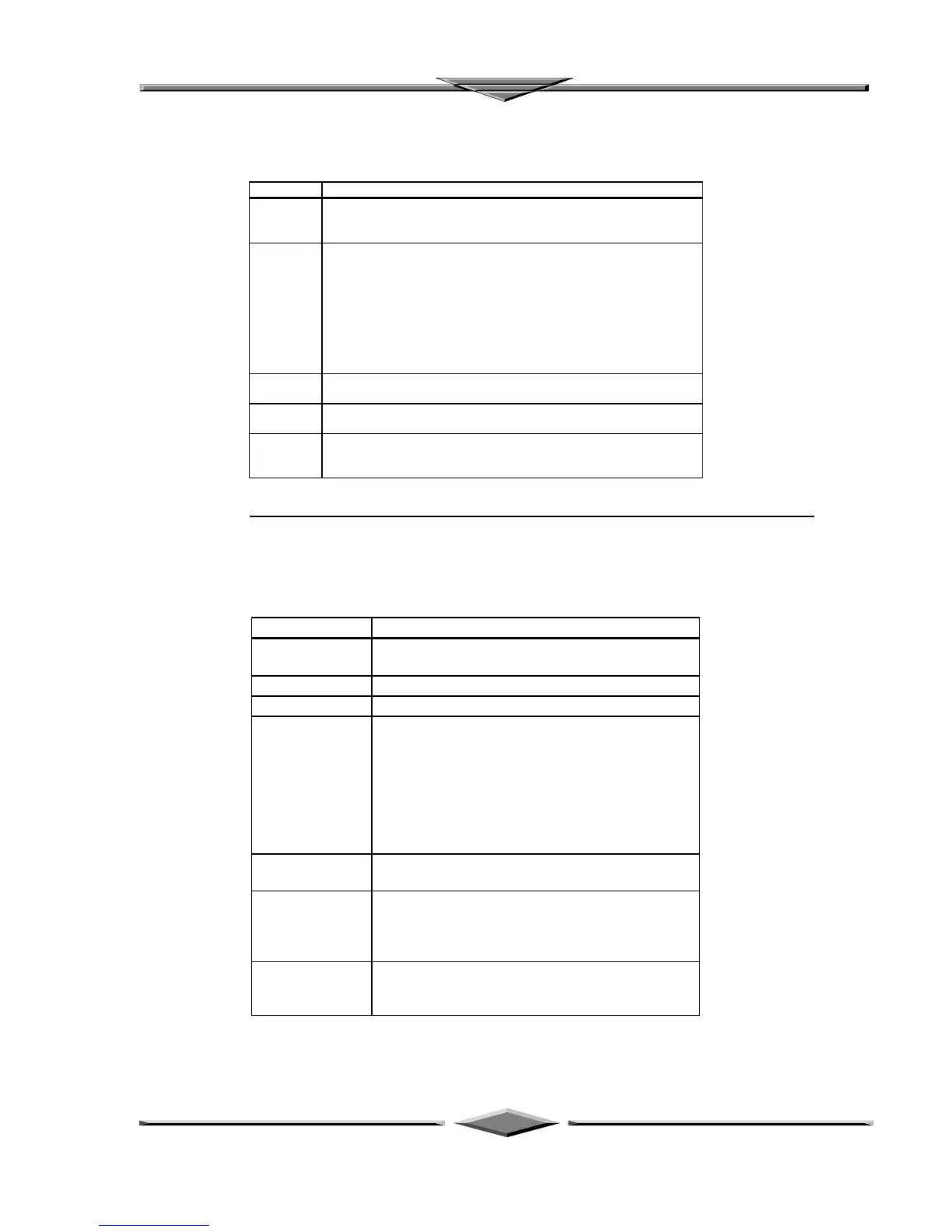
Entering Drive Parameters
You can also enter the hard disk drive parameters. The drive parameters are:
Parameter Description
Type The number for a drive with certain identification
parameters.
Cylinders The number of cylinders in the disk drive.
Heads The number of heads.
Write
Precompensation
The actual physical size of a sector gets progressively
smaller as the track diameter diminishes. Yet each
sector must still hold 512 bytes. Write
precompensation circuitry on the hard disk
compensates for the physical difference in sector size
by boosting the write current for sectors on inner
tracks. This parameter is the track number on the disk
surface where write precompensation begins.
Landing Zone This number is the cylinder location where the heads
normally park when the system is shut down.
Sectors The number of sectors per track. MFM drives have 17
sectors per track. RLL drives have 26 sectors per
track. ESDI drives have 34 sectors per track. SCSI
and IDE drives have even more sectors per track.
Capacity The formatted capacity of the drive is the number of
heads times the number of cylinders times the number
of sectors per track times 512 (bytes per sector).



 To Next Page