An “Address in use” warning appears when the address is already active on a different controller. The address
can then, if desired, be taken over with the U-Key. Also see “External & Computer Control”.
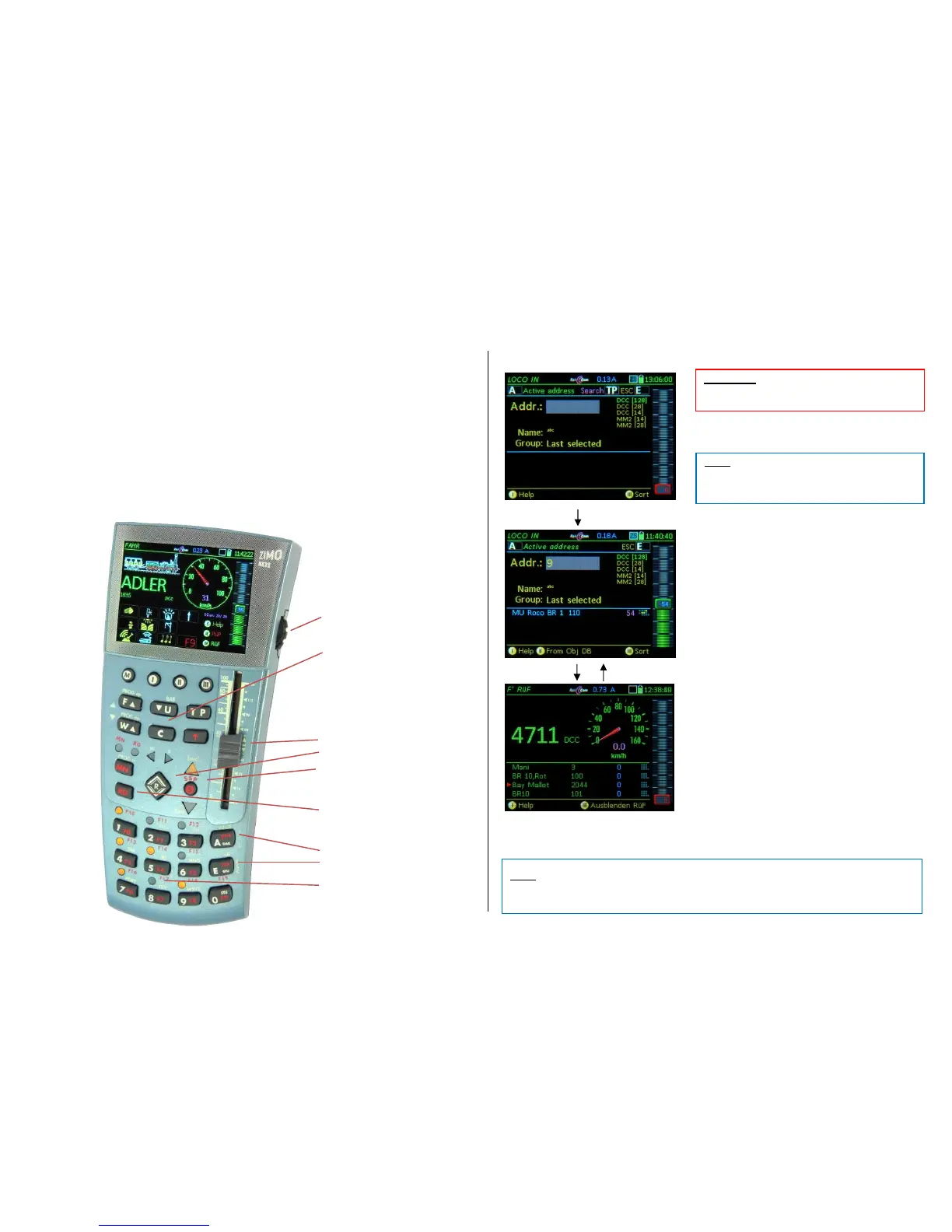
After activating the new address, that is, after switching over to the driving mode LOCO with the
F-Key, the loco can be operated with the following controller elements:
- Slider for speed control,
- Scrollinging wheel for fine speed control (+/- 12 steps from 128) or scrolling inside LoR , if open, or
volume control while function key is pressed.
- Rocker switch to browse inside the LoR *), if it is invisible (in the background).
- R-Key to change direction.
- Function keys F0 … F9 (= the numeric keys 1 … 0),
- and (Shift) key, for F10 … F19 or F20 … F28; back to F0 ... F9
- S-Key, pressed briefly = emergency stop (if set as default in CAB CONF),
- S-Key, press/hold = broadcast stop (if set as default in CAB CONF),
- S-Key + TP-Key = track power OFF.
To activate other locos: A- Key Switches to the LOCO IN display.
Enter new vehicle address.
F-Key Activates the new engine
(in this example without a name) and switches over to
the operating mode LOCO.
Softkey III Show / hide Loco Recall (LoR)
The Loco Recall list opens in place of the function
icons and lists the vehicles currently stored in the
recall memory.
All vehicles that were activated once are
automatically entered into the loco recall memory
(LoR) including their last valid GUI and driving data, so
they can be recalled and activated again when needed.
The LoR is also called “background memory”, from which
vehicles can be brought to the “foreground” by activating
them.
The LoR is also working when in the background,
that is, when it is NOT visible. Making it visible with
Softkey III offers a convenient overview and quick
selection using the scrolling wheel.
However, vehicles can be activated one by one from
the LoR with the F and U-Key, whether the LoR is
visible or invisible. Vehicles can be deleted from the
LoR with the C-Key.
The open LoR shows for each vehicle:
Name, Address, Consist Info, Speed step or RailCom-Actual speed, Functions F0-F9, (after rocker
switch) Direction, MAN and Position.


 To Next Page
 Loading...