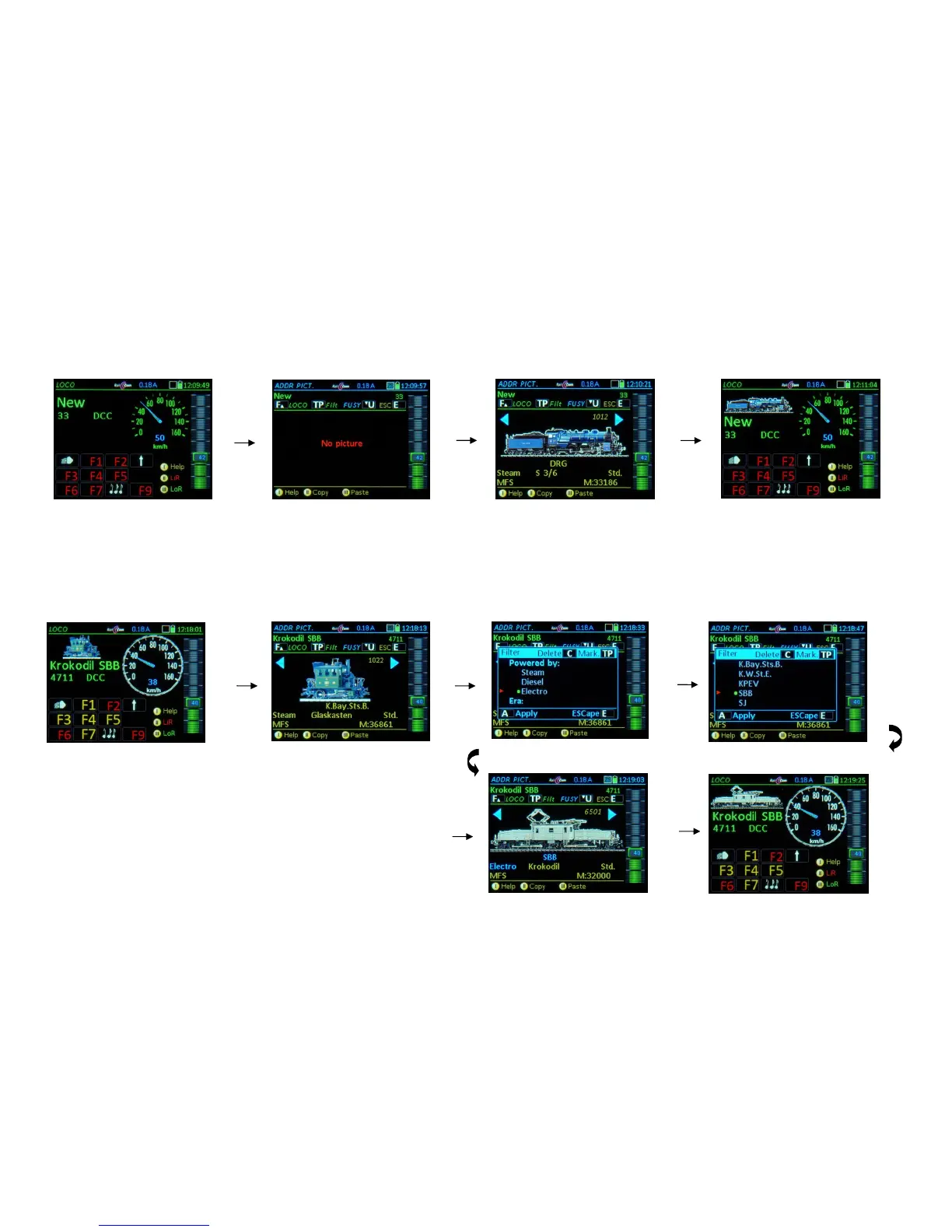
E + 4 ADDR IMAGE – Selecting a vehicle image, for an active address that does
NOT yet have an image assigned:
Scroll through vehicle images; when desired image is found:
F-Key activates the address with the selected image and switches to LOCO; or
U-Key advances to ADDR FUSY for function symbol assignments
(the selected image will be saved during the subsequent activation with the F-Key).
If an image was assigned already to an active address (in the following example an obviously wrong
image for a “crocodile type” engine):
The previously selected image is the starting point for scrolling.
Attributes and filter:
Each image (if "properly" recorded) is associated with a number of "attributes": Engine type,
country, company, locomotive name, author, etc.; these can be used as a filter and simplify the
search in the comprehensive database, which often contains several hundred images:
TP- Key opens a filter definition window; in the window:
Scrolling wheel and TP- Key mark one or several filter terms, which will be linked with
an *and* command.
A- Key exits the window and returns to the (now) filtered image collection.
E- Key cancels the filter effect for the current selection (the markings remain)



 To Next Page