Page 30 TETHERED CONTROLLER MX32, RADIO CONTROLLER MX32FU
12. GUI (Graphical User Interface) back-up in the MX10
and Handover/Takeover between devices, “cloning” vehicles
The settings made on a MX32 controller with ADDR FUMT, ADDR SPEEDO, ADDR IMAGE, ADDR
FUSY define the GUI (Graphical User Interface) and should also be available for other controllers. On
the other hand, there are cases where an automatic GUI transfer is not desired, for example, when us-
ing the controller as a guest on another system.
Automatic or manual procedure:
Automatic – Save the GUI in the MX10:
Any changes to the GUI (i.e. the name and settings in ADDR FUMT, ADDR SPEEDO, ADDR IMAGE,
and ADDR FUSY) made on a MX32 controller will not only be stored in its local Object Database (Ob-
jDb), and therefore also in the LoR, but also transferred to the MX10, where it is stored in the systems
database.
This is of course only the case if a MX10 command station is used (not with a Roco Z21 or an old ZIMO MX1
command station!).
Automatic – Takeover of GUI or GUI-Elements from the MX10:
When an address on a controller is activated that has NO GUI or an INCOMPLETE GUI (i.e. only
some of the 5 GUI elements), regardless of whether it comes
from “External Control” or “Address in use” with the U-Key or
from “External Control” automatically (because the address is no longer “externally controlled”) or
from the address input screen LOCO IN or
from the recall memory LoR or
from the object database ObjDB,
the controller will take over the GUI or GUI-ELEMENTS automatically from the MX10.
These 5 GUI-ELEMENTS are: Name, FUMT values, Speedo, Image, Function Icons.
If, for example, a name is defined for an address on controller A but no function icons, and yet for
the same address on controller B both name and function icons are defined, the function icons will
appear on controller A also when the address is recalled, the name however is not changed.
Special provision for function icons: Those function keys which were still represented with a "substi-
tute symbol" (F1, F2, F3, etc.) will, when the address is activated again, receive the function icons
stored in the MX10 for that address, even if some of the function keys already had icons assigned.
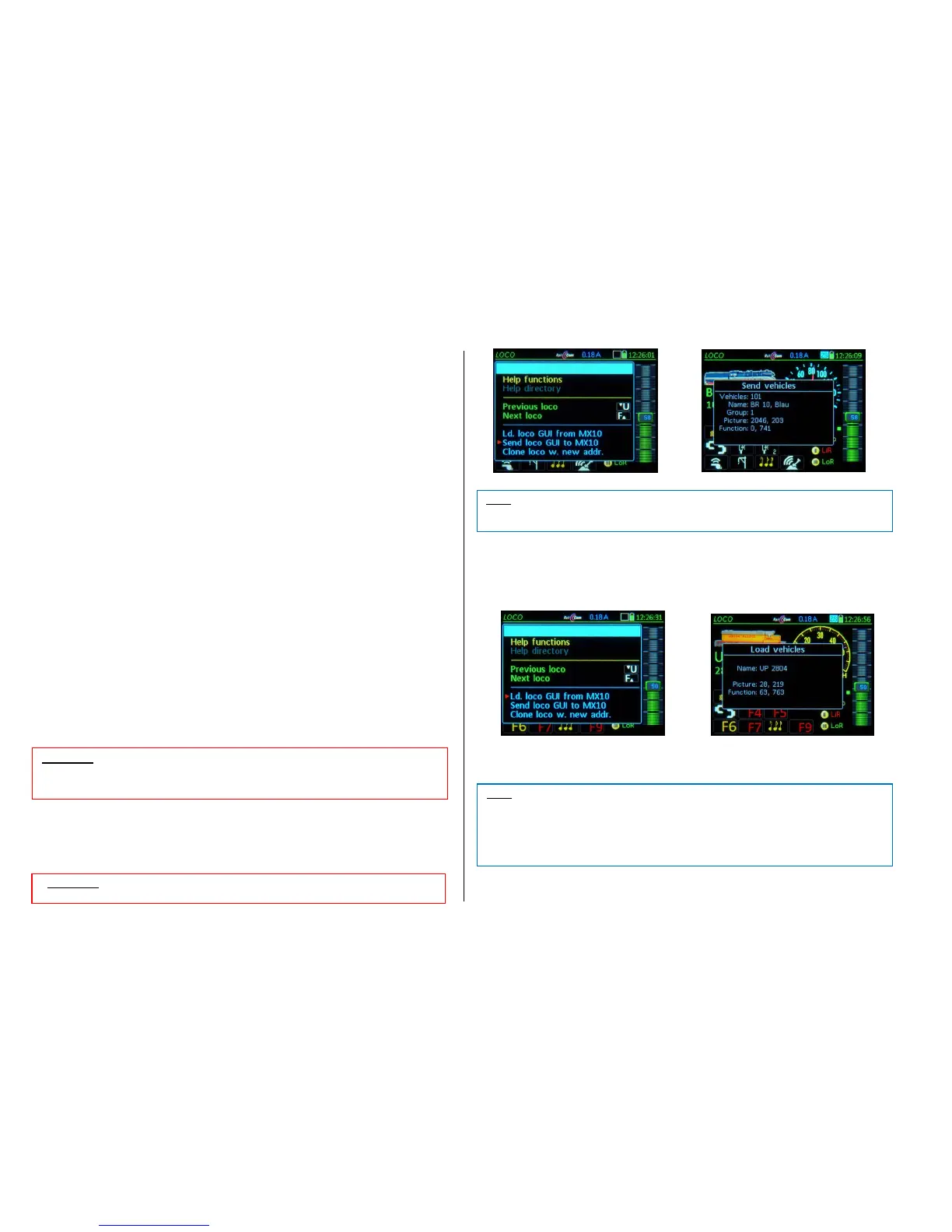
Manual Handover (saving the GUI in the MX10 via the menu):
M-Key Enter the menu from the operating mode LOCO
Scroll to the line “Send vehicle GUI to MX10“;
A-Key The GUI is sent to the MX10 and saved in its memory.
Manual Takeover (importing the GUI from the MX10 via the menu):
M-Key Enter the menu from the operating mode LOCO
Scroll to the line “Load vehicle GUI from MX10“; “;
A-Key The GUI will be taken over and displayed by the controller



 To Next Page
 Loading...