EasyManua.ls Logo

Zip HydroTap G4 - User Manual

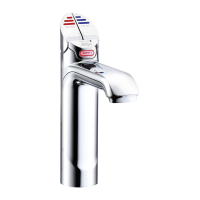
Zip HydroTap G4
560 pages
Print Icon
To Next Page IconTo Next Page
Loading...
801912 - G4 BCS, BCSHA Commercial User Guide - June 2015 - v2.00 Page 1 of 28
ZIP HydroTap G4
User Guide
®
Tap Operation..................(Pages 2-10)
LCD Screen & Menu .......(Pages 11-22)
Maintenance.................... (Pages 23-26)
Home Menu Icons............(Page 27)
Contact details.................(Page 28)
Date of Installation.........../........../...........
Affix Model Number Label
Here
801912
BCS Commercial

Other manuals for Zip HydroTap G4

Questions and Answers

  • A
    Angela HawkinsAug 28, 2025
    What to do if my Zip Water Filtration Systems shows condenser overtemp.?
    • A
      Amanda HuffAug 28, 2025
      If the condenser on your Zip Water Filtration System is overheating, it's likely due to a blocked air filter. Remove any blockage and clean the filter. You may also consult the user guide for detailed instructions.
  • J
    Jorge RogersAug 28, 2025
    How to fix a blocked condenser screen on a Zip Water Filtration Systems?
    • S
      Susan BrandtAug 29, 2025
      If the condenser screen of your Zip Water Filtration System is blocked, it's likely due to a blocked air filter. Remove the blockage, clean the filter, and check the user guide for further assistance.
  • V
    Valerie WoodsAug 29, 2025
    Why is the compressor over-running on my Zip Water Filtration Systems?
    • P
      Paul BeckAug 29, 2025
      If your Zip Water Filtration System's compressor is over-running, this could be because the compressor is too hot. Ensure that the unit has adequate ventilation.
  • D
    Dr. Barbara LeeAug 30, 2025
    What causes a hot tank to be under filled in Zip Water Filtration Systems?
    • L
      Logan BeanAug 30, 2025
      If your Zip Water Filtration System's hot tank is under filled, it may be due to low water pressure. Check the water supply to ensure adequate pressure.
  • A
    Ashley RobertsonAug 30, 2025
    What to do if I see a water leak in my Zip Water System?
    • A
      alexandrabarnesAug 30, 2025
      If you notice a water leak in your Zip Water System, immediately turn off the mains water supply. Then, call for service.
  • D
    Diane SpearsAug 30, 2025
    How to troubleshoot a power board fault in my Zip HydroTap G4 Water System?
    • L
      Latoya SchwartzAug 31, 2025
      If there's a power board fault in your Zip Water System, check the power supply and all fuses.
  • C
    Chelsey SmithAug 31, 2025
    What to do if the condenser screen is blocked on my Zip HydroTap G4 Water System?
    • J
      johncharlesAug 31, 2025
      If the condenser screen is blocked on your Zip Water System, it's likely due to a blocked air filter. Remove the blockage, clean the filter, and check the user guide for further instructions.
  • J
    John KerrAug 25, 2025
    What to do if there is a water leak in my Zip Water Filtration Systems and I need to isolate the mains?
    • J
      Julia KirbyAug 25, 2025
      If you find your Zip Water Filtration System leaking water and need to isolate the mains, immediately turn off the mains water supply. Following this critical step, it's essential to call for service to address the water leak effectively.
  • C
    corey20Sep 1, 2025
    What causes a condenser overtemp in Zip HydroTap G4?
    • L
      Linda SotoSep 1, 2025
      If your Zip Water System is experiencing a condenser overtemp, it's likely due to a blocked air filter. Remove the blockage, clean the filter, and consult the user guide.
  • J
    Jamie SantosSep 1, 2025
    Why is the hot tank under filled in my Zip Water System?
    • T
      Todd CampbellSep 2, 2025
      If the hot tank in your Zip Water System is underfilled, it could be due to low water pressure. Check the water supply to ensure it's sufficient.

Summary

Tap Safety

To set the tap safety setting: (Classic; Elite & All-In-One taps)

Instructions for configuring the tap's safety feature via the menu.

To activate the safety (From the tap)

Steps to enable the safety lock directly from the tap.

To deactivate the safety (From the tap)

Steps to disable the safety lock directly from the tap.

Tap functions

Elite Tap

Explains touch-sensitive controls for dispensing water types.

All-In-One Tap

Details operation of the two levers for dispensing water.

Tap operation

To dispense chilled water

Instructions for dispensing chilled water on different HydroTap models.

To dispense boiling water: (With the safety OFF)

Steps for dispensing boiling water when safety is off.

To dispense Boiling water: (With the safety ON)

Steps for dispensing boiling water with safety lock engaged.

Tap lights

Red Boiling Water Light: (All)

Indicates boiling water status (ready or below temperature).

Warning: (All)

Flashing light indicates a system fault requiring attention.

Filter Lights

Filter light: Classic; Elite & AIO

Shows filter status (off, flashing for replacement).

Safety Sensor Calibration (lever models)

1. With the unit in Normal operating mode and with the safety enabled

Step 1 for safety sensor calibration procedure.

LCD Screen

Other possible messages in status window:

Lists status messages like Safety OFF, System Fault, Sleep Mode.

LCD Screen Menu

Main Menu

Lists main menu categories: Language, Information, Installation, Service, Security, Communication, Settings.

Settings

Details for Date/Time, Temperature, Filter, Energy Modes, Safety, Dispense Time settings.

C Install

1. - Filter Flush

Instructions for flushing the filter system after installation or replacement.

LCD Screen operation - Section C

2. - Filter Reset

Instructions to reset filter counters after replacing the filter.

3 - Boiling Calibration

Procedure and caution for calibrating boiling water temperature.

LCD Screen operation - Section D

D Service

Section reserved for service technicians only; contact details provided.

LCD Screen operation - Section E

E Security

Allows setting up a password to protect system settings.

To set a password

Steps to set a 4-digit password for system settings access.

LCD Screen operation - Section F

F Communication (when available)

Functionality for using Wi-Fi to monitor and control the product remotely.

LCD Screen operation - Section G

G Settings

Accesses system settings like password, date/time, temperature.

Set Temperature

Details on operating temperatures for boiling and chilled water.

Filter Maintenance

Dispense Times

Allows changing the maximum dispensing time for water.

Water Filter

Notifies when filter replacement is due and lists indicators.

To change the Filter: (See also Section C)

Steps for opening unit, relieving pressure, and replacing cartridge.

Filter Maintenance

Air Inlet Filter

Location, inspection, cleaning, and replacement of the air filter.

2.6 kg Gas bottle change

1. Turn the CO2 bottle, black knob, OFF (Clockwise).

Step 1 of the CO2 bottle change procedure.

Cleaning

General cleaning

Recommended cleaning instructions using soft cloth and mild soap.

Home Menu Icons

Safety switch is LOCKED.

Icon indicating the safety switch is locked, preventing Boiling water dispense.

Boiling Temperature

Displays the set temperature for boiling water.

Contact Details

Head Office

Provides Zip Heaters (Aust) Pty Ltd contact information.

Telephone: (02) 9796 3100

Telephone number for customer support and inquiries.

Zip HydroTap G4 Specifications

General IconGeneral
ModelHydroTap G4
CategoryWater System
Power Supply220-240V, 50Hz
DimensionsVaries by model
WeightVaries by model
Boiling Water CapacityUp to 160 cups per hour
FilterAdvanced filtration system
SafetyChild safety lock
Filtration0.2 micron
Energy EfficiencyEnergy-saving mode
Warranty5 years
Chilled Water CapacityVaries by model (e.g., up to 175 cups/hour)

Related product manuals