14 Reset key : when the machine is in halt, push this key with
samll tools
13 Key hole: Lock the whencover of the Cable Box
Installation Steps
1) Mount the metal plate on walls in the appropriate place and fix
it.
2)find the key along with the product. Open cover of the cable box
3)Connect the cable with machine, make sure that the wired
machine align with the plate , then hang it on the plate and fix
machine with screws below.
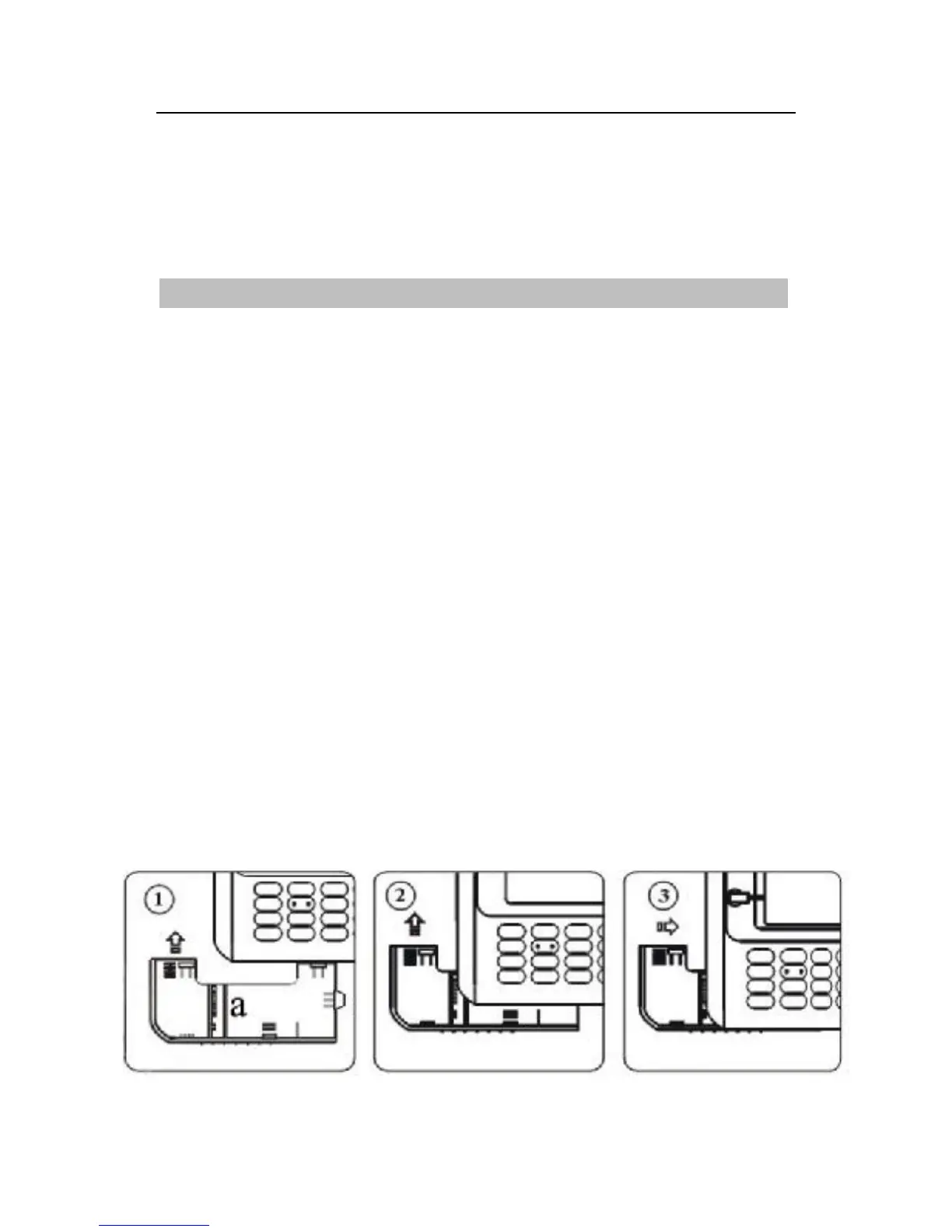
4) Arrange the machine’s vertical edge so that they are in line with
edge of the cover of the cable box, alignment, hold the machine
bottom, and after in accordance with gently push the cover toward
the vertical direction, shown as ②arrowhead.
5) Push the cover until it is parallel with the bottom of machine,
and then push lightly the cover toward the right level until the
cover completely meet with the machines.
6) Use the Key lock the cover



 To Next Page