8
2.5.2 Connec on to an electric roller shu er
If the pool is ed with an electric roller shu er, it can be connected to the chlorinator using a dry contact so that
the la er automa cally adapts its chlorine produc on when the shu er is closed (see “3.2.3 “LOW” mode: chlorine
produc on reduced to 10 % if the pool is covered”).
• Make sure the appliance is powered o .
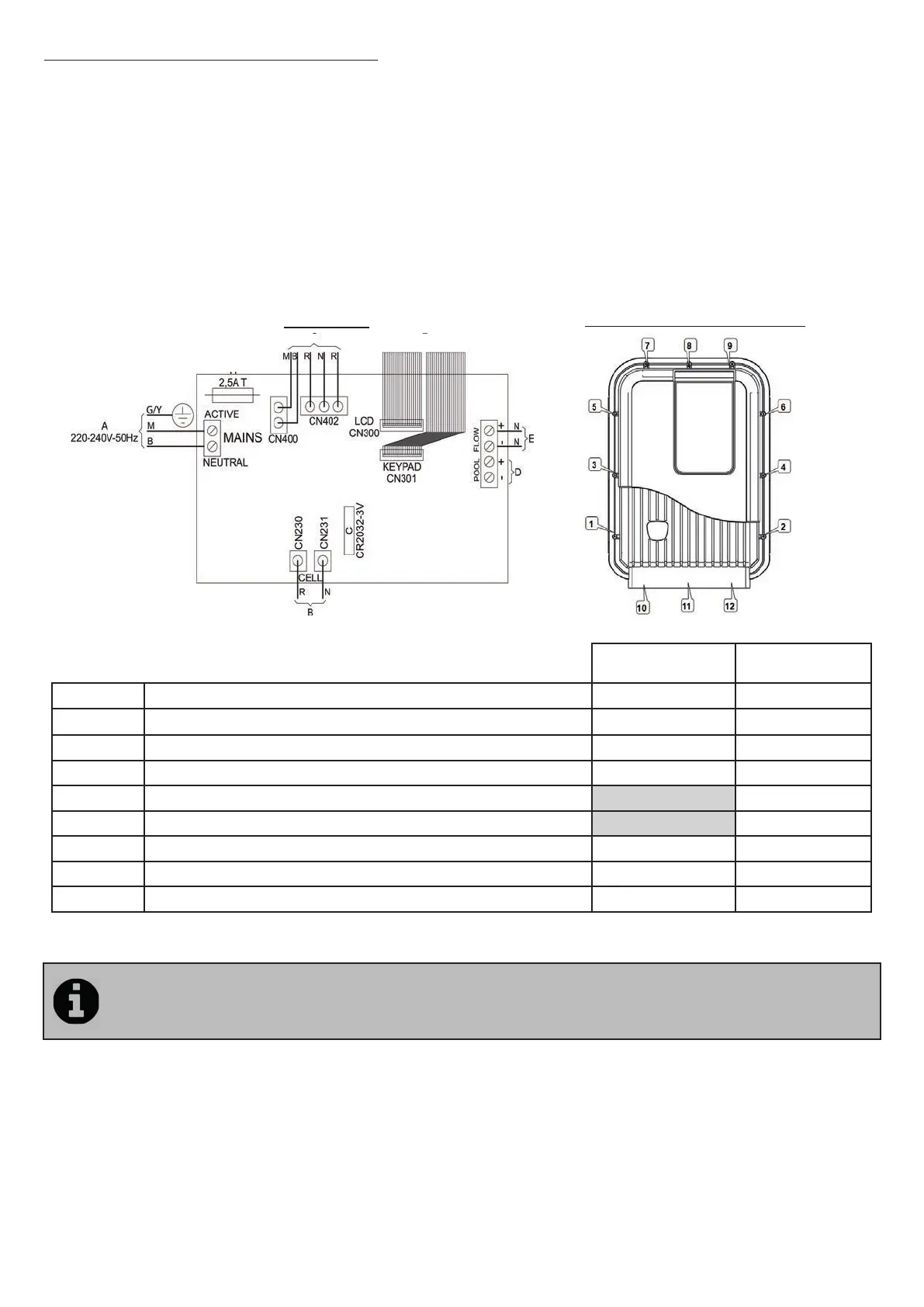
• Remove the 12 screws securing the cover and remove it (take care not to disconnect the ribbon cables).
• Unscrew the dedicated cable gland ghtening ring (at the bo om of the control box) and remove the plug to feed
through the cable from the shu er. Tighten the cable gland ghtening ring.
• Connect the cable from the shu er to the "POOL+" and "POOL-" connectors on the printed circuit board.
• Close the box according to the ghtening order shown on the following diagram (9 long screws for the perimeter of
the box and 3 short screws for the bo om of the box). The protec on ra ng of the box for water ingress (IPX5) may be
a ected if this procedure is not strictly observed.
Connec ons Torque = 1.2 N.m (= 12.2 kg.cm)
F G
H
I
Ei²
GenSalt OE
Ei² Expert
A
Mains power supply 220-240 Vac / 50 Hz X X
B
Cell power supply X X
C
Memory ba ery type CR2032 X X
D
Shu er connec on (contact closed = shu er closed) X X
E Connec on of fl ow switch X
F LCD connec on ribbon cable X
G Keypad connec on ribbon cable X X
H Transformer connec ons X X
I Fuse 2.5 A me-delayed X X
• The chlorinator is compa ble with several di erent types of electric shu er. However, certain systems may not
be compa ble. In this case, ac vate "Low" mode manually from the chlorinator control panel (Ei² Expert only).
• Refer to the shu er manufacturer's installa on manual.
• The dry contact opera ng principle is as follows: contact closed = shu er closed.



 To Next Page