9
EN
3. Use
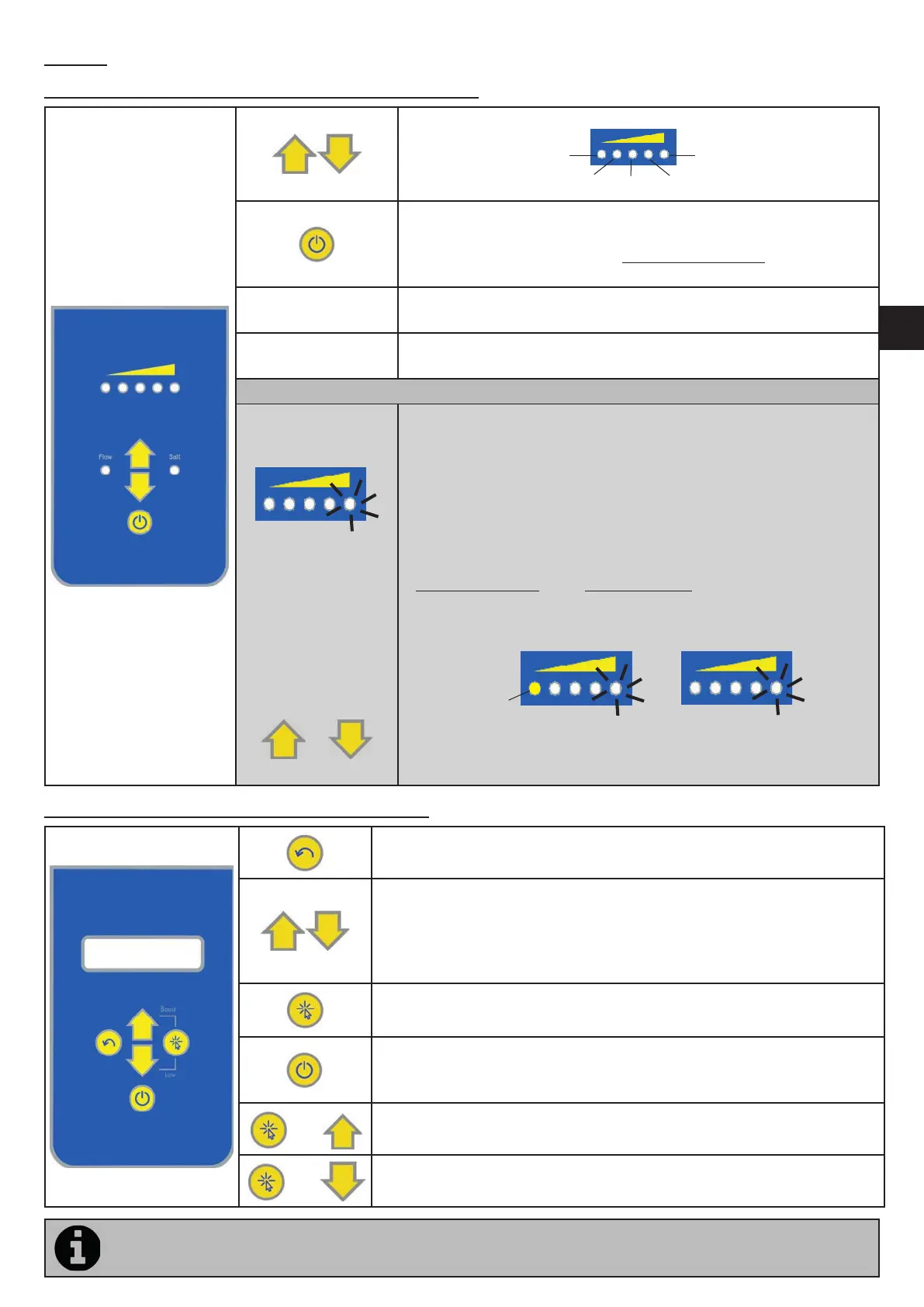
3.1 Descrip on of the Ei² - GenSalt OE user interface
To increase or reduce chlorine produc on by pressing and releasing:
20%
40%
60% 80%
100%
- To ac vate/deac vate chlorine produc on by pressing and
releasing.
- To switch o the appliance by pressing and holding for 5 seconds.
- To switch on the appliance by pressing and releasing.
FLOW
Red indicator showing the absence of fl ow and/or presence of air in
the cell.
SALT
Orange indicator showing a water conduc vity problem (not enough
salt, water too cold, etc.).
Only if a compa ble electric roller shu er is connected to the chlorinator:
Automa c ac va on
of LOW mode
(closed shu er)
==> To con gure
chlorine produc on
for LOW mode
(closed shu er)
Press and hold
or
- The fl ashing LED indicates that LOW mode was automa cally
ac vated when the electric roller shu er was closed.
Chlorine produc on is reduced to the default value of 20%.
- LOW mode is automa cally deac vated when the shu er is opened.
==> Chlorine produc on can be con gured for
LOW mode (0% or 20%). The default se ng is 20%.
- Close the shu er then press and hold to adjust to 0% or 20%.
20%
Desired produc on
at 20% (LED on steady)
Desired produc on
at 0%
- If chlorina on is set to 0%, LOW mode will keep the
0% se ng when the shu er is closed. The con gura on
is memorised for when the shu er is next closed.
3.2 Descrip on of the Ei² Expert user interface
- To exit the user menu or the internal se ngs menu.
- To deac vate BOOST mode or LOW mode.
- From the home screen: to increase or decrease chlorine produc on.
- In the user menu: to change values when a choice is proposed (fl ashing
characters).
- Press simultaneously for 5 seconds: to access the internal se ngs menu.
- To access the user menu and browse the se ngs (with successive
presses)
- To ac vate/deac vate chlorine produc on by pressing and releasing.
- To switch o the appliance by pressing and holding
- To switch on the appliance by pressing and releasing
and
- To ac vate BOOST mode
and
- To ac vate "LOW" mode manually
If the language displayed on the screen when the Ei² Expert is rst switched on is not appropriate, see “3.2.6
“Internal se ngs” menu”



 To Next Page