17
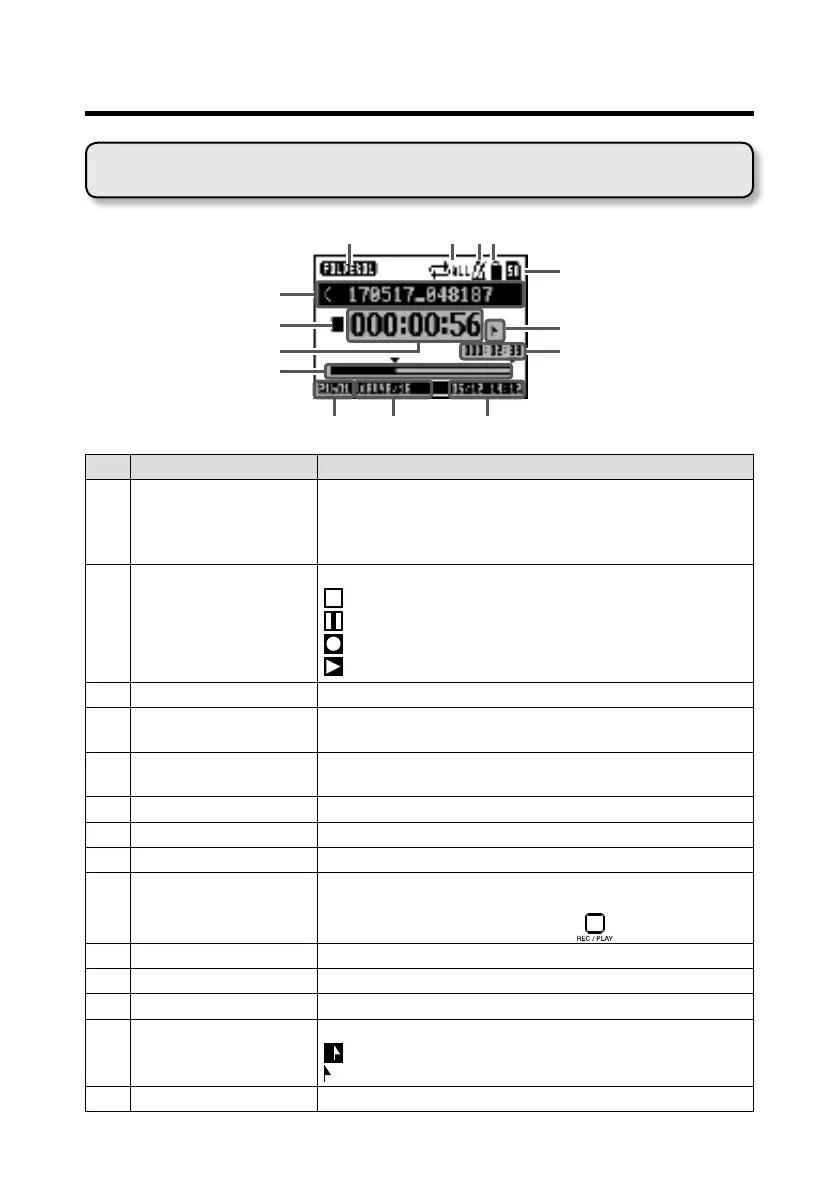
Display overview
No. Item Explanation
1
Project name This shows the project name.
"<" appears if there is another project before this one in the
folder.
">" appears if there is another project after this one in the folder.
2
Status icon This shows the status as follows.
: Stopped
: Paused
: Recording
: Playing back
3
Counter This shows the hour: minute: second.
4
Progress bar This bar shows the amount of time in the project from begin-
ning to end.
5
Folder name The folder where the project is saved will be shown as FOLD-
ER01 – FOLDER10.
6
7
Metronome icon This is shown when the metronome is enabled. (
→
P. 47)
8
Project protection icon This is shown when project protection is enabled.(
→
P.58)
9
Remaining recordable
time
This shows the remaining recordable time.
This will change automatically according to the number of chan-
nels that have recording enabled with
.
!
Recording le format This shows the recording le format used by the recorder.
"
Current date and time This shows the current date and time.
#
SD card icon This is shown when an SD card is being recognized.
$
Mark This shows the mark number and the status as follows.
: at mark (mark added at counter location)
: not at mark (mark not added at counter location)
%
Longest le time in project
This shows the length of the longest le in the project.
Home Screen



 To Next Page